

April 12, 2022
Solved

How to enter VAT from Imported goods - hand luggage

  • April 12, 2022
  • 1 reply
  • 0 views

Hi All,

I brought goods/samples from EU back to the UK in my hand luggage and declared the goods online. I paid for VAT but not sure how to add it to Quickbooks as there is only the VAT amount that I paid.
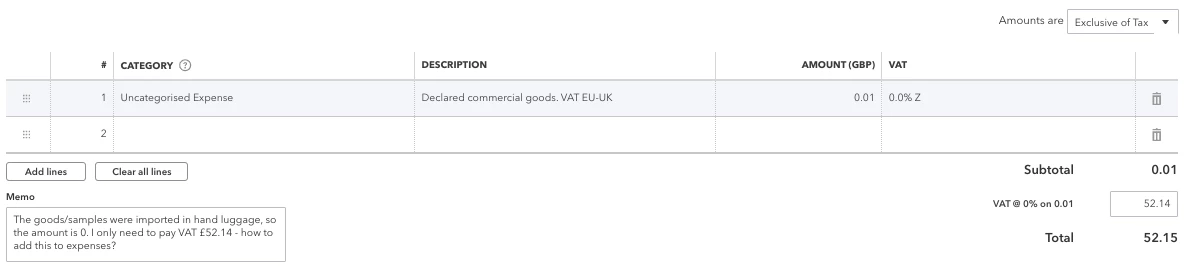
 

For other goods that were sent by courier, I entered the courier charge to 'Amount', selected '0.0% Z' which allowed me to enter the correct amount paid for VAT manually. But not sure how I should do in this case?


Best answer by emmam6

Hello Community Users!! Just wanted to pop in to confirm the process for creating a 100 percent VAT transaction is as follows;

1.click on the + sign and select the transaction type that you need.

2.On the first line of the  transaction, choose the account you want to use. For the rate, enter £1, and for the VAT code, select the 20% Standard code.

3.On the second line, select the same account. For the rate, enter -£1, and choose an Exempt code.

4.The total of the invoice will be 0. You can then edit the amount in the VAT box to whatever you need it to be.

5.Save the transaction

We have included the help article on this here as well. Any questions just ask.

1 reply

April 12, 2022

Hello ah_22, 


Welcome to the Community page, 


If you are unsure on what VAT code to use, we would advise that you speak to a trained and qualified accountant who will be able to tell you how to record this correctly in your QuickBooks accounts. As we are not trained accountants just technical support. 

ah_22Author
April 12, 2022

I found a guide how to add a 100% VAT invoice to QuickBooks if anyone else needs it - https://www.youtube.com/watch?v=a8XSS0mSW1w