Solved
I did actions for submitting VAT return from Quickbooks. I received email from HMRC about connecting with my software. But status in QB still "can't connect with HMRC".
Original commenter did not share additional details


No, it is the first period for filling. There are no already periods that have been marked as filed. The first period is August-September 2020(deadline was November,7)
You can count on me, @userorbitonixcompany.
First, the "We can't connect to HMRC right now" error occurs when:
I've got the steps needed to fix the issue you're getting. To start, let's ensure to use the correct login credentials when submitting your VAT return.
Also, please make sure that the QuickBooks filing period or date matches with that in HMRC. Then, we'll also need to check if the VAT registration number is correct.
To do that:
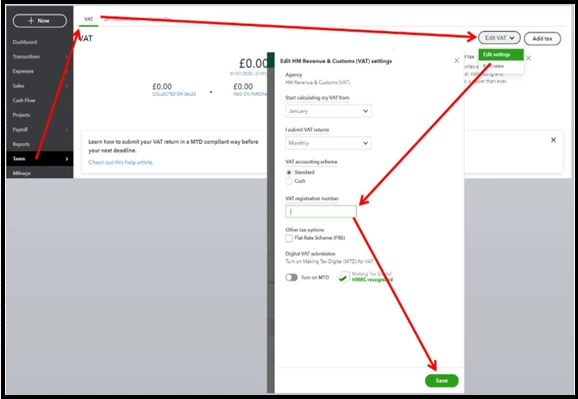
If the issue persists, let's disconnect and then reconnect the MTD to refresh the connection.
To disconnect your MTD:
Once done, reconnect your MTD. Then, submit your VAT returns again as you normally would.
If everything's fine, you can run some VAT-related reports to keep track of all your returns. To achieve this, go to the Taxes menu, and then select the desired report from the View reports drop-down.
I've got your back if you have some follow-up questions about managing your VAT in QuickBooks. Have a good one.
Enter your E-mail address. We'll send you an e-mail with instructions to reset your password.