

December 5, 2020
Solved

I have recently registered for VAT, and wish to be ready ...

  • December 5, 2020
  • 1 reply
  • 0 views

I have recently registered for VAT, and am awaiting HMRC to finish processing my application.  Whilst waiting, I want to get my accounts prepared for my first return.  However I can't get past the "enter your VAT registration number".  I want to get the figures into the system and also explore how it all works. Does anyone know how this can be done, or if there is a workaround?
Best answer by JenoP

Good day, RCJ58.


An entry in the VAT registration number field is require to complete your VAT setup in QBO. 


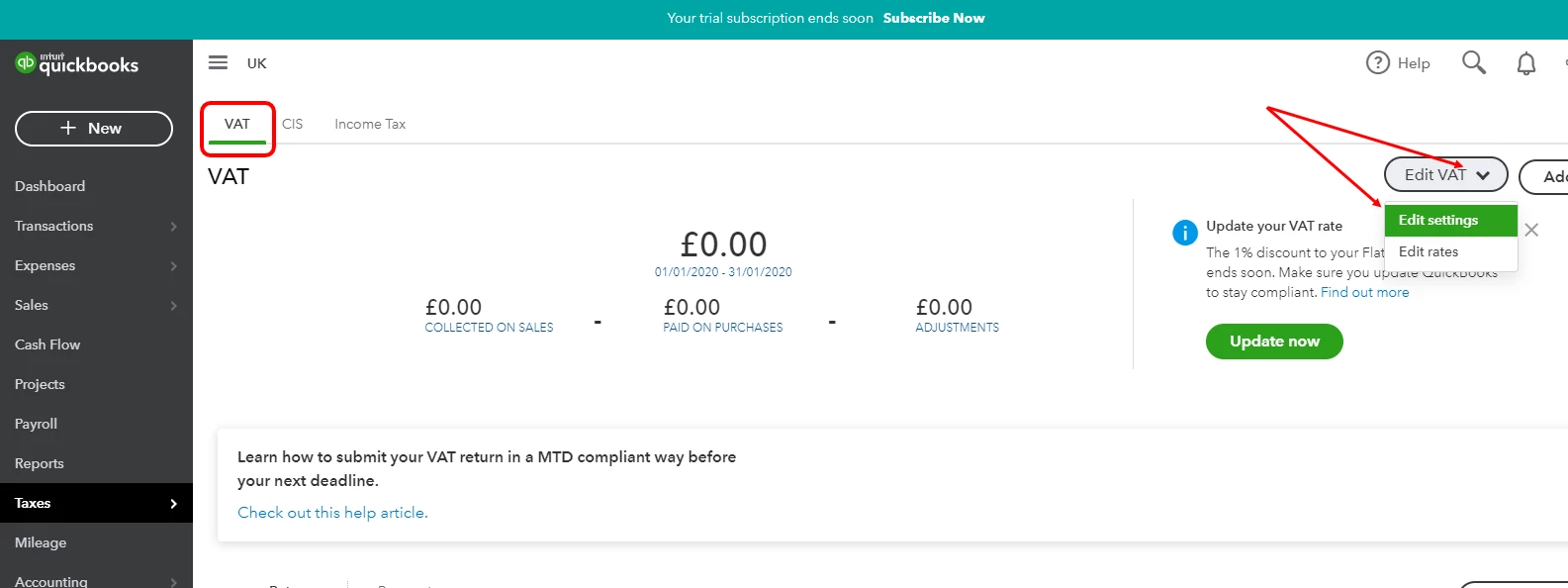
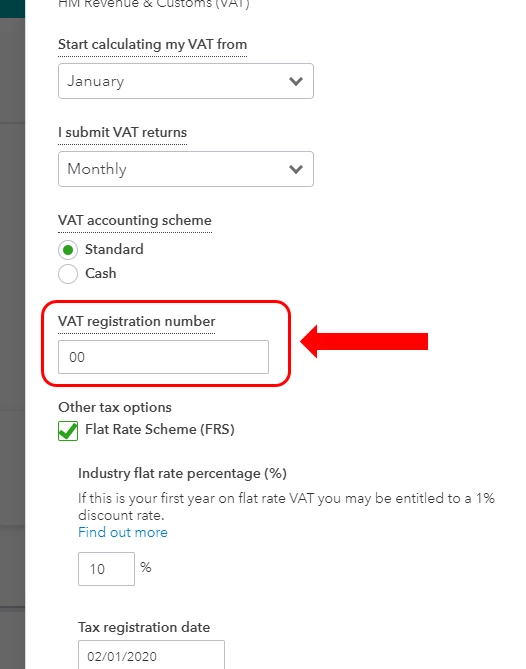
Sine you're still waiting for the application to be finished, you can use a dummy VAT number or type in 0 in the VAT registration number field just to get past that page. Then, edit it once you receive our VAT registration number from HMRC. Here's how:


  1. Go to the Taxes menu and proceed to the VAT tab. 
  2. Click Edit VAT, then select Edit settings
  3. Go to the VAT registration number field and edit the information.
  4. Click Save

You can also check out these articles as your guide while exploring how the VAT feature works in QBO:


Then, follow the steps in this article on how to submit your tax return in the future: Submit A VAT Return In QuickBooks Online.


Please don't hesitate to reach out to us again if you have other questions. 


1 reply

JenoP
JenoPAnswer
December 5, 2020

Good day, RCJ58.


An entry in the VAT registration number field is require to complete your VAT setup in QBO. 


Sine you're still waiting for the application to be finished, you can use a dummy VAT number or type in 0 in the VAT registration number field just to get past that page. Then, edit it once you receive our VAT registration number from HMRC. Here's how:


  1. Go to the Taxes menu and proceed to the VAT tab. 
  2. Click Edit VAT, then select Edit settings
  3. Go to the VAT registration number field and edit the information.
  4. Click Save

You can also check out these articles as your guide while exploring how the VAT feature works in QBO:


Then, follow the steps in this article on how to submit your tax return in the future: Submit A VAT Return In QuickBooks Online.


Please don't hesitate to reach out to us again if you have other questions. 


RCJ58Author
December 10, 2020

Thank you.