Glad to have you back here in the Community, @ThumbelinaPM.
I've got some information to share on why your unable to record a VAT payment in QuickBooks Online.
When recording a VAT payment in QuickBooks Online, you'll need to make sure that your return has been Mark as Filed so the option to record the payment will be visible.
If you've submitted the return through QuickBooks Online, I suggest contacting our Customer Care Team. They have the tools to check your return and change its status. Please see their contact details from the Speak to us section of this article: Making Tax Digital (MTD).
Once done, you can now see the option to record the payment, and it will look like this: 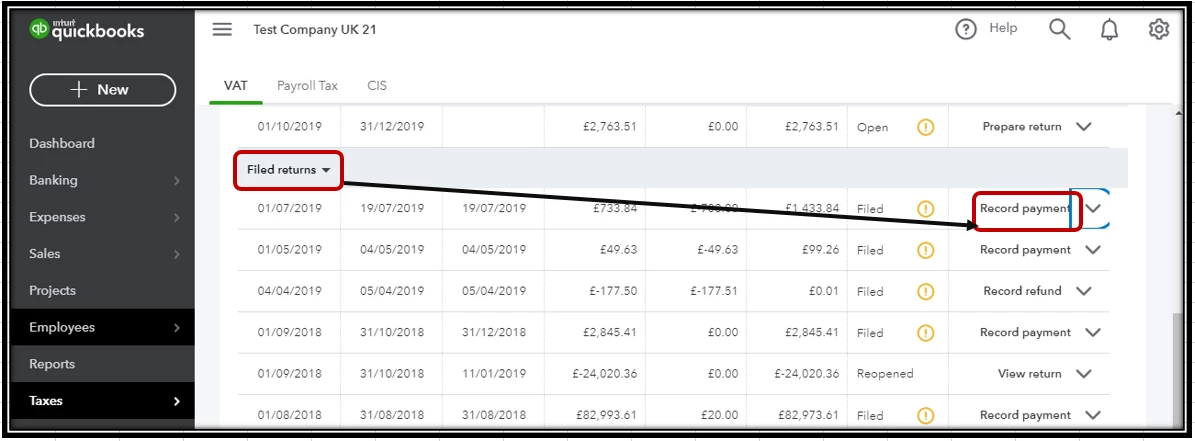
For your reference I'm also adding here some links on how mark the return as filed if they are submitted outside QBO: Submit a VAT return in QuickBooks Online.
On the other hand, to track the COVID grant that you received, you may manually add the transaction into the system. Just make sure to select the appropriate category for this entry.
To do that:
- Go to the Transaction menu.
- Select Add Transaction at the upper-right portion.
- Enter amount and brief description.
- Click the Select category menu.
- Choose option to organize transaction.
You can also check out this reference about the programs and resources for COVID-19 in QBSE: QuickBooks business resources and tax info for COVID-19.
Know that I'll be right here to help if you have any other questions. Take care!

