Let's get this sorted out, @pandpblasting.
To isolate the issue, let's check where the deposit came from. First, review the deposit if is linked to an invoice.
If not, let's now check your Audit log to know who created the deposit. By doing this, we can determine if this transaction is valid or not. Here's how:
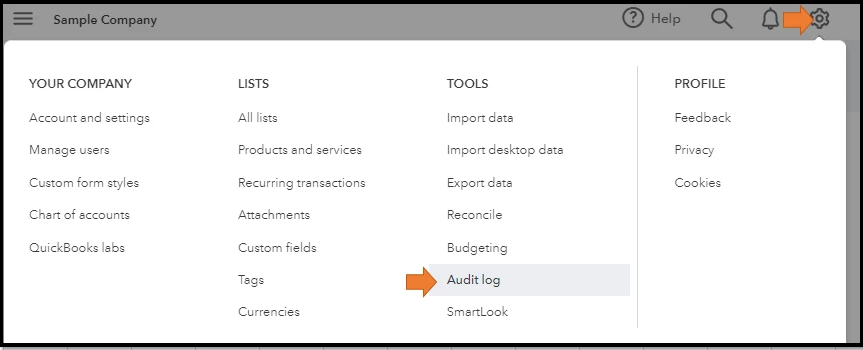
- In your QuickBooks Online (QBO) account, go to the Gear icon.
- Next, choose Audit Log.
- From there, click the Filter button and use the fields on the page to choose the appropriate User, Date, or Events to narrow the results.
If confirmed that this deposit should not exist, here's how you can delete it:
- Navigate to the Chart of Accounts page by clicking the Gear icon.
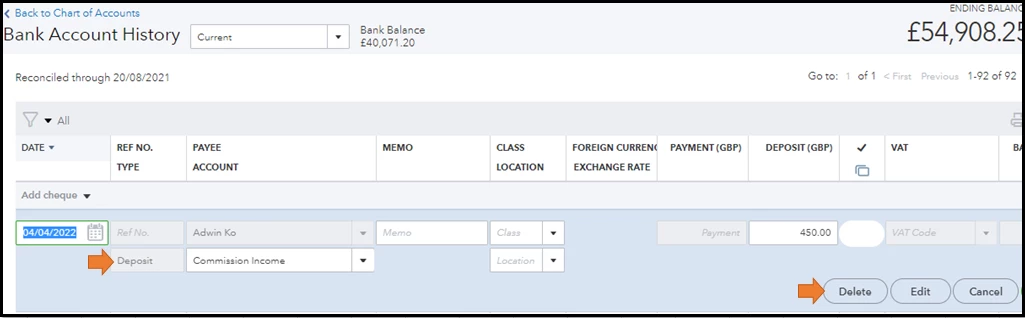
- From there, look for the bank account the deposit is located and click Account history.
- Then, search for the bank deposit and select it to get more details.
- Choose Delete.
Once everything is fine you can now file your VAT return. For your guidance you can visit this article: File your VAT return and record tax payment in QuickBooks Online.
Also, checking your filing status is easy. To do so, you simply need to go to your tax agency's website.
Should you have any additional questions or concerns, I'm always here ready to help. Thanks for reaching out, best wishes.

