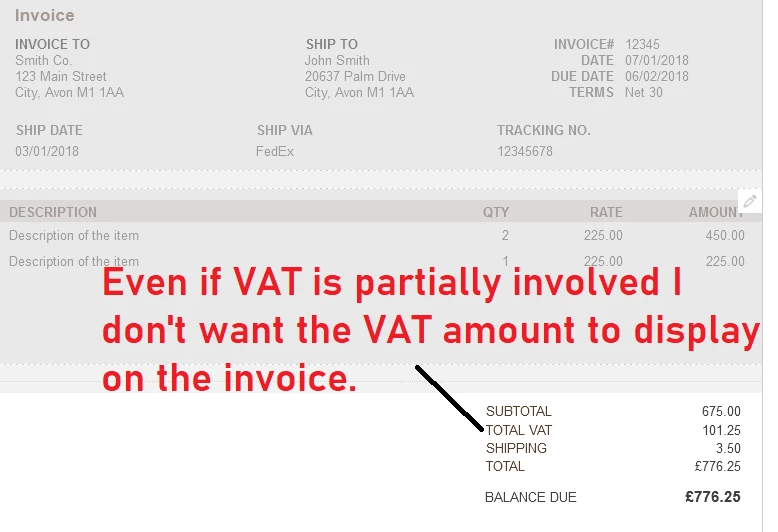
Removing "VAT total" or "Vat included" from invoices
Hi There,
I have a client who uses the Antiques VAT special scheme where they must state on all invoices that they use the scheme, they obviously show their VAT number but they don't need to show VAT breakdowns.
To be clear, the scheme is that the VAT on an invoice is actually the VAT on the profit, the difference between the cost and sale price.
I want to use the Quickbooks invoices so the client can send invoices to their customers etc, however, I cannot find a way to make the pdf and emailed invoices to exclude the VAT breakdown or even VAT total, obviously if it is displayed, then any knowledgable customer would be able to work out the clients profit! To be clear, the buyer usually can't claim VAT on such purchases hence VAT does not essentially need to be broken down on the invoice so I want it removed.
Anyone with any ideas?
To be clear, I'm using MTD to submit VAT so using "No VAT" on invoices is not an ideal solution but I am considering it as a last resort, the downside of it though is that for every invoice raised a corrected journal with sales net and VAT has to be entered to correct the VAT return info!
Screenshot below of the invoice template I'm trying to work with, and the offending VAT amount. The VAT columns and footer VAT summary were all easy enough to remove.