December 11, 2024
Solved

Add new inventory

  • December 11, 2024
  • 2 replies
  • 0 views

I am suddenly unable to add new inventory. Also on the Add Products and Services page the Tax editing option has disappeared.


Best answer by ClaireSamanthaS

I understand how important it is for you to have accurate sales tax reports, @allegra03. I'm here to help you fully address your concerns.


Currently, there's an ongoing investigation (INV-116050) regarding the missing or undisplayed Sales Tax Category field.


We suggest getting in touch with our live support team. They can include your details among the affected users and will keep you updated on any resolutions made by our engineers. Here's how:


  1. Sign in to your QuickBooks (QBO) account.
  2. At the upper right corner of your screen, select the ? Help button.
  3. Navigate to the Search tab and type your issue into the search box.
  4. Click on Contact Us and pick a method to get in touch with us


Meanwhile, you can modify your tax classification directly when creating an invoice. Here’s how to do it:


  1. Go to + New and choose the Invoice.

             Note: Fill out the necessary information.
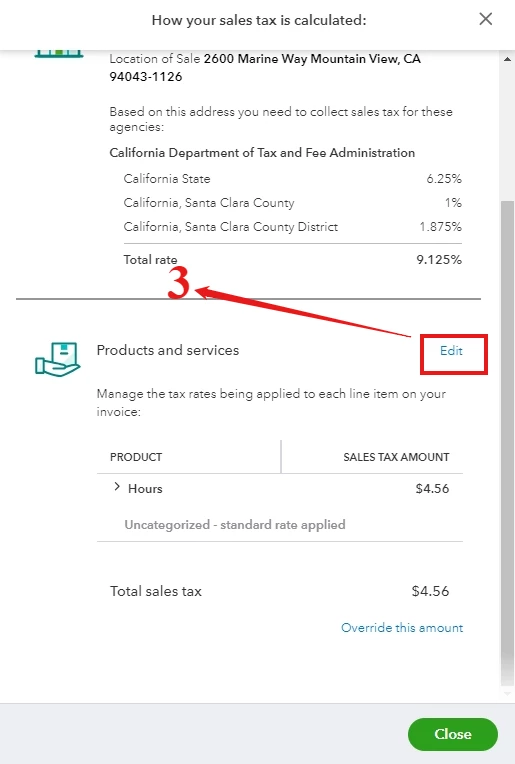
  2. Below Sales tax, select See the math.
  3. Next to Products and services, click on Edit.


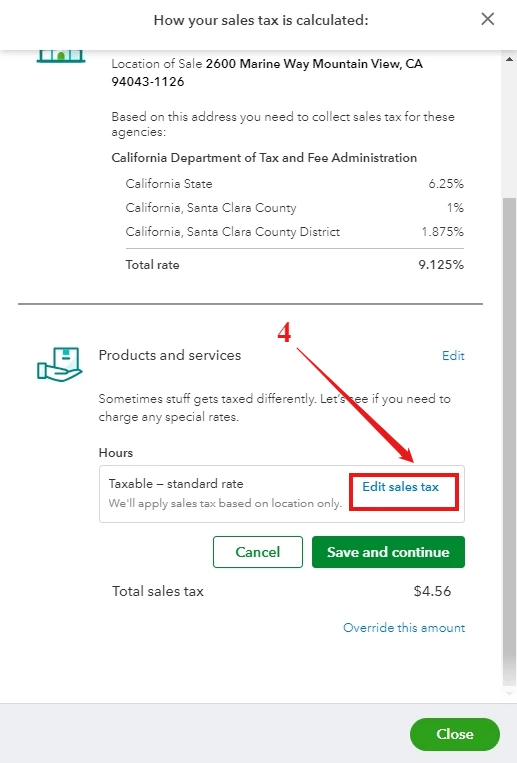
  4. Choose Edit sales tax.


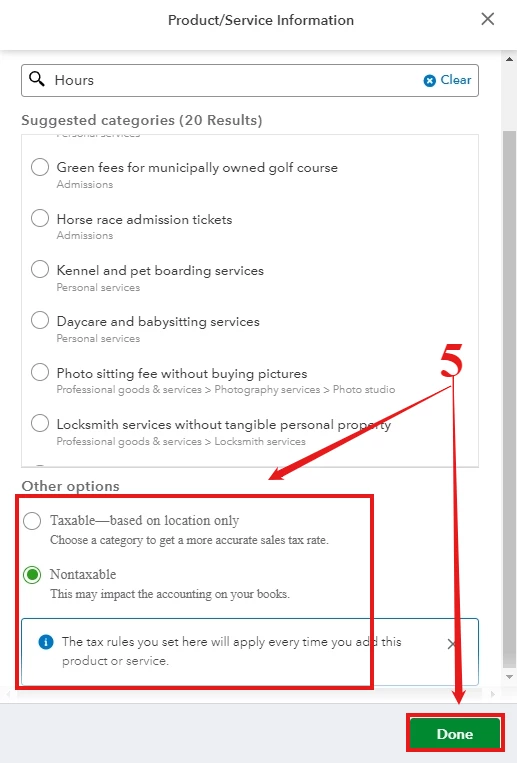
  5. From the Other options, select Nontaxable and Done.


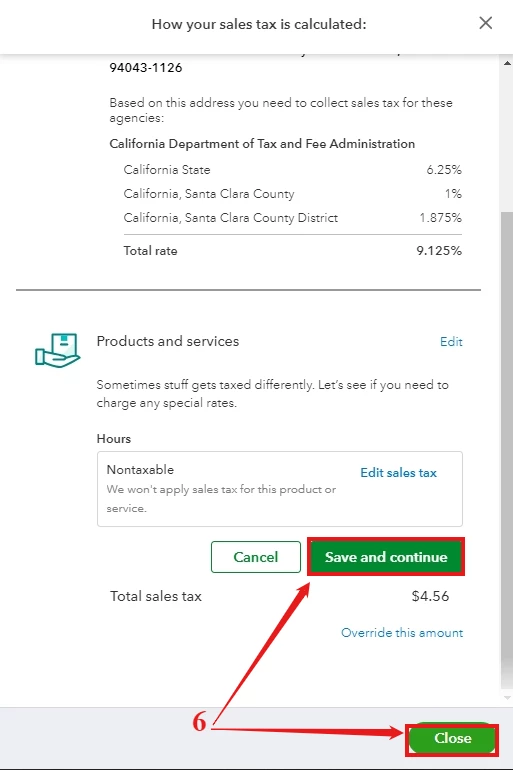
  6. Hit Save and continue then Close.


To find out how much sales tax you owe in QuickBooks Online (QBO), refer to this article: Check how much sales tax you owe.

If you continue to experience issues with adjusting your sales tax in QBO, @allegra03. Please don't hesitate to get in touch. We understand the urgency of accurate tax adjustments, and our dedicated support team is always available to help you 24/7. Just click the Reply button to connect with us directly. We’re committed to helping you resolve this smoothly and efficiently.

2 replies

JaeAnnC
December 11, 2024

It's my goal to help you add a new inventory and adjust the sales taxes for your items in QuickBooks Online (QBO), @2A.


Before doing so, did you encounter an error message when adding a new product or service? If so, we'd appreciate it if you could specify it so we can add a more tailored solution.


Meanwhile, let's troubleshoot your browser to address potential issues. This action clears the outdated cache that resulted in the problem. Here are some keyboard shortcuts you can use:


  • For Google Chrome browser: Ctrl + Shift + N
  • For Mozilla Firefox browser: Ctrl + Shift + N
  • For Safari browser: Command + Shift + N


Once resolved, return to your regular browser to clear its cache or switch to a different supported one. It could be a short-term issue with QBO or the window you're using.


Moreover, creating categories for your products and services will provide more insightful sales reports.


Furthermore, discover a smarter way to manage your business inventory with QuickBooks Live Assisted. Our dedicated team of certified experts is here to provide you with tailored support, ensuring your inventory management is seamless and efficient.


We're always committed to helping you navigate QBO with ease and confidence, especially when managing inventory. Just don't hesitate to reach out if you have other concerns, and we'll get back to you promptly to address them. Have a great rest of the day.

2A86_2Author
December 11, 2024

Hello,

I was able to switch to Firefox and add one new item. Then went to the second item and had the same issue as with Chrome. Cache and cookies have been cleared in both.

The ability to designate sales tax is gone on both Chrome and Firefox. I have come to assume it has something to do with the tax edit area being gone. Before this happened if sales tax wasn't edited the software would not save a new item.

Thoughts?

December 12, 2024

I am able to add a new product, however, I cannot choose 'taxable' or 'non-taxable' in the set up. That section is GONE!

This is a necessary piece of setting up & editing products!!!!! 


Right now, if I set up a new product, it's automatically 'taxed'. If I open a product that's already been created, it switches automatically to 'taxable'. I can't put it back to 'non-taxable'.


Now, when I create an estimate or invoice, I have to remember to unclick the 'tax' box on the right side of the line item.

This could really mess up our sales tax reporting!


My QBO customer service member told me that today she just learned that this piece of the product set-up screen has been removed from the program. WHAT?!?!?!


We received no notice, before or after the removal AND no way to work around this issue!


I have to have the sales tax section put back. We all do!!!!!


December 13, 2024

I understand how important it is for you to have accurate sales tax reports, @allegra03. I'm here to help you fully address your concerns.


Currently, there's an ongoing investigation (INV-116050) regarding the missing or undisplayed Sales Tax Category field.


We suggest getting in touch with our live support team. They can include your details among the affected users and will keep you updated on any resolutions made by our engineers. Here's how:


  1. Sign in to your QuickBooks (QBO) account.
  2. At the upper right corner of your screen, select the ? Help button.
  3. Navigate to the Search tab and type your issue into the search box.
  4. Click on Contact Us and pick a method to get in touch with us


Meanwhile, you can modify your tax classification directly when creating an invoice. Here’s how to do it:


  1. Go to + New and choose the Invoice.

             Note: Fill out the necessary information.
  2. Below Sales tax, select See the math.
  3. Next to Products and services, click on Edit.


  4. Choose Edit sales tax.


  5. From the Other options, select Nontaxable and Done.


  6. Hit Save and continue then Close.


To find out how much sales tax you owe in QuickBooks Online (QBO), refer to this article: Check how much sales tax you owe.

If you continue to experience issues with adjusting your sales tax in QBO, @allegra03. Please don't hesitate to get in touch. We understand the urgency of accurate tax adjustments, and our dedicated support team is always available to help you 24/7. Just click the Reply button to connect with us directly. We’re committed to helping you resolve this smoothly and efficiently.

2A86_2Author
December 13, 2024

The sales tax editing tool has been turned back on and we are able to enter inventory. I hope the rest of you having the same problem are now back up and running. Thanks to everyone who voiced concern as well as the QuickBooks employees who tried to help.