Hello there, orchard.
Let me chime into this thread and help you manage your company.
In QuickBooks Online (QBO) Simple Start subscription, you're unable to manage two companies under one user ID. That explains why you're unable to add users.
However, you can change or update the other company's Intuit account sign-in information.
Here's how:
- Sign in to your QuickBooks Online company.
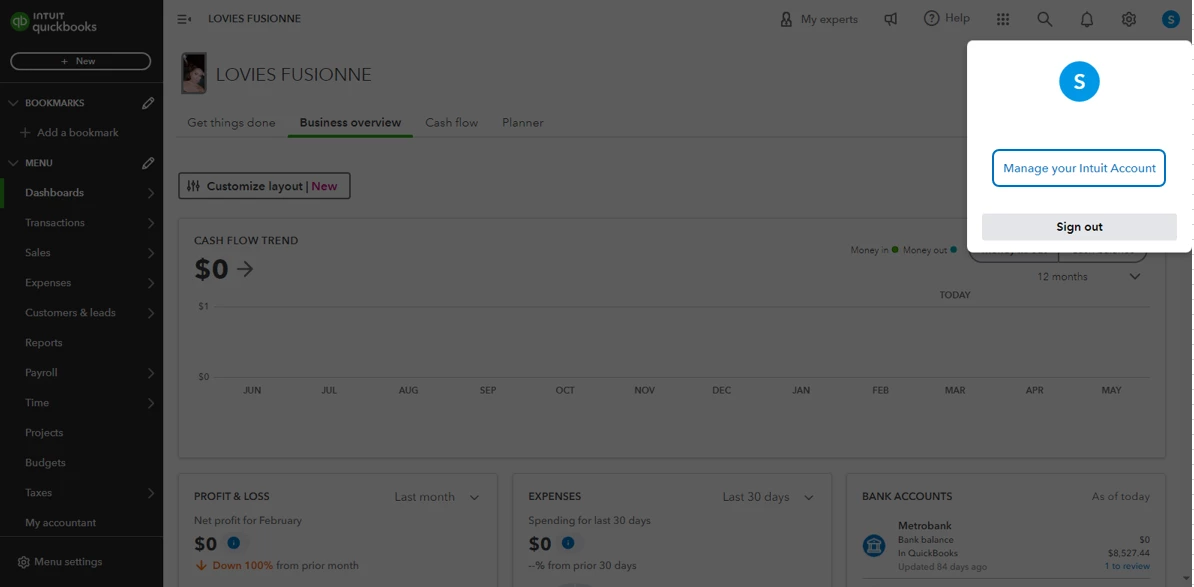
- Look for the profile icon next to Settings, then select Manage your Intuit Account.
- In the Intuit Account Manager, click Sign in & security.
- Select the User ID, Email address, Password, or Phone section.
- You can now then make changes or an update.
- Once done, select Save.
You can refer to the screenshot below for visual reference.
On the other hand, if you changed your email address, be sure to update also your email address in the Company settings of QuickBooks Online. This ensures your customers see the correct contact info for your company.
Additionally, here's an article you can browse through in case you need assistance updating the business or contact names associated with your Intuit Account: Update business or contact names on your account.
If you still need further assistance managing users or anything else about QuickBooks, let us know by dropping a comment below. We're always here 24/7. Stay safe.

