January 3, 2021
Solved

Can you manage multiple company's books from one user account in Quickbooks Online?

  • January 3, 2021
  • 2 replies
  • 0 views
Original commenter did not share additional details

Best answer by LieraMarie_A

This is just the place to get the answers you're looking for, @userchristian.


Yes, you can have as many companies as you'd like under the same QuickBooks Online account. Each company you create requires an additional subscription, but you can access them with the same sign-in info. This lets you quickly switch between companies so you can manage everything more efficiently. 


To add a new company:
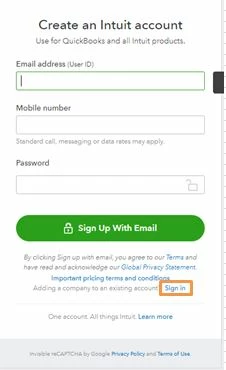
  1. Go to the QuickBooks pricing page and select the subscription you want. 
  2. You’ll see a page that asks you to create an Intuit account to buy QuickBooks. Scroll all the way to the bottom and look for the small text that says Adding a company to an existing account.” Select Sign in next to this. 
  3. If you're signed in to QuickBooks, you’ll be asked to confirm the account you want to sign in with. If the account displayed is the one you want to use for the new company file, select Continue.
  4. When asked, enter the same ID and password you already use for QuickBooks. 
  5. Fill out all the information about your new company and you’re good to go.


Now that you have multiple companies, you’ll be asked which company you want to open whenever you Sign in to QuickBooks Online . To switch between companies at any time, select the Gear icon and select Switch company.


To learn more about managing multiple companies, check out the following link. It has a bunch of useful information for you and your business: Managing your companies


Be sure to let me know if you have concerns while working in QBO. I'm here to lend a helping hand. Have a good one.

2 replies

LieraMarie_A
January 3, 2021

This is just the place to get the answers you're looking for, @userchristian.


Yes, you can have as many companies as you'd like under the same QuickBooks Online account. Each company you create requires an additional subscription, but you can access them with the same sign-in info. This lets you quickly switch between companies so you can manage everything more efficiently. 


To add a new company:

  1. Go to the QuickBooks pricing page and select the subscription you want. 
  2. You’ll see a page that asks you to create an Intuit account to buy QuickBooks. Scroll all the way to the bottom and look for the small text that says Adding a company to an existing account.” Select Sign in next to this. 
  3. If you're signed in to QuickBooks, you’ll be asked to confirm the account you want to sign in with. If the account displayed is the one you want to use for the new company file, select Continue.
  4. When asked, enter the same ID and password you already use for QuickBooks. 
  5. Fill out all the information about your new company and you’re good to go.


Now that you have multiple companies, you’ll be asked which company you want to open whenever you Sign in to QuickBooks Online . To switch between companies at any time, select the Gear icon and select Switch company.


To learn more about managing multiple companies, check out the following link. It has a bunch of useful information for you and your business: Managing your companies


Be sure to let me know if you have concerns while working in QBO. I'm here to lend a helping hand. Have a good one.

January 7, 2022

What is the cost to add each new business


MonicaM3
January 7, 2022

Hi @Mandy L.


Happy Friday!


You can have multiple companies using the same User Id to make it easy and quick to navigate between them. The price of the subscription depends on which version of QuickBooks Online you choose. Each version has different features so you can choose the best fit for each company.


Check out our products and pricing page for the most current information. If you have questions about what is right for you and your businesses, there is an option to do a live chat, call, or schedule an appointment to talk to one of our small business specialists.


Let me know if you have any additional questions about adding new companies or anything else. I’m happy to help anytime.


Have a great weekend!

Fiat Lux - ASIA
January 4, 2021

@userchristian 

One QBO account is for one company file. You may use the same email address to open and manage multi QBO accounts.
