Solved
Change Order
I have looked at every “how to” and multiple threads on this website. What do I do if the “change order” box doesn’t populate when I make changes to an estimate? Pls help. sos


I have looked at every “how to” and multiple threads on this website. What do I do if the “change order” box doesn’t populate when I make changes to an estimate? Pls help. sos
You've made the right choice of coming here, JRH2.
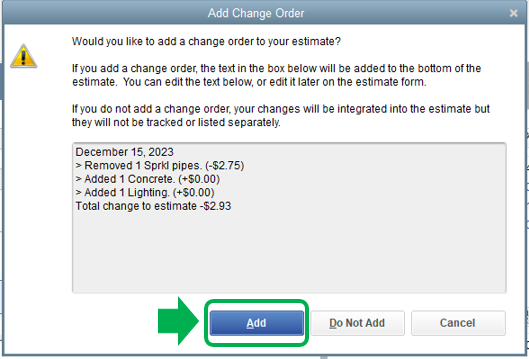
When you make changes to your estimates, the Add Change Order box will pop up after the Recording Transaction window appears. I'll show you some screenshots below:
This the Recording Transaction pop-up. Just click Yes and the Add Change Order will automatically appear.

This is the Add Change Order box. Click Add to save the changes made.
You can have this article handy for more information about creating estimates in QuickBooks Desktop: Create an estimate.
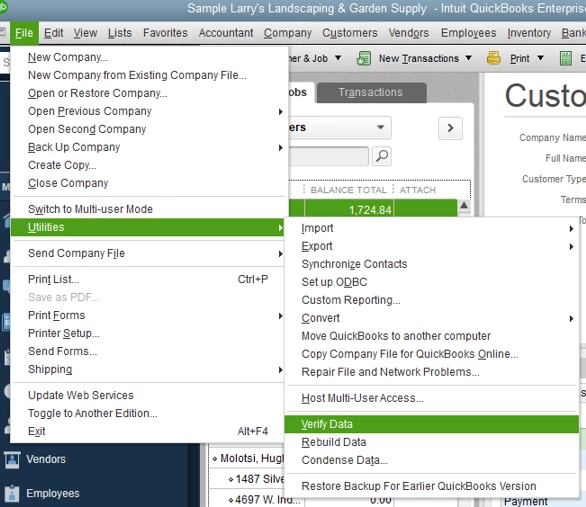
If it still doesn't give you the change order box, I suggest running the Verify and Rebuild Utility Tool. This helps repair any data damage in the system. Below are the steps on how to do this:
I've got your back whenever you need help while working with QuickBooks. It will be a pleasure to assist you further. Enjoy the rest of the day!
Enter your E-mail address. We'll send you an e-mail with instructions to reset your password.