June 28, 2020
Solved

Correcting a deposit payee

  • June 28, 2020
  • 1 reply
  • 0 views

I added a deposit from my PayPal review tab  into the PayPal registry, and found that I made a mistake on the payee line.  The deposit in the registry is recorded as split, one amount being the payment from the client, and the other the PayPal fee.  I am trying to correct the client and I am receiving this error message: “This transaction has been deposited. If you want to change or delete it, you must edit the deposit it appears on and remove it first.”  Please tell me the steps to doing this.

Best answer by Adrian_A

I've got the steps on how we can change the payee line, JHLLYWD.


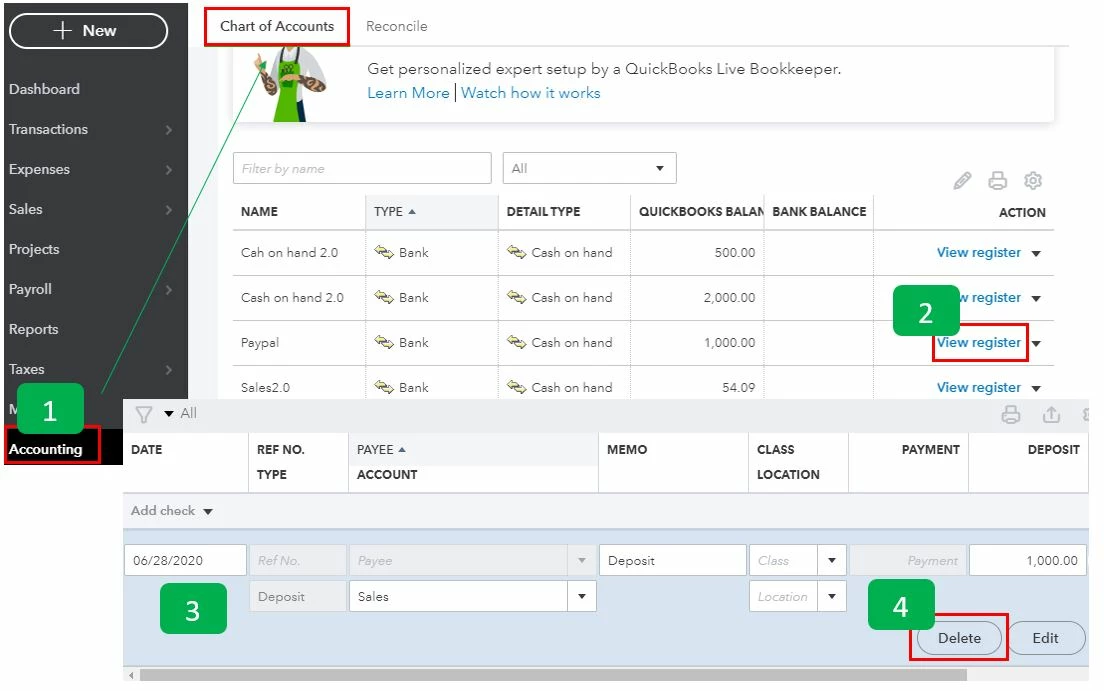
The first thing that we have to do is to delete the transaction in the Chart of Accounts page so it will go back to the banking tab. I'll show you how:


  1. From the Accounting tab, select Chart of Accounts.
  2. Locate the account and click View register.
  3. Click the transaction that has the incorrect payee.
  4. Select Delete.
  5. Select Yes.


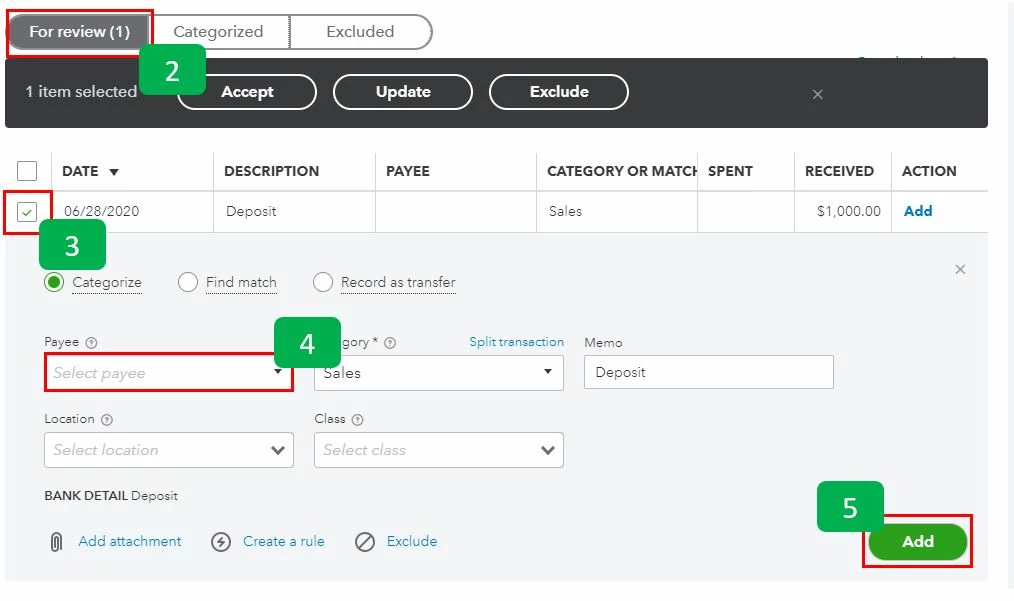
Afterward, the transactions will be moved back to the For Review tab, and we can modify the payee.


  1. Select Banking from the Transactions tab.
  2. Go to the For Review tab.
  3. Click the transaction.
  4. Select the correct payee in the Payee field.
  5. Click Add.


Once done, you can now categorize and reconcile the transactions. I've added these links as your guide when categorizing and reconciling:


You can always get back to this thread if you need help in reconciling the transactions. Have a great day!

1 reply

Adrian_A
Adrian_AAnswer
June 28, 2020

I've got the steps on how we can change the payee line, JHLLYWD.


The first thing that we have to do is to delete the transaction in the Chart of Accounts page so it will go back to the banking tab. I'll show you how:


  1. From the Accounting tab, select Chart of Accounts.
  2. Locate the account and click View register.
  3. Click the transaction that has the incorrect payee.
  4. Select Delete.
  5. Select Yes.


Afterward, the transactions will be moved back to the For Review tab, and we can modify the payee.


  1. Select Banking from the Transactions tab.
  2. Go to the For Review tab.
  3. Click the transaction.
  4. Select the correct payee in the Payee field.
  5. Click Add.


Once done, you can now categorize and reconcile the transactions. I've added these links as your guide when categorizing and reconciling:


You can always get back to this thread if you need help in reconciling the transactions. Have a great day!