Hello, snowleopard25.
Happy to offer assistance on how you can simplify your Profit and Loss report.
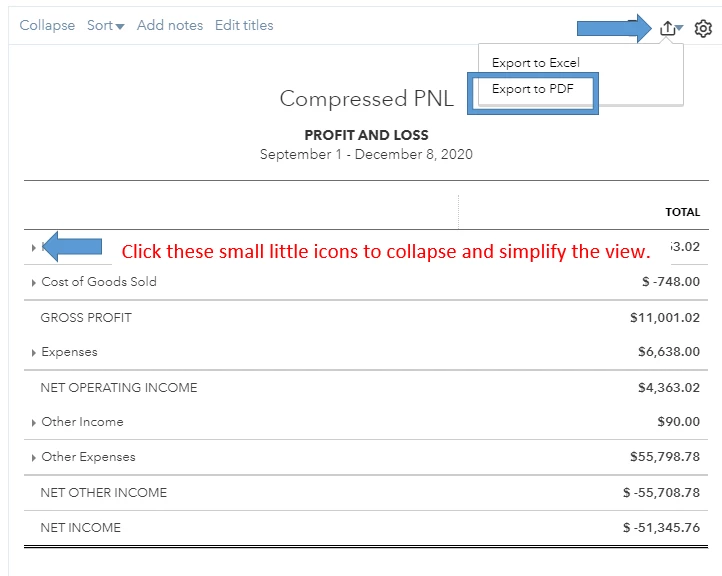
You can collapse the view of the report and export it to PDF to simplify it (without omitting the needed accounts). Doing it on Excel however will expand the view. Here's how:
- Run the Profit and Loss report.
- On the report overview, click the small arrow icons beside the account category. You can also click the Expand or Collapse link right above the report header.
- After collapsing all accounts, click the Export icon.
- Choose Export to PDF.
You can also filter specific accounts (Income and expense accounts) to simplify your Profit and Loss report. However, this will omit other accounts. In case you want to do it:
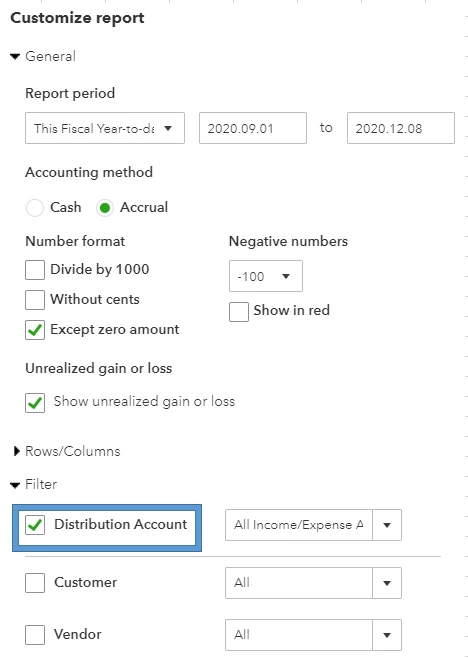
- On the Profit and Loss report, click the Customize button.
- Expand the Filter section.
- Check Distribution account, then select the specific account you want to show on the report.
- Once done, click Run report.
If you need more help customizing your Profit and Loss report, please check this article for a guide: Customize reports in QuickBooks Online.
You're more than welcome to visit our help articles if you need assistance doing a specific task in QuickBooks. Just browse a topic here and look for an article of your choice. I'm sure they'll guide you in managing your transactions, data and your account.
I can show you what else you can do in QuickBook Online. Just post your questions here, and I'll guide you.

