
May 15, 2021
Solved

Does anyone know if I can switch from accrual to cash basis in QB Online to get cash basis financials to our tax accountant and then switch back to accrual without issue?

  • May 15, 2021
  • 1 reply
  • 0 views
Original commenter did not share additional details

Best answer by jamespaul

Hello, kturner1. 


Yes, you can switch to Cash basis in QuickBooks Online without any issues. I'm happy to show you the steps below. 


There are two ways to do this. You can either change the basis in the Account and settings page or within a specific report. Here's how to do it:
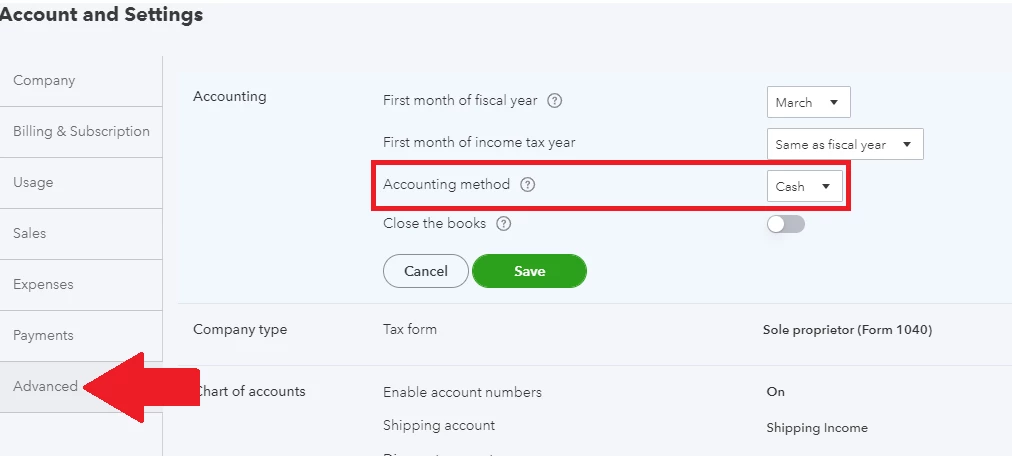
 

  1. Click the gear icon, then select Account and settings.
  2. Go to the Advanced tab.
  3. Expand the Accounting section.
  4. Select Cash from the Accounting method drop-down menu. 
  5. Click Save, then Done


On the reports, simply select Cash under the Accounting method section. 
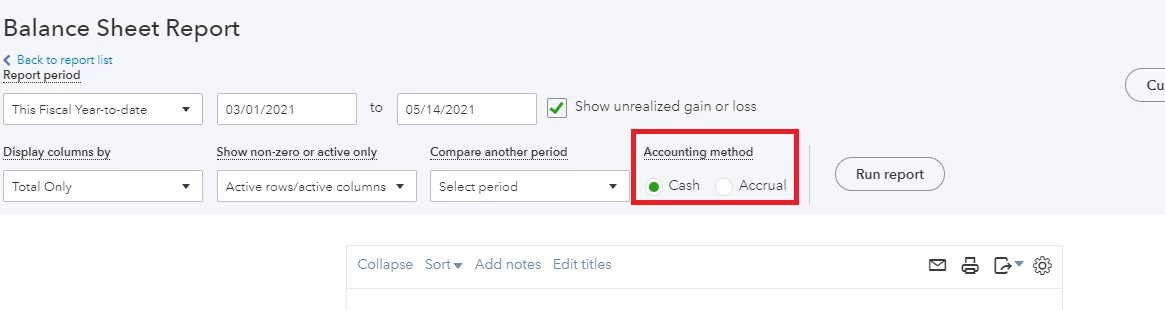


Changing the basis will only affect the transactions' reporting. Though, just make sure you get an approval from the IRS (through your tax accountant). They require you to use the same accounting method from year to year. 


You can check this article if you need references about changing the accounting methods: Choose between cash and accrual accounting methods in reports


Ready to export your reports to Excel for your tax accountant? This article can guide you with the processes: Export your reports to Excel from QuickBooks Online.


Do you need help with your company settings or do you need a specific report to send to your tax accountant? Please let me know and I'll help you complete your tasks. 

1 reply

jamespaulAnswer
May 15, 2021

Hello, kturner1. 


Yes, you can switch to Cash basis in QuickBooks Online without any issues. I'm happy to show you the steps below. 


There are two ways to do this. You can either change the basis in the Account and settings page or within a specific report. Here's how to do it:


  1. Click the gear icon, then select Account and settings.
  2. Go to the Advanced tab.
  3. Expand the Accounting section.
  4. Select Cash from the Accounting method drop-down menu. 
  5. Click Save, then Done


On the reports, simply select Cash under the Accounting method section. 


Changing the basis will only affect the transactions' reporting. Though, just make sure you get an approval from the IRS (through your tax accountant). They require you to use the same accounting method from year to year. 


You can check this article if you need references about changing the accounting methods: Choose between cash and accrual accounting methods in reports


Ready to export your reports to Excel for your tax accountant? This article can guide you with the processes: Export your reports to Excel from QuickBooks Online.


Do you need help with your company settings or do you need a specific report to send to your tax accountant? Please let me know and I'll help you complete your tasks. 

kturner1Author
May 15, 2021

James Paul - Oh my goodness.  You were incredibly helpful.  I can't believe it's as easy as clicking "cash" under accounting method.  Woo Hoo!!! Thank you so much. I will print these off for our tax accountant.  

So grateful,

Karen