Hi there, Jack. Yes, there's a way to export a copy of your bank register. I can show you the steps to get a copy of data in QuickBooks Online (QBO).
You can get a copy of your bank register by going to your Chart of accounts.
Here's how:
- Go to the Gear icon and select Chart of accounts.
- Look for the account you want to get a copy with and select View Register.
- On the top right corner of the page, click the Export icon.

After exporting it, you can view the file that can be found in your computer documents.
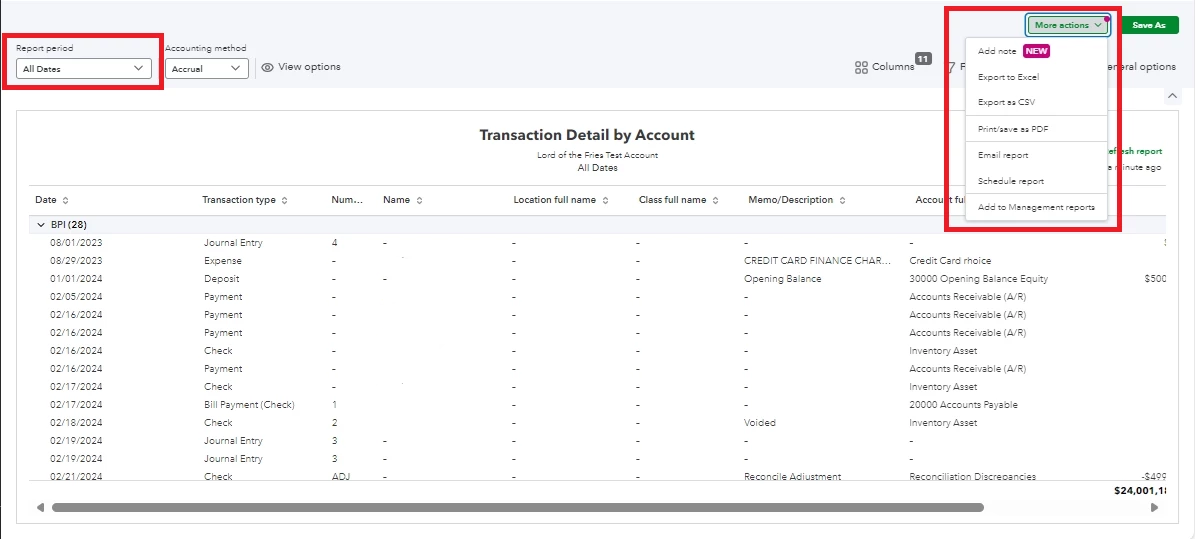
Another option is to run a Transaction Detail by Account report. This way, you can display your records and filter them all the way back to 2002.
Here's how:
- On the left panel of your account, click Reports.
- Enter Transaction Detail by Account in the search bar.
- On the Report period, click the dropdown arrow and select All Dates.
- Click the More actions dropdown, then select Export to Excel or Export as CSV.
Additionally, you can refer to this article to learn about managing your bank transactions while importing them into QBO:
Enhance your financial trajectory by working with our QuickBooks Live Expert Assisted team. These financial maestros streamline your processes and provide bespoke advice to meet your business's unique needs. Click now to embark on a new era of financial clarity and success.
Your success in managing your transactions is essential for your business. If you have more questions about exporting/importing transactions, let's address them together. I'm here to make sure you have the support you need to keep things running smoothly.

