March 8, 2021
Solved

Hello, I am trying to create a sales by customer type summary report. All that is available is a detail report. Is it possible to customize this report to show summary?

  • March 8, 2021
  • 2 replies
  • 0 views
Original commenter did not share additional details

Best answer by Rubielyn_J

Thanks for posting here in the Community, @BWFC.


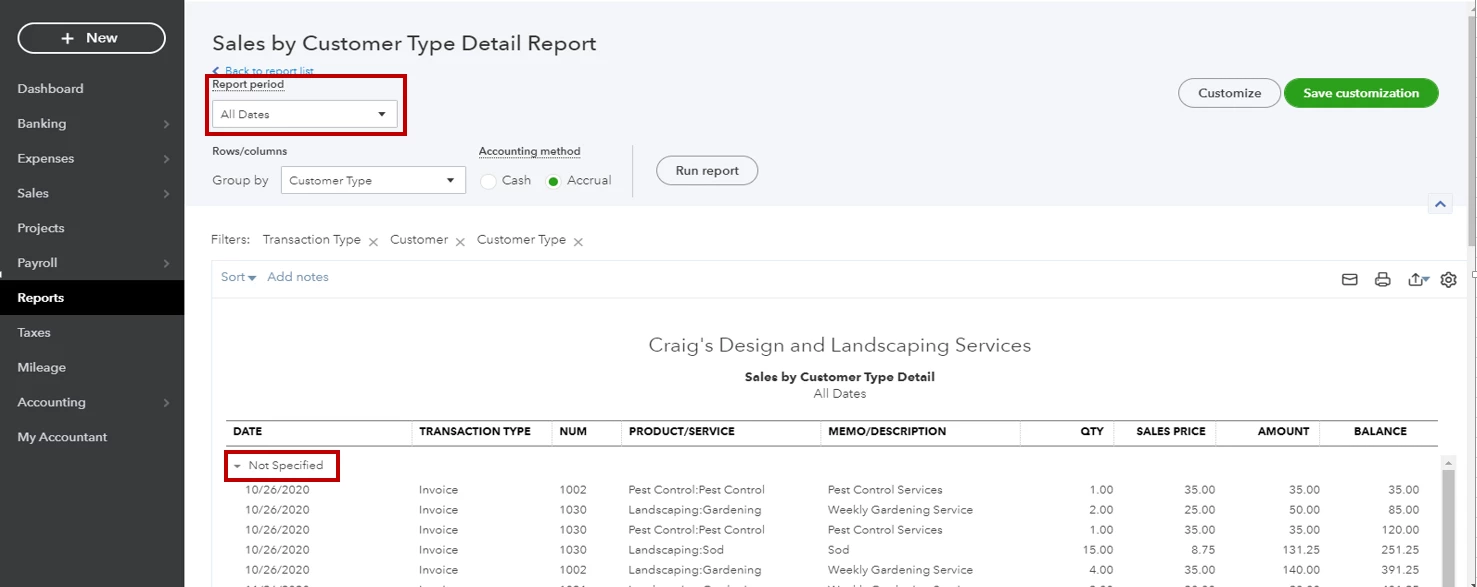
Let me provide some details about creating reports in QuickBooks Online. We can customize the Sales by customer type detail report to show the summary. 


Here's how: 
  1. Go to the Reports menu.
  2. From the Find report by name field, search and choose Sales by customer type detail report. 
  3. Select the Report period
  4. On the report's page, collapse the invoice line by clicking the drop-down arrow beside the customer type.


You'll want to personalize your reports, feel free to check out this article: Customize reports in QuickBooks Online.


Lastly, you can memorize your report to save it with its current customization settings.


Let me know if you have further concerns. I'll keep an eye on your response. Have a nice day ahead. 

2 replies

Rubielyn_J
March 8, 2021

Thanks for posting here in the Community, @BWFC.


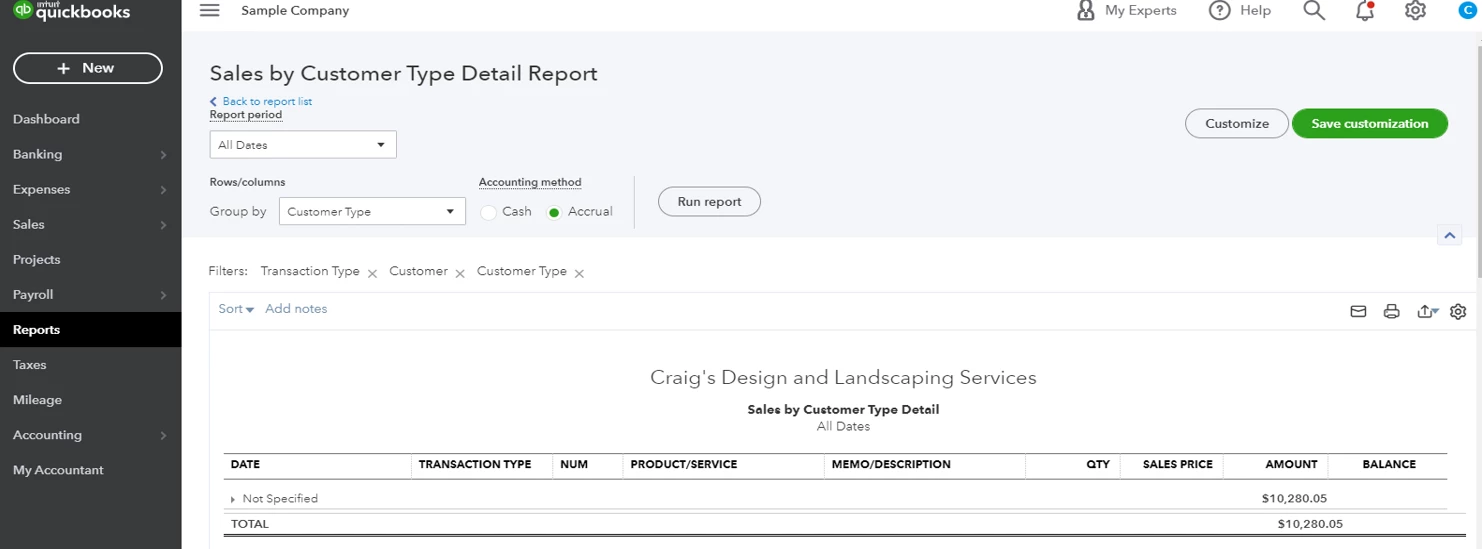
Let me provide some details about creating reports in QuickBooks Online. We can customize the Sales by customer type detail report to show the summary. 


Here's how: 
  1. Go to the Reports menu.
  2. From the Find report by name field, search and choose Sales by customer type detail report. 
  3. Select the Report period
  4. On the report's page, collapse the invoice line by clicking the drop-down arrow beside the customer type.


You'll want to personalize your reports, feel free to check out this article: Customize reports in QuickBooks Online.


Lastly, you can memorize your report to save it with its current customization settings.


Let me know if you have further concerns. I'll keep an eye on your response. Have a nice day ahead. 

Rubielyn_J
March 9, 2021

Hi, @BWFC.


Hope you’re doing great. I wanted to see how everything is going about creating a sales by customer type summary report concern you had the other day. Was it resolved? Do you need any additional help or clarification? If you do, just let me know. I’d be happy to help you at any time.


Looking forward to your reply. Have a pleasant day ahead!

October 5, 2022

Yes, I need the Same Sales by Customer Type Report (summary) in Quickbooks Enterprise.  Can you help?

AlcaeusF
October 5, 2022

Hi @careya2,


I appreciate you getting back to us regarding the report you need in QuickBooks Online. Allow me to assist you with pulling up the necessary sales data from the system.


The closest report you can run is Sales by Customer Summary. It's available on all versions of QuickBooks Online (Simple Start, Plus, and Essentials).


Your summary report will show the total sales by customer. You can expand the details by clicking the amounts under the Total column.


Here's how:


  1. On the left navigation bar, click Reports.
  2. Scroll down and select Sales by Customer Summary under Sales and customers.
  3. Filter the date range.
  4. Hit Run report.


In case there's information you want to add that is not available within QuickBooks, you can also export it to Excel. From there, you can personalize your data further manually.


Some reports are only available for certain subscription levels. I've attached an article you can use to learn about the availability depending on the version of QuickBooks: Reports included in your QuickBooks Online subscription.


Leave a comment below if you have more questions or need further assistance with the sales data. I'll keep an eye on your response.
