August 3, 2021
Solved

How can I export all data to excel without an export option?

  • August 3, 2021
  • 3 replies
  • 0 views
Can I get a data table to export to excel?

Best answer by Maybelle_S

It's good to see you here, @amelendez-vidalu.


I’m here to ensure all your data will get exported. Before that, may I know if you're unable to see the Export option in your QuickBooks Online (QBO) account? Any information can help us provide a timely fix.


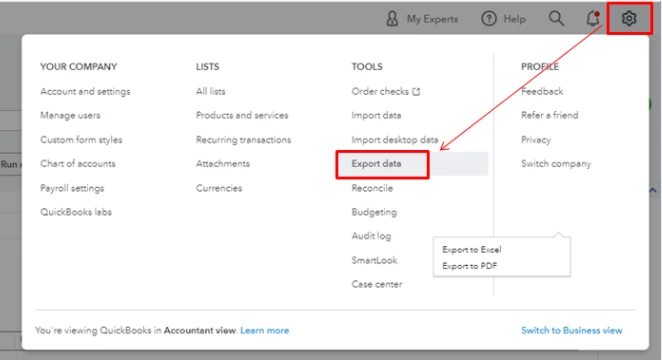
In QBO, you can export your reports and lists into individual Excel files contained in a zip format in one just one process. You’ll want to make sure to filter the date period to cover year-to-date transactions. Here’s how:


1. Go to the Gear icon.

2. Under Tools, select Export Data.
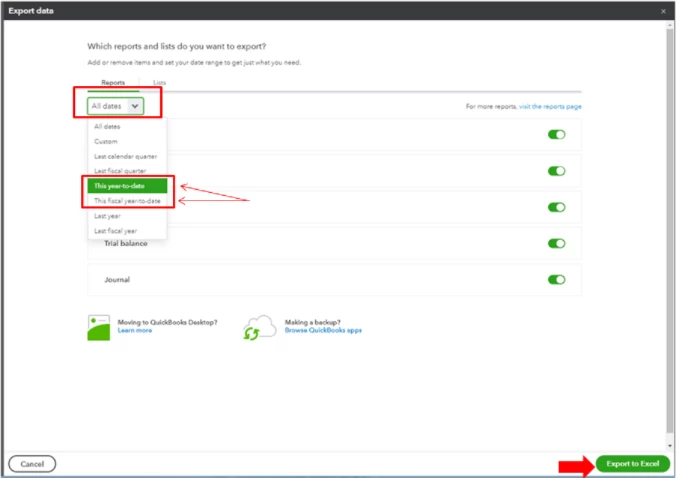
3. On the Reports tab, set the date range to year-to-date.

4. Add items from the Reports/Lists tabs by toggling the slider.

5. Press Export to Excel.
 

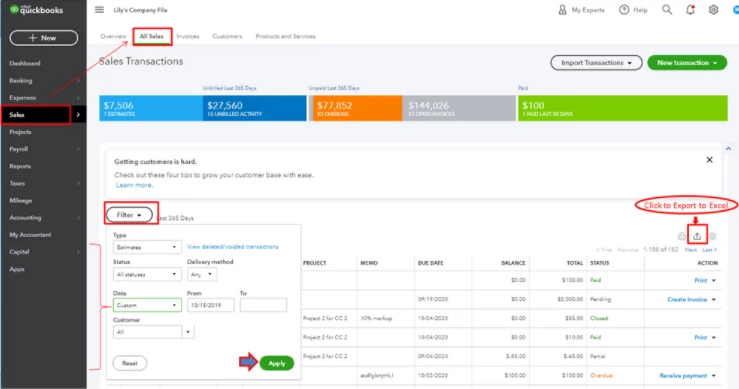
Please know that you’ll need to export non-posting transactions and attachments separately since it doesn’t include in the lists. You can follow the instructions listed in this article to do so: Export reports, lists, and more.
 

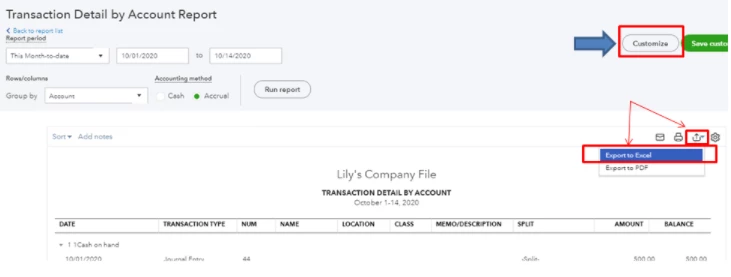
You can also customize your other reports if you wanted to export specific details of your transactions in QuickBooks.
 

I'm always here if you have any other questions about exporting data. Just leave a reply below and I'll get back to you.

3 replies

BigRedConsulting
August 3, 2021

It isn't possible to export all data to Excel from QB Online.

August 3, 2021

It's good to see you here, @amelendez-vidalu.


I’m here to ensure all your data will get exported. Before that, may I know if you're unable to see the Export option in your QuickBooks Online (QBO) account? Any information can help us provide a timely fix.


In QBO, you can export your reports and lists into individual Excel files contained in a zip format in one just one process. You’ll want to make sure to filter the date period to cover year-to-date transactions. Here’s how:


1. Go to the Gear icon.

2. Under Tools, select Export Data.

3. On the Reports tab, set the date range to year-to-date.

4. Add items from the Reports/Lists tabs by toggling the slider.

5. Press Export to Excel.


Please know that you’ll need to export non-posting transactions and attachments separately since it doesn’t include in the lists. You can follow the instructions listed in this article to do so: Export reports, lists, and more.


You can also customize your other reports if you wanted to export specific details of your transactions in QuickBooks.


I'm always here if you have any other questions about exporting data. Just leave a reply below and I'll get back to you.

August 4, 2021

Thanks for you reply.  In the gear icon, I only have Profile, Feedback, Privacy and the Business and Accountant views that I can toggle between.


Fiat Lux - ASIA
August 4, 2021

@amelendez-vidalu 

Have you explored this exporter tool?

https://transactionpro.grsm.io/qbo


Why do you need to export all the data out to XLS? Do you need to migrate your data to another accounting app? You may consider purchasing our conversion service.

August 4, 2021

Thanks for your reply.  No, I'm not transferring to another system.  I'd like to see what makes up the totals in the P&L, for example, and be able to export all of the detail.  I can do that with reports, just more time-consuming than pulling a data table with the details.

Fiat Lux - ASIA
August 4, 2021

@amelendez-vidalu 

Another option, explore a BI app to analyze your data. You don't have to export your data to XLS.

November 10, 2021

Only my 3 very active companies of my 5 total companies have the "export data" option. 

The remaining 2 companies do not have export in settings under Tools.

Does activity or bank connection have anything to do with having the option to export data available?


November 10, 2021

Hello there, @tportnoy.


You can refresh your browser by pressing the F5 key to check if the export data option comes back. If not, this can be caused by too many cache files stored in your browser. We can perform some basic troubleshooting steps to check if it fixes the issue. 


You can use these shortcut keys depending on the browser you're using:


• Google Chrome: press Ctrl + Shift + N 

• Mozilla Firefox: press Ctrl + Shift + P

• Safari: press Command + Shift + N


If it works, go back to your regular browser and clear its cache. These caches of data are essentially junk files and can be safely deleted to free up storage space. Otherwise, switch or use a different browser.


Once done, you can start exporting your data. See the steps below:


1. Go to the Gear icon and select Export Data.

2. Choose the data you want to export.

3. Click Export to Excel.


Lastly, you can always visit our Self-Help references in case you wanted some related articles on managing your account and transactions.


If there's anything else that I can help you with, please let me know in the comments below. I'm always around to get your back here in the Community.

November 10, 2021

No change. Used incognito Chrome and newly installed Edge browser. 

As I said, the export option appears on companies where I have a fair amount of frequent use and is not present on the 2 companies that have sporadic or occasional use.

Browser cache shouldn't impact QBO functionality anyway. 

Why is the export option not on all company profiles?
