November 16, 2019
Solved

How do I activate a tax rate I unactivated?

  • November 16, 2019
  • 2 replies
  • 0 views
Original commenter did not share additional details

Best answer by MirriamM

I'd be happy to show you on how to activate an inactivated tax rate, brendacamilleri.


To make an inactive tax rate active again, follow below steps:


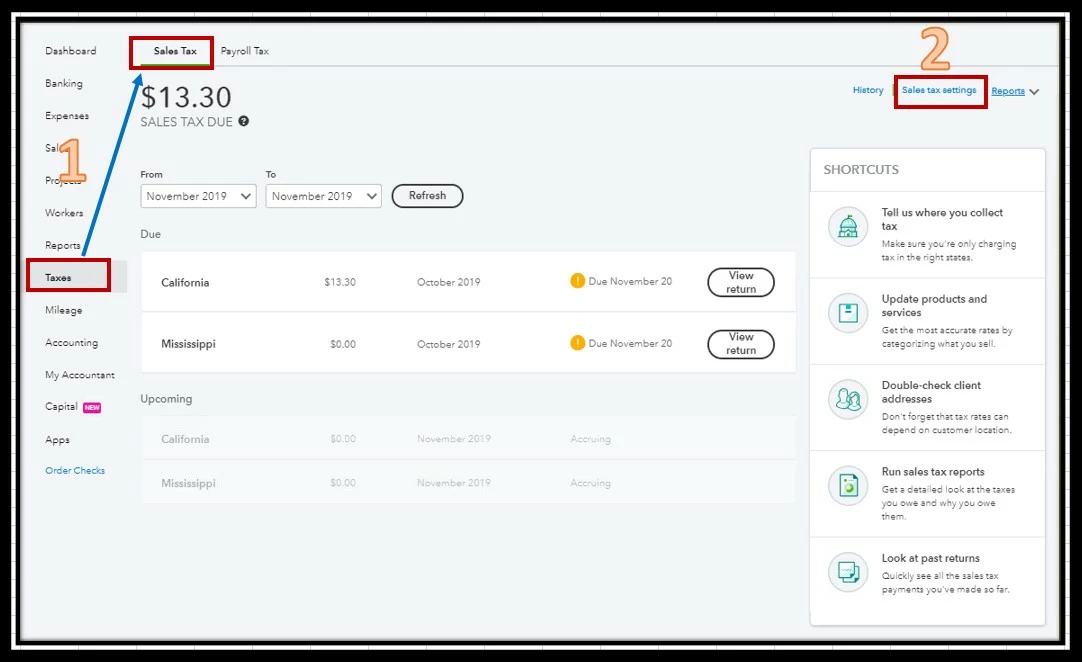
  1. Click Taxes in left menu bar, and go to Sales Tax tab. 
  2. Pick Sales tax settings at the upper right hand.
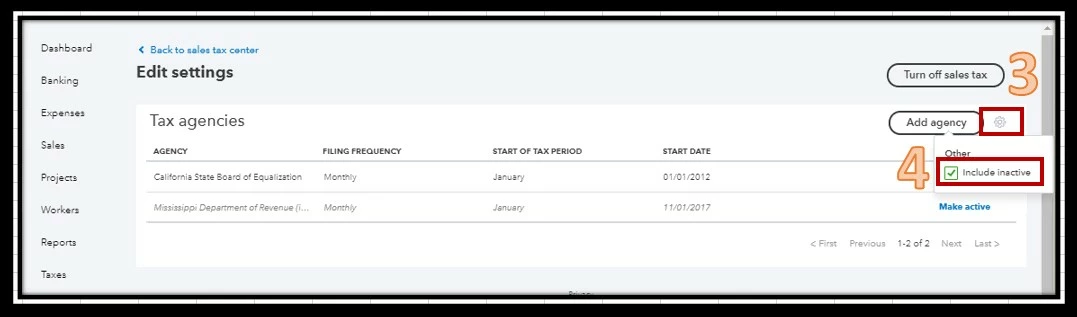
  3. In the Edit settings page, click the gear icon beside the Add agency button. 
  4. Put a check mark for Include inactive.
  5. Look for the inactive tax rate and hit the Make active under the ACTION column.

Check out below screenshots for your visual reference:


You can visit this Set up and use automated sales tax article to know more how Sales Tax feature works.


That's it! If you need anything moving forward, our inbox is always open. Enjoy the rest of your day.

2 replies

MirriamMAnswer
November 16, 2019

I'd be happy to show you on how to activate an inactivated tax rate, brendacamilleri.


To make an inactive tax rate active again, follow below steps:


  1. Click Taxes in left menu bar, and go to Sales Tax tab. 
  2. Pick Sales tax settings at the upper right hand.
  3. In the Edit settings page, click the gear icon beside the Add agency button. 
  4. Put a check mark for Include inactive.
  5. Look for the inactive tax rate and hit the Make active under the ACTION column.

Check out below screenshots for your visual reference:


You can visit this Set up and use automated sales tax article to know more how Sales Tax feature works.


That's it! If you need anything moving forward, our inbox is always open. Enjoy the rest of your day.

August 11, 2020

I changed the percentage on a county tax, and now the county shows inactive. I did not do anything but change the percent by .25%. 

August 11, 2020

Hello there, @Dusty17.


If you adjust the percentage on a county tax, it will become inactive. You will need to create a new tax to replace the inactive one if there are changes that need to be made.


To learn more about sales tax, visit our Community help website for some video tutorials which you may find helpful in the future.


You're welcome to get back to me by commenting below if you need other help in QuickBooks Online. I'm more than happy to assist further. Have a great day!

December 19, 2021

Hi, I've tried the steps to re-activate a tax rate but I am not seeing any deactivated rates displaying after selecting the show inactive rates? 


I have tax rates that are not active which I want to re-activate as these were deactivated in error when trying to set up automated tax. see attached. 

Jen_D
December 19, 2021

Thanks for updating this thread, @RainD.


I'm joining in the conversation to share some insights about this tax rate concern. 


If you previously deactivated a tax rate under the Custom rates section of you sales tax settings, this cannot be undone. The system can only reactivate inactive tax agencies for now.


You will need to add a new tax rate for a certain state or country to use it again for your sales entries. Click the Add rate option to re-enter the tax rate details. Also, it looks like the screenshot you share did not post, so if you can share it again, it will be greatly appreciated.


I'm adding some related links for your references with the sales tax feature in QuickBooks Online:


Visit us anytime if there's anything else you need assistance with sales tax processes in QuickBooks. We are always here to help you out. Have a nice day and take care.

