December 20, 2018
Solved

How do I delete an account from the chart of accounts. What has been posted here about running a report does not work? I would like very specific details.

  • December 20, 2018
  • 4 replies
  • 0 views
Original commenter did not share additional details

Best answer by Angelyn_T

Hi there, @Philip C.


I'm here to help share additional information about deleting accounts in QuickBooks Online (QBO).


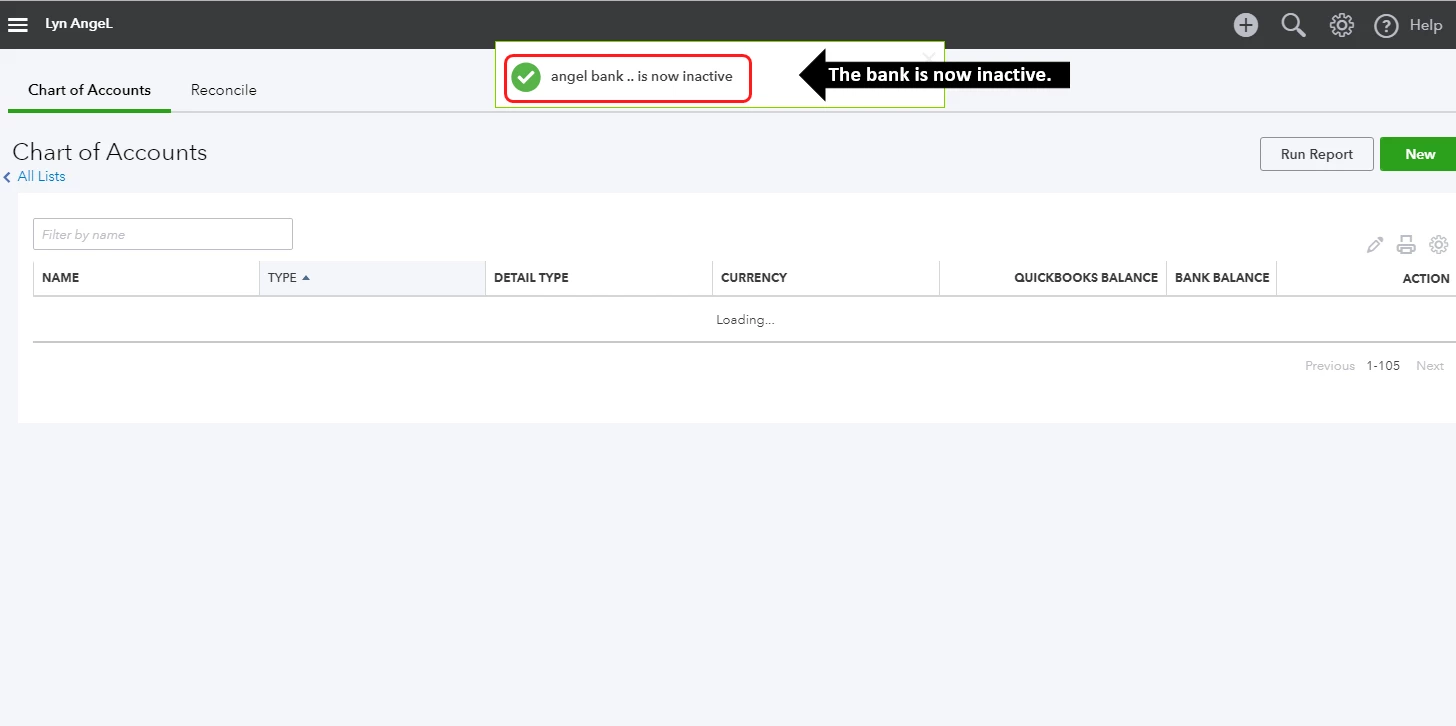
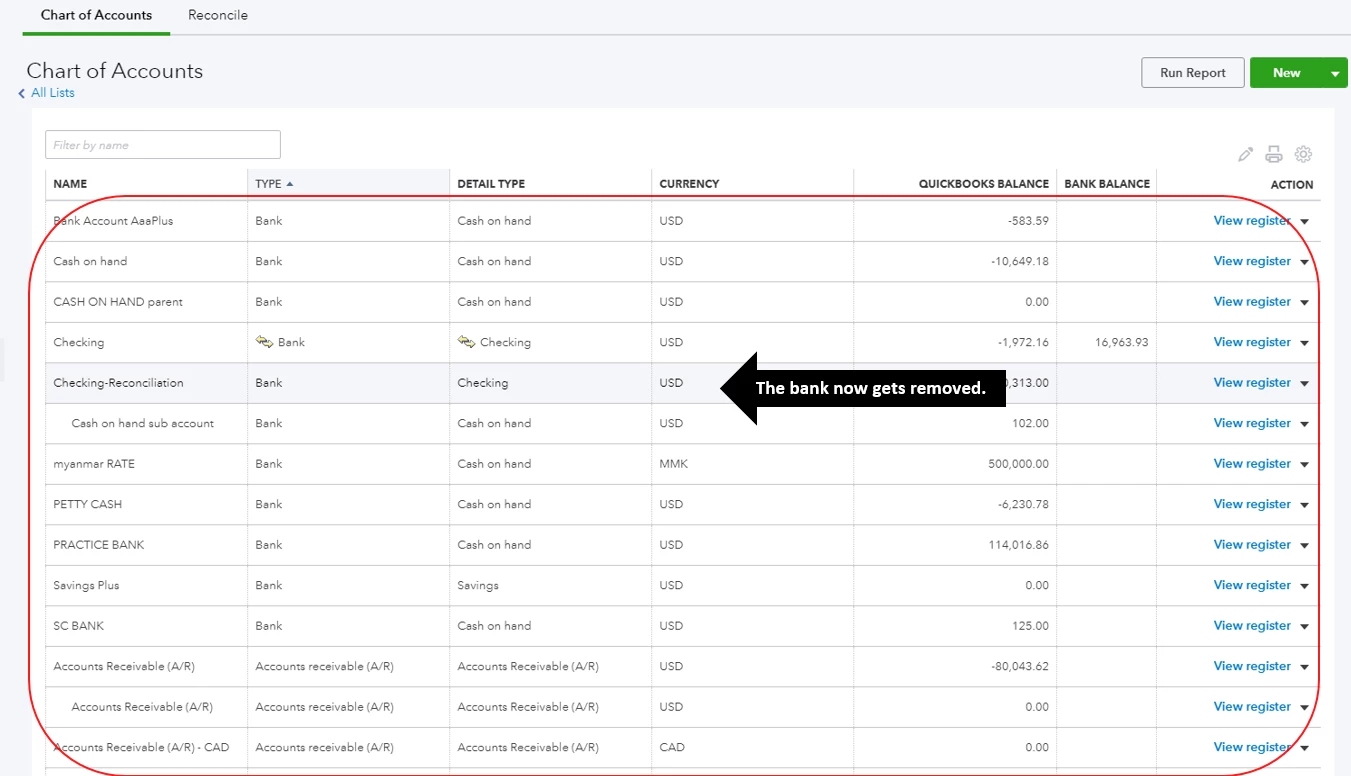
Making the account inactive is also deleting the account. When the account is deleted, it gets removed from the Chart of accounts, and other places where you can choose accounts. If the account contains transactions, they remain part of your company data. You can find them through reports.


To delete the account successfully, you may need to make it inactive:
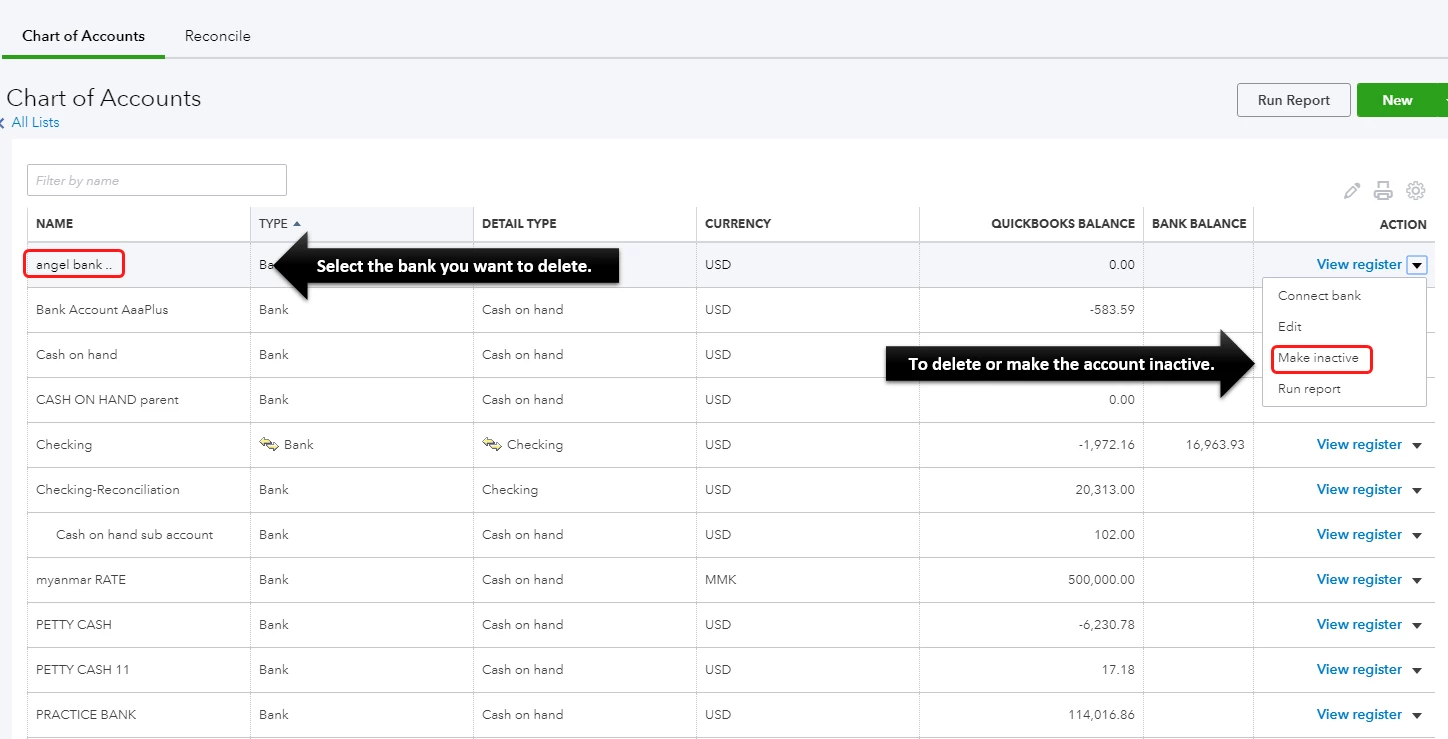
 

  1. Go to the Gear icon.
  2. Select Chart of Accounts under Your Company.
  3. Find the account you want to delete.
  4. Select the drop-down in the Action column, then choose Make Inactive.
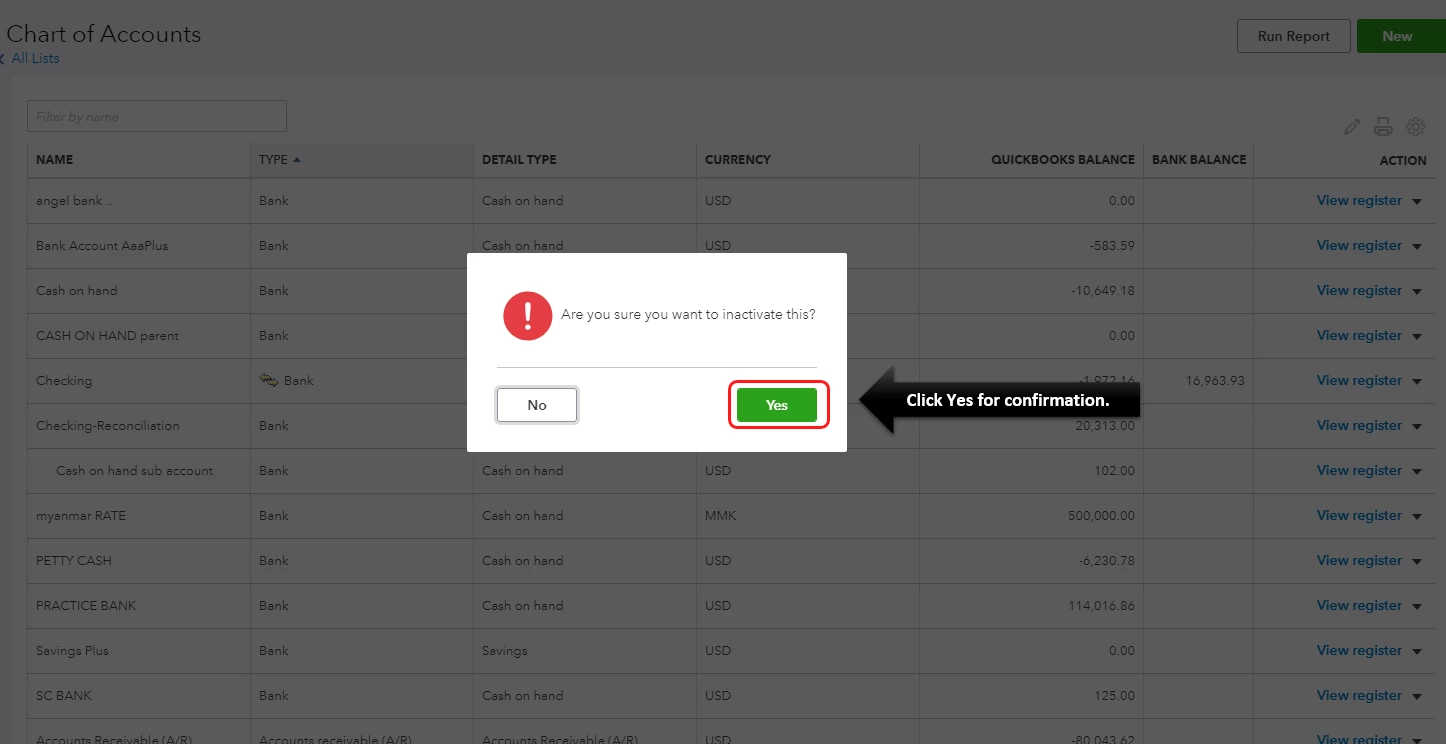
  5. Select Yes to confirm the action.

To learn more, you may check this article: How to delete a bank account in Chart of Accounts.


You can also get a QuickBooks-certified bookkeeper to help manage your chart of accounts:  Check out QuickBooks Live.


Keep me posted if you have any other questions about deleting accounts in QBO. I'm always here to help you!

4 replies

December 20, 2018

Thanks for visiting the Intuit Community, jeanne,

I’d be glad to share information on how to delete an account in QuickBooks Online.

You can delete accounts in QuickBooks Online that are no longer in use. Need not to worry, deleting accounts doesn’t erase your transactions, so your reports won’t change. You also have an option to restore deleted accounts any time.

To delete an account, here’s what you’ll need to do:

  1. Click on the gear icon at the top.
  2. Under Your Company section, select Chart of Accounts (COA).
  3. Look for the account that you want to delete.
  4. In the Action column, choose the drop-down then click Delete.
  5. Click Yes when asked if you want to delete.

Once you delete an account, it will be removed in the Chart of Accounts. The good thing is, you can filter the COA page to include inactive or deleted accounts. You can refer to the attached screenshot for guidance.

For detailed steps, here’s how:

  1. Click Accounting from the left menu.
  2. Click the gear icon above the Action column.
  3. Put a checkmark in the Include inactive box.
  4. Once done, search the deleted account in the search bar.

Here’s an article about how to delete an account and restore it for more detailed information.

As always, you can contact our QuickBooks Customer Care support if you need assistance with the steps. They'll be able to help you navigate using one of their tools.

Please feel free to come back in if you have further questions about deleting accounts in QuickBooks Online, I’m always here to answer it for you.

February 20, 2019

Sorry to bother you... I am using QB Online and trying to delete a Fixed Assets account that I have created incorrectly. When I brought up the drop-down, there's no Delete button - only Edit, Make Inactive and Run Report. I then tried the Edit button but there's no way there to delete the account either. Wondering if someone has some idea? Thank you so very much! Best regards,

Angelyn_T
Angelyn_TAnswer
February 20, 2019

Hi there, @Philip C.


I'm here to help share additional information about deleting accounts in QuickBooks Online (QBO).


Making the account inactive is also deleting the account. When the account is deleted, it gets removed from the Chart of accounts, and other places where you can choose accounts. If the account contains transactions, they remain part of your company data. You can find them through reports.


To delete the account successfully, you may need to make it inactive:
 

  1. Go to the Gear icon.
  2. Select Chart of Accounts under Your Company.
  3. Find the account you want to delete.
  4. Select the drop-down in the Action column, then choose Make Inactive.
  5. Select Yes to confirm the action.

To learn more, you may check this article: How to delete a bank account in Chart of Accounts.


You can also get a QuickBooks-certified bookkeeper to help manage your chart of accounts:  Check out QuickBooks Live.


Keep me posted if you have any other questions about deleting accounts in QBO. I'm always here to help you!

February 18, 2020

In case anybody gets here looking for a solution for QuickBooks for Mac ('cause there's -nothing- about this anywhere else);


Delete Account is not available from the (right-click) context menu for an account, but it is available from the Edit menu in the top menu bar.

June 14, 2020

I have the same problem - i had mistakenly created two expense accounts - they showed up in the COA. I made them "inactive", then active, tried to merge, merged, and now they appear "deleted". Fine I can filter the view in COA so I don't see them. However, now all my financial reports show the extra (deleted) account. There is no ability in Reports to filter out the (deleted) accounts.


Help.

June 14, 2020

Hi there, @tgl641


Thank you reaching out to the Community. The only time an inactive account will show up on your report, is when it contains a transaction dated for the new fiscal year. However, there are two ways to stop these deleted accounts from showing on reports. Here's how: 


Temporarily remove deleted accounts from reports:  


  1. Open the report you working on, then click Customize
  2. From Rows/Columns, set Show non-zero or active only rows to non-zero
  3. Press Run Report


To completely remove a deleted account from the reports, you can check out this link for more detailed steps: Remove deleted accounts from reports


The Community is always open 24/7, you can post anytime if you have a follow-up questions. I'll be happy to assist you. Have a great day and Take care!

July 31, 2020

This is a bit ridiculous.  I accidentally created an account with an incorrect type while setting up Quickbooks, and as far as I can tell I'm stuck with it for time immemorial...


Come on...gotta be a way to fix this...

March 4, 2021

I have almost the same question. I had to split a company. Now I have 2 companies and in each company I now have accounts that are redundant for the other company. If I only make them inactive, they still show in the reports. But since the one company is starting fresh, I don't want the data of the "old" company in the reports. So I want to really delete those accounts. Please help!


March 4, 2021

Hello @sigitoma,


As of the moment, there isn't an integrated way of completely deleting your accounts even after inactivating them. This is to keep your records accurate in case you need a copy of your data for any reason in the future.


That said, let's customize your report to filter out the accounts you've already inactivated. Let me show you how.

  1. Go to Reports.
  2. Open the report you wish to review your company's financial accounts.
  3. Select Customize.
  4. Under Show non-zero or active only on the Rows/Columns section, select Active.
  5. Click Run report.

In addition, here's an article you can read to learn more about how you can customize a report: Customize reports in QuickBooks Online.


Lastly, I've got you this helpful article for ideas about saving your report after customizing it: How to Save Customized Reports?


Keep me posted in the comments below if you have any other questions. I'll be here to lend a hand.