
June 3, 2020
Solved

How to log a transfer between an old credit card account to a new one.

  • June 3, 2020
  • 1 reply
  • 0 views
Original commenter did not share additional details

Best answer by ReyJohn_D

Thanks for posting a question here in the Community, @fairwindsbis.


You can use the Credit card credit option in QuickBooks Online (QBO) to transfer the amount between your old credit card account to the new one. Just select the new credit card account where to transfer the funds. Then, choose the old card at the line item where the amount is from. Here's how:
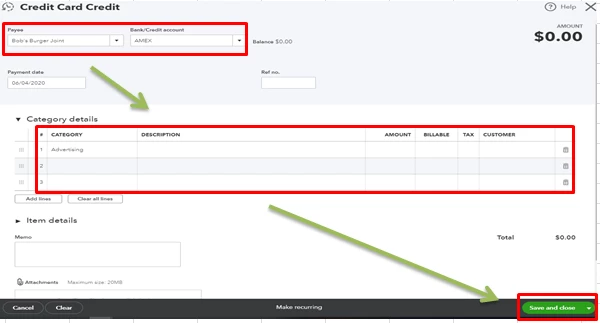
 

  1. Click the +New icon then choose Credit card credit under the Vendors section.
  2. Pick a Payee, then choose a credit card account under the Bank/Credit account drop-down ▼.
  3. Enter the needed info under the Category details drop-down ▼. In your case, you'll have to select a credit card account under the Category column. Fill out the other needed info like the DescriptionQtyAmount, etc.
  4. Hit Save and Close once ready.


You'll also want to use the Transfer feature in QBO to move your funds from one account to another. This way, you can easily track it in your bank register. However, if you used a check to transfer the funds, use the Check feature so you can record a check number. Here's an awesome resource that will guide you with the steps: How to transfer funds in QBO?.


Fill me in if you have more questions. I'll be here to help you. Take care always.

1 reply

ReyJohn_DAnswer
June 3, 2020

Thanks for posting a question here in the Community, @fairwindsbis.


You can use the Credit card credit option in QuickBooks Online (QBO) to transfer the amount between your old credit card account to the new one. Just select the new credit card account where to transfer the funds. Then, choose the old card at the line item where the amount is from. Here's how:


  1. Click the +New icon then choose Credit card credit under the Vendors section.
  2. Pick a Payee, then choose a credit card account under the Bank/Credit account drop-down ▼.
  3. Enter the needed info under the Category details drop-down ▼. In your case, you'll have to select a credit card account under the Category column. Fill out the other needed info like the DescriptionQtyAmount, etc.
  4. Hit Save and Close once ready.


You'll also want to use the Transfer feature in QBO to move your funds from one account to another. This way, you can easily track it in your bank register. However, if you used a check to transfer the funds, use the Check feature so you can record a check number. Here's an awesome resource that will guide you with the steps: How to transfer funds in QBO?.


Fill me in if you have more questions. I'll be here to help you. Take care always.

June 4, 2020

Thank you for the response. However, I already connected the old credit card account in Quickbooks to a new credit card account from my bank. When I when back and tried to create a new credit card account in Quickbooks, it stated that there are no other account to connect. Is there a way to revert back?


Sincerely,


Sang Park

June 4, 2020

Hello fairwindsbis,


Based on your response, are you somehow referring to the Banking page? If so, yes, we can still go back to your old credit card account and connect it to QuickBooks.


Before that, we'll need to disconnect the recent one. You can follow the detailed steps in this article: Disconnect or delete an account connected to online banking.


After that, we can already reconnect the other account: Connect bank and credit card accounts to QuickBooks Online.


Once you've done it successfully, you can start managing your bank transactions.


Please let me know if you have additional queries so we can further assist you. Have a great day!