October 24, 2024
Solved

How to restore a deleted account so I can modify an old transaction assigned to that old deleted account?

  • October 24, 2024
  • 1 reply
  • 0 views
I was about to edit a bill payment to apply it to the correct invoices paid, however, edits were not saved because an old invoice was assigned to an old deleted account. I cannot see restore option in the Chart of Accounts page or see deleted accounts. I also cannot see it in the Audit log. How can I restore the account so I can avoid this error : Account assigned to this transaction has been deleted. Before you can modify this transaction, you must restore (Old) (deleted) account.
Best answer by JoanaC

I'm glad to help you reactivate your deleted account, Carreon. 


In QuickBooks Online (QBO), deleted accounts in the Chart of Accounts are hidden by default. However, we can change the settings to unhide your previous account. Here are the steps to follow:


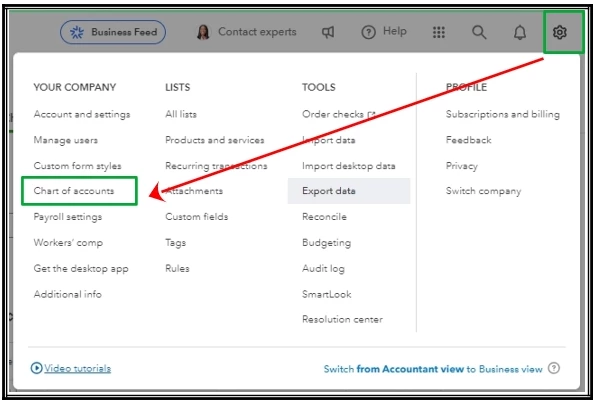
  1. Go to the Gear icon.
  2. Under Your Company, select Chart of Accounts
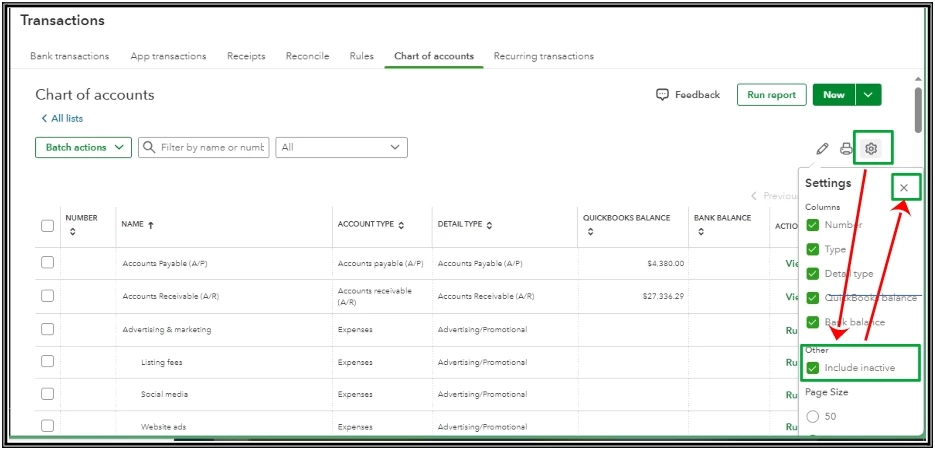
  3. Click the small Gear icon.
  4. Check the box for Include Inactive.
  5. Hit the X icon. 

After that, simply locate the account you want to use again, then select the Make active option. Additionally, for assistance in removing a deleted account from your QuickBooks Online reports, please refer to this link: Remove erased accounts from reports in QuickBooks Online.


If you have any other questions about your Chart of Accounts, please let us know. Have a wonderful day, and take care.

1 reply

JoanaCAnswer
October 24, 2024

I'm glad to help you reactivate your deleted account, Carreon. 


In QuickBooks Online (QBO), deleted accounts in the Chart of Accounts are hidden by default. However, we can change the settings to unhide your previous account. Here are the steps to follow:


  1. Go to the Gear icon.
  2. Under Your Company, select Chart of Accounts
  3. Click the small Gear icon.
  4. Check the box for Include Inactive.
  5. Hit the X icon. 

After that, simply locate the account you want to use again, then select the Make active option. Additionally, for assistance in removing a deleted account from your QuickBooks Online reports, please refer to this link: Remove erased accounts from reports in QuickBooks Online.


If you have any other questions about your Chart of Accounts, please let us know. Have a wonderful day, and take care.

October 24, 2024

Thank you so much for the detailed instructions. In addition to your steps, I clicked "Make active" on the deleted account. Problem resolved.

October 24, 2024

Thank you for taking the time to share your experience with us, Carreon. I’m so glad our agent’s guidance on restoring the deleted account was successful. It’s great to hear that tapping the Make Active button resolved your problem.


I also collected these resources that you can use for guidance in categorizing and reconciling your accounts in QBO:


Your feedback is invaluable to us, and it’s rewarding to hear that our efforts made a difference for you. Let me know if you have further questions about deleted accounts in QuickBooks. We’re always here to help. Wishing you continued success with QuickBooks.