February 4, 2023
Solved

I'm looking for a way to print/create a report of expenses by category. Seems like something every business would want to know.

  • February 4, 2023
  • 1 reply
  • 0 views
All the details are above.  The only way I can see to do that is by going to expense transactions and looking at the expenses with a filter - one at a time.  This is a tedious way to get this information.  Can't I just get a report of the total expenses per category somewhere?
Best answer by KlentB

I know another way to pull up that data, alext-pobox-com.


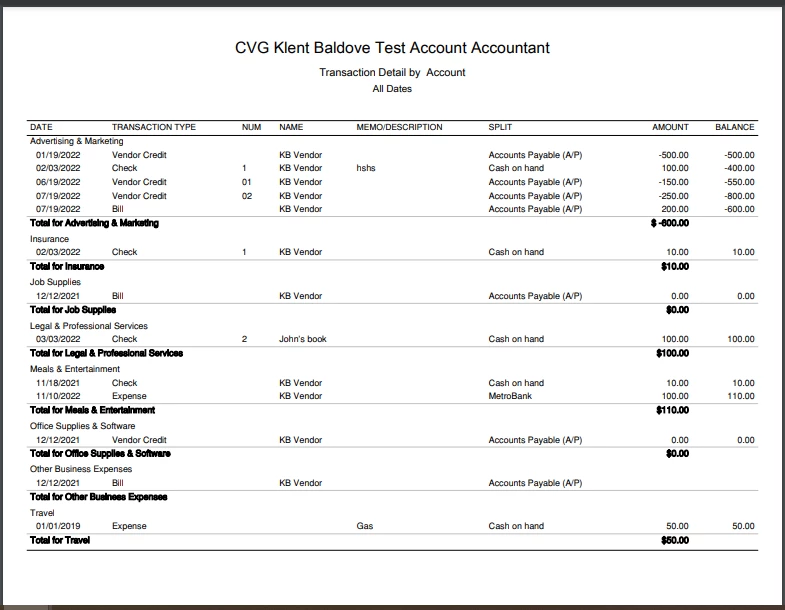
You can run the Transaction Detail by Account report in QuickBooks Online. Then, customize it to view your expenses grouped by category. I'll show you how to do it:


  1. Go to the Reports menu.
  2. Under For my accountant, select Transaction Detail by Account.
  3. Click the Customize button, then set the appropriate report date and accounting method.
  4. Tick the Split checkbox, under Rows/Columns.
  5. Head to the Filter section and select these options from the Transaction Type drop-down menu:
    • Bill
    • Bill Payment (Check)
    • Bill Payment (Credit Card)
    • Cash Expense
    • Check
    • Credit Card Expense
    • Credit Card Credit
    • Vendor Credit
  6. Choose All Expenses Accounts from the Distribution Account drop-down menu.
  7. Hit Run report.


This is how it looks like after the customization:


I also encourage reading these articles to ensure that you'll get the most out of QBO's reporting capabilities:


 Don't hesitate to tap me again if you need a helping hand in tracking your other business transactions. I'll be right here to continue assisting.


1 reply

KlentB
KlentBAnswer
February 4, 2023

I know another way to pull up that data, alext-pobox-com.


You can run the Transaction Detail by Account report in QuickBooks Online. Then, customize it to view your expenses grouped by category. I'll show you how to do it:


  1. Go to the Reports menu.
  2. Under For my accountant, select Transaction Detail by Account.
  3. Click the Customize button, then set the appropriate report date and accounting method.
  4. Tick the Split checkbox, under Rows/Columns.
  5. Head to the Filter section and select these options from the Transaction Type drop-down menu:
    • Bill
    • Bill Payment (Check)
    • Bill Payment (Credit Card)
    • Cash Expense
    • Check
    • Credit Card Expense
    • Credit Card Credit
    • Vendor Credit
  6. Choose All Expenses Accounts from the Distribution Account drop-down menu.
  7. Hit Run report.


This is how it looks like after the customization:


I also encourage reading these articles to ensure that you'll get the most out of QBO's reporting capabilities:


 Don't hesitate to tap me again if you need a helping hand in tracking your other business transactions. I'll be right here to continue assisting.

February 4, 2023

This worked once I added sorting by the Split column.  This kept all the various expense categories grouped together.  I then exported to Excel and added my own subtotals for each category.  I would think this is a common type of report since tax deductions are taken per expense category.  All I'm trying to understand is "what did I spend on expense category X last year."  Thanks for the tips!

MaryLandT
February 4, 2023

I'm happy to hear that sorting by the Split columns works, alext-pobox-com.


If you have other QuickBooks questions, please don't hesitate to create a new post here in the Community forum. We're always open to providing the necessary steps and information so you'll get what you need.


I'll be closing this post now. Thank you and have a great weekend ahead!