May 8, 2024
Solved

Invoice Update Issue

  • May 8, 2024
  • 8 replies
  • 0 views

Hello - 


We noticed earlier this week that QuickBooks came out with an invoice update. Is there a way to revert back to the old invoice? I noticed on the new invoice it is referencing some of our old fields but it is like it is not recognizing the third (bottom) section of the invoice template which hold our banking details for customers to pay us. It also is not following our color scheme of invoicing format as we have set up under custom forms? 


Are we missing something or is there a way to fix this? It also seems like now we have to go through one by one to invoice rather than before when we could bulk save and send invoices now it seems it wants us to visit every invoice review it to each field and then send individually. 


We are not fans so if there is a way out of this update please let us know. 

Best answer by CamelleT

I recognize the importance of reverting to the old invoice layout, erica. Allow me to provide additional insights about this matter.


Last April 24, around 70k Simple Start and Essential users were migrated to the new experience with NO option to go back to the Old layout. Those with Plus and Advanced were also moved to the new one beginning May 6 with NO opt-out.


Since you're noticing different changes to the new invoice, use this article as a reference to view the features that are currently unavailable in the new experience: See what’s new with estimates and invoices in QuickBooks Online.


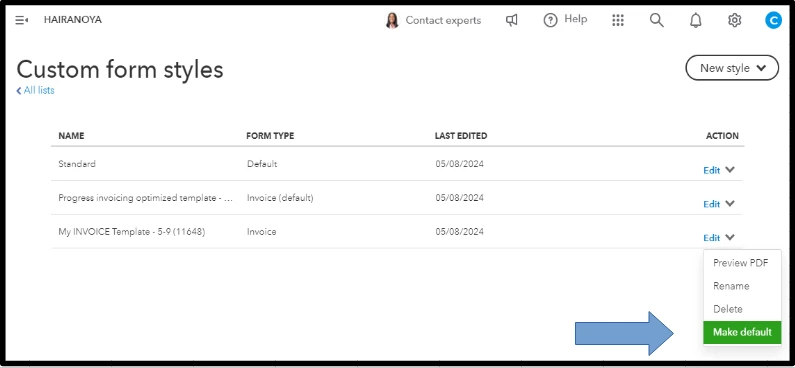
Regarding the invoicing format under custom forms, we can check if your chosen style is selected to ensure it reflects on your sales forms. Here's how:


  1. Go to the Gear icon and choose Custom form styles.
  2. Locate the name of your invoice style. It should be marked as default.
  3. If it's not, click the dropdown arrow beside the Edit button.
  4. Tap Make default.


After doing so, if it's still not following the color scheme of the invoicing format you've set up and not recognizing the third section of the invoice template, we can perform basic troubleshooting steps by logging in via incognito mode or a private window to confirm if the cache is the cause. Below are the keyboard shortcuts:


Google Chrome: Ctrl + Shift + N

Mozilla Firefox: Ctrl + Shift + P

Microsoft Edge: Ctrl + Shift + P

Safari: Command + Shift + N


Once logged in, open your invoice again. If everything works, go to your regular browser and clear the cache so the system can restart allowing you to work with a clean slate. Alternatively, you can use other supported browsers


Moreover, if you're using QuickBooks Online (QBO) Advanced, you should be able to send multiple invoices at once. 

I'm still all ears if you have other concerns relating to the new invoice update in QBO, erica. Feel free to add your comment below. Stay safe!


8 replies

May 8, 2024

New updates suck. You can not go back to the way you had them before. Quickbooks is now telling you how your invoice will look. Good luck on getting help. Took 45 minutes to get help on another issue. Now I am an hour behind in my work. The new changes are not making it easier. Just harder and longer to accomplish.

May 10, 2024

I spent 3 hours on the phone. 

This is a hideous joke. Thanks so much QBO - your new invoices are unusable and we are currently unable to bill clients until you sort out your ill-advised "upgrade".  Disconnecting apps that worked in conjunction with QBO and forcing your own process onto it without a way to turn it off or prioritize what we are paying for is a bush-league move. Changing the download screen is annoying.  Adding windows that fly in randomly and block the screen is just stupid.  Oh, and what's the idiocy with resetting the screen to the very top of the invoice EVERY SINGLE TIME you make an entry in the body?


Fix this - maybe introduce your development team to actual humans who use the system every day.

May 8, 2024

After the 40 minutes on the phone with them before being hung up on, they said this is the format and you cannot go back.  So, to correct sales tax issues, I have to click calculate sales tax and make the changes there. Do duplicate invoices, I can no longer duplicate an existing invoice I am looking at, but have to back out to the customer screen, select the invoice I would like to duplicate and select the duplicate in the dropdown...same for voiding an invoice.


You are unable to email or view the pdf of an old invoice without converting the invoice to the new "modern" template.


Does intuit actually consult with end users before making these changes?

CamelleTAnswer
May 8, 2024

I recognize the importance of reverting to the old invoice layout, erica. Allow me to provide additional insights about this matter.


Last April 24, around 70k Simple Start and Essential users were migrated to the new experience with NO option to go back to the Old layout. Those with Plus and Advanced were also moved to the new one beginning May 6 with NO opt-out.


Since you're noticing different changes to the new invoice, use this article as a reference to view the features that are currently unavailable in the new experience: See what’s new with estimates and invoices in QuickBooks Online.


Regarding the invoicing format under custom forms, we can check if your chosen style is selected to ensure it reflects on your sales forms. Here's how:


  1. Go to the Gear icon and choose Custom form styles.
  2. Locate the name of your invoice style. It should be marked as default.
  3. If it's not, click the dropdown arrow beside the Edit button.
  4. Tap Make default.


After doing so, if it's still not following the color scheme of the invoicing format you've set up and not recognizing the third section of the invoice template, we can perform basic troubleshooting steps by logging in via incognito mode or a private window to confirm if the cache is the cause. Below are the keyboard shortcuts:


Google Chrome: Ctrl + Shift + N

Mozilla Firefox: Ctrl + Shift + P

Microsoft Edge: Ctrl + Shift + P

Safari: Command + Shift + N


Once logged in, open your invoice again. If everything works, go to your regular browser and clear the cache so the system can restart allowing you to work with a clean slate. Alternatively, you can use other supported browsers


Moreover, if you're using QuickBooks Online (QBO) Advanced, you should be able to send multiple invoices at once. 

I'm still all ears if you have other concerns relating to the new invoice update in QBO, erica. Feel free to add your comment below. Stay safe!

May 10, 2024

Thank you - I am now seeing the correct color scheme and bank detail on my invoice. I had created a new invoice template and set as default but I am not able to view "email view" or "PDF view" because it is an 'old template' which doesn't make any sense because I had used the "New Style" drop down invoice template when creating a new template. 


Also, I am experiencing an issue when trying to receive payments using the AR aging / AR detail report. when using this report I now have to go through 5 clicks just to get to the payment and then once the payment is saved QBO sends me back out to the home page and I have to go back in every single time. This is a HUGE waste of my time and extreme annoyance. Is there a fix to this? I remember after the last update something similar happened but this update seems like we've gone backwards quite a bit. 

MsNorthPND18
May 10, 2024

I understand, that changing to the old layout for invoices is essential in QuickBooks Online, Erica. I can assure you that you're on the right path.


To check how the invoices look when you use the Standard or customized template, click Review and Send or Print and Download. Probably software is being updated constantly to accommodate users' transition from the old invoice experience to the new one.


When you see payments in the A/R detail report on the modern view, it goes back to the home page. As a solution, you can try running the A/R detail. Here's how:


  1. Go to one browser tab, and Receive Payments on another browser tab.
  2. On the +New menu, select Receive Payment. 
  3. Choose Customer.


You can only use email and PDF views on modern templates. If you choose New Style from the drop-down menu on the Custom Form Style page, you will see the old template.  I suggest submitting feedback to use other features of the New Style.


Here's how to send feedback: 


  1. Go to Settings on the Gear icon, then select Feedback.
  2. Type in your comments or product suggestions.
  3. And then click Next to submit feedback.


Here's a link you can use to learn how to submit feedback for both QuickBooks Online and QuickBooks Desktop.


Moreover, check out this article to learn how to get the most out of your financial reports: Customize reports in QuickBooks Online.


Feel free to comment below if you have other queries with invoices, payments, and correct bank details on your invoice. I'll be here to help you.

May 10, 2024

Horrendous update. It is causing my team so much more work. Why does QuickBooks do this with out asking us if we would like the change. Now we have to figure out a different process.


It's almost if none of the people at Quickbooks who work on these updates are accountants. 


PLEASE give us the to REVERT! 

May 13, 2024

Why does your product team take away functionality with their updates. The new invoice "experience" is a royal pain in the ____. First off, the screen is spread out too much have to scroll up and down, there is no place to void or delete the invoice and it looks ridiculous (as something from about 10 years ago).


Do they even test this with a user group before implementing anything? This is no different than the new search "experience" - BAD.


You need fix this. 

May 14, 2024

I don 't understand the stupid desire to update invoices when they are working just fine.  WTF?  Why are you guys spending time and money on something that already works fine?  It's also messed up my sales tax integration with Avalara.  PLEASE STOP FIXING THINGS THAT WORK FINE!

May 17, 2024

This has got to be the worst QBO update yet, I now have to go manually fix all of the invoices that are synced into QBO because they have decided that they are going to force an invoice format down your throat that doesn't work properly and also decided that they know better which tax codes belong to which customer instead of the ones you have chosen. Anybody have any recommendations on a different Accounting software?

QBO is officially unusable!

May 27, 2024

Since the switch to the new invoice format, when I add billable expense to a customer invoice, I can no longer drop and drag it to a product code.  We would do this so that on the invoice there was only one line and not numerous rows of detailed expenses.  For example we have a product code "Meals".  Let's say we have 3 billable meal expenses; StarBucks $5.00, Airport Cafe $3.75 and McDonalds $13.07.  We would drop and drag these to Meals and the invoice would show Meals $21.82.  Now the customer sees a list of 3 expenses.  It's not that we don't want them to see the detail, they have asked not to see it, just a total.  I thought I had a workaround, total the expense and manually enter them as the total on the Meals row.  Not only is this a pain, the expenses never get linked to the invoice.  If you have figured this out, please help! Thanks!

May 27, 2024

I noticed a similar question about consolidating your billable expense was also asked in another thread recently. @CP-.


I wanted to share a direct link to that conversation where my colleague provided a detailed response: https://quickbooks.intuit.com/learn-support/en-us/reports-and-accounting/re-new-invoice-format/01/1445979#M220006.


The Community is always available to help with any QuickBooks-related questions. Just let us know if there's anything else we can assist you with.

May 27, 2024

Thanks, this is an interesting option, however, won't work for my scenario. The product code for meals for example will change with each customer and will be different every month.

May 30, 2024

Not sure why Intuit's programmers are going backwards with the new modern invoice template update forced on users. This is definitely a step backwards, once again, by the programmers that do not know how the program works or accounting. This invoice update is horrible. All invoices are now set to modern and we have to go into each invoice to change to our standard default invoice format. There is no way to change the view to our standard format or change the modern view to match our invoices. Whomever is in charge of QuickBooks online changes should be fired. Once again the changes make it take more time for users to do the same operation and make the software less appealing. Good way to lose all your customers to another software!

June 7, 2024

The new invoices also don’t feed through to the general ledger correctly, so reporting functionality is also not working

June 7, 2024

Hello there, @Tilly111.
 
I would love to provide information regarding the general ledger report. However, before doing so, I'd like to ask what you see when running the report. Also, could you please provide a screenshot that prompts when pulling up the report?  It will help me identify the root cause of the issue. 
 
The thread will be open for any additional information you can provide. I'll keep an eye out for it. Have a nice day ahead! 

June 7, 2024

The cause of the issue is that what used to be considered a quantity of one is now a flat rate price and results in the quantity zero once it is fed through in reports.