Solved
Is there a way to password-protect last year's books so no one changes anything by mistake?
Original commenter did not share additional details


Welcome to the Community space, @carolynjtaylor. I'd be glad to help you with the steps to protect your books from making changes in QuickBooks.
Yes, there's a way to password-protect your last year's books so no one can change the transactions by mistake. You'll have to select Allow changes after viewing a warning and entering a password option, so it will require a password before editing your books.
Here's how:
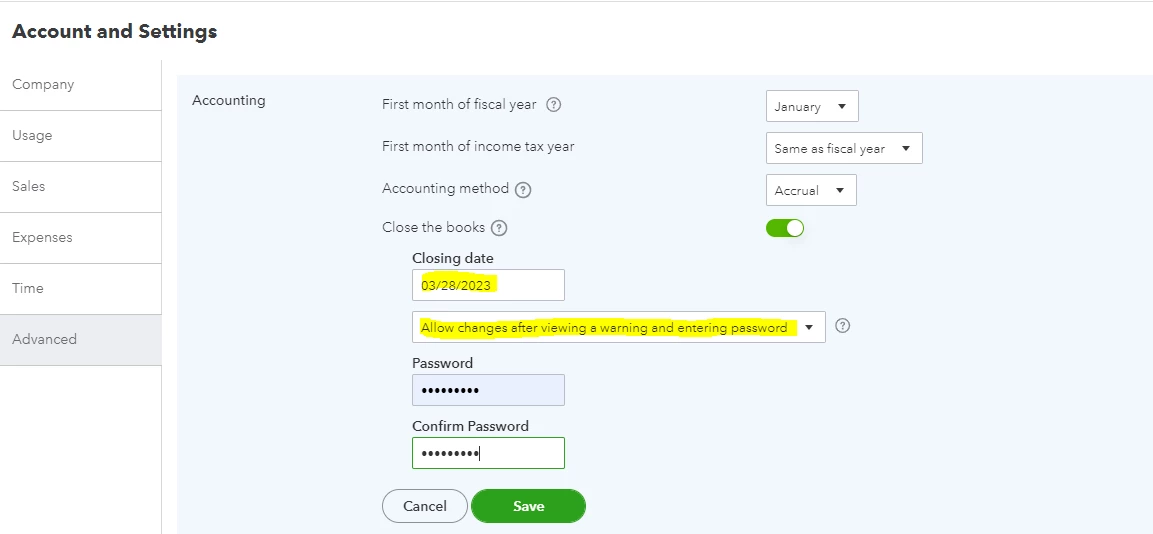
For more details, open this article: Close your books in QuickBooks Online. If you need to edit your books in the future, you may click this link: Edit your closed books.
Also, I'll be sharing these links on how to prepare your books and run basic reports in QuickBooks:
Let me know if there’s anything else you need help with in QuickBooks. I’d be more than happy to assist you. Take care.
Enter your E-mail address. We'll send you an e-mail with instructions to reset your password.