October 28, 2022
Solved

New user interface

  • October 28, 2022
  • 5 replies
  • 0 views
I am frustrated and struggling with the new user interface.  Why did you have to change something that was working well?  Did you bother to do user testing? Is there any way to revert back to what I was using last week?  I have a whole list of things I commonly used that I can't find anymore. Thanks for the increased stress and the decreased productivity.
Best answer by MichelleBh

Happy to help, @portoffice@porto.


I'm determined to improve your experience with our product. I want to bring back the interface that you like and are comfortable using.


I checked our reports on the new user interface, but there are no updates yet. 
Does your current interface the same as shown in the screenshots below? If this is the case, QuickBooks Online has two views, namely Accountant and Business. It looks like your account view have been switched. 
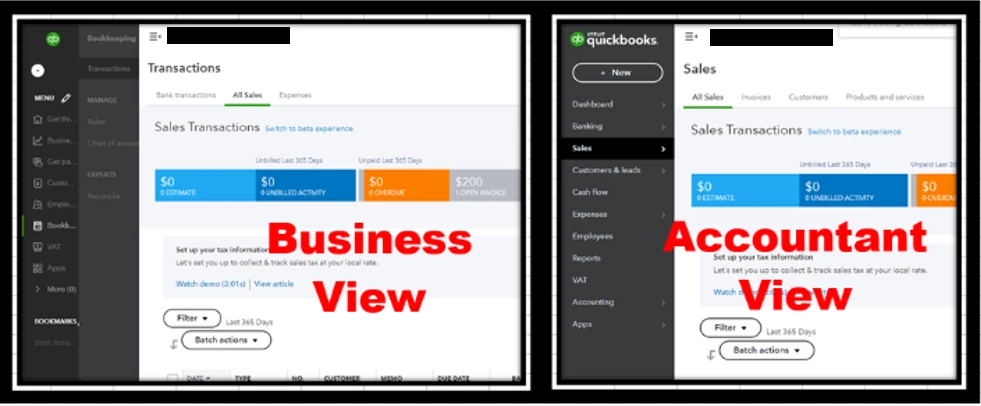
 

You can revert this back by following the steps below: 


  1. Go to the Gear icon on the upper right side. 
  2. In the bottom part, click the appropriate view. 
  3. Refresh your browser. 


If you mean the new invoice and estimate experience, you can revert it back by clicking the Old Layout button.


Here's how: 


  1. Go to the New or icon on the upper left side. 
  2. Select the Invoice or Estimate tab. 
  3. Click the Old Layout button.


Furthermore, read the following articles to learn about the QuickBooks view and what you can do with the new sales forms experience:


Please let me know if you notice any strange behaviour in the QuickBooks interface. I'm always here for you. Keep safe. 

5 replies

MichelleBh
October 28, 2022

Happy to help, @portoffice@porto.


I'm determined to improve your experience with our product. I want to bring back the interface that you like and are comfortable using.


I checked our reports on the new user interface, but there are no updates yet. 
Does your current interface the same as shown in the screenshots below? If this is the case, QuickBooks Online has two views, namely Accountant and Business. It looks like your account view have been switched. 


You can revert this back by following the steps below: 


  1. Go to the Gear icon on the upper right side. 
  2. In the bottom part, click the appropriate view. 
  3. Refresh your browser. 


If you mean the new invoice and estimate experience, you can revert it back by clicking the Old Layout button.


Here's how: 


  1. Go to the New or icon on the upper left side. 
  2. Select the Invoice or Estimate tab. 
  3. Click the Old Layout button.


Furthermore, read the following articles to learn about the QuickBooks view and what you can do with the new sales forms experience:


Please let me know if you notice any strange behaviour in the QuickBooks interface. I'm always here for you. Keep safe. 

October 28, 2022

Thank you!  This helped somewhat.

October 28, 2022

This new User Interface is horrible.  Please change it back immediately.  This was changed so you could advertise for your other products and its not helpful.  Please return to old interface.

October 28, 2022

Thanks for getting involved with this thread, cgk114.


I've reviewed our QuickBooks Blog, as well as Intuit's Product Updates webpage, and can confirm there's currently no publications about changes that have been made to the user interface.


To verify my understanding, what changes are you noticing? If you could provide screenshots, that would also help me to see what you're seeing.


I've also included a detailed resource about what's new in QuickBooks for October 2022 which may come in handy moving forward: New features & improvements - October 2022


I'll be looking forward to hearing back from you. Have a great day!

November 10, 2022

I have been using computers regularly since the Early 80s, I purchased my first copy of Quickbooks in the Mid 90s, and I've been using Quickbooks online for many years now.


I've been doing the accounts for many of my business now for nearly 30 years, using many different systems and accounts packages.

I simply can't get my head around the latest changes to the interface as of the last week or so.


I want to revert to the previous version please.


November 10, 2022

We appreciate you for joining the thread. I'd like to share some ideas about reverting to the previous QuickBooks Online interface.


Before anything else, I want to clarify which specific changes of QBO's interface you want to revert. 


If it's the interface when creating invoices, then you can simply click on the Old layout option on the top part of the invoice. Here's how:


  1. Click on New or the + icon from the upper left part.
  2. Choose Invoice.
  3. Hit the Old layout button from the top.


See this image for reference:


Additionally, you have the option to switch your views by navigating to the Gear icon and then selecting either the Accountant or Business view. 


I suggest using the business view if you're new to accounting. Your workstation is made simpler, making daily activities like sales and billing simpler. By doing this, you may complete your accounting without having to learn challenging words or procedures.


On the other hand, use the accountant view if you already have knowledge of accounting. This includes standard accounting language.


You can also find this link helpful when handling your business: QuickBooks Help Articles. This includes ideas regarding banking security and expense, etc.


Feel free to reply back if you have other concerns about this or QuickBooks. We'll respond as soon as we can. Take care!


May 22, 2023

I completely agree about the new user interface.  No option, no education and no choice.  Every time a new screen comes up with the "modern view", I have to switch it back.  It is frustrating and a waste of time.

May 22, 2023

I hear your sentiments, @PeterCH. Let me impart some information and help improve your experience.


I can see the impact of the new user interface and how it's time-consuming to switch every time the modern view comes up.


QuickBooks Product Development team searches for ways to improve user experience by promoting helpful and efficient features to streamline processes that suit your needs. With this, I recommend submitting feedback to them. This way, they can take a look and might consider this as part of the future enhancements.


Here's how you do it:


  1. Select the Gear icon.
  2. Go to Feedback.
  3. Enter your suggestion(s) in the box.
  4. Click Next to finish.


You can visit the QuickBooks Online Feature Requests website to track your suggestions and view recently updated ideas.


If you want to adjust specific features and customize your company setup so the default display shows what’s most important to you, check out this guide to get insights and learn how to make it: Edit company settings in QuickBooks Online.


We always value customers who are keen to give us their feedback. If you have any other concerns or questions navigating and managing your QuickBooks account, please never hesitate to add comments. I look forward to working with you in the future.

July 25, 2023

I FEEL YOUR PAIN!   How can we make this go back to the way it was THIS MORNING!  SO over these changes.  It is NOT making my job easier if that was the intention!