March 22, 2023
Solved

Opening Newer Version File into Older one

  • March 22, 2023
  • 1 reply
  • 0 views

Hi buddies,

My client has a Company file on QBD Enterprise 2022 version but wants to open this file on QBD Pro 2020 version. How can we make this happen. Please help


Best answer by LieraMarie_A

Hi there, @pakeezalarkee. Let me share some insights concerning opening files in prior QuickBooks Desktop (QBDT) versions.


Yes, I agree with Fiat Lux - ASIA. You're unable to open the upgraded file in the older version. As a workaround, you'll want to manually re-enter the transactions you have entered in the upgraded version. You may also use a different application as an alternative solution.


Here's how:
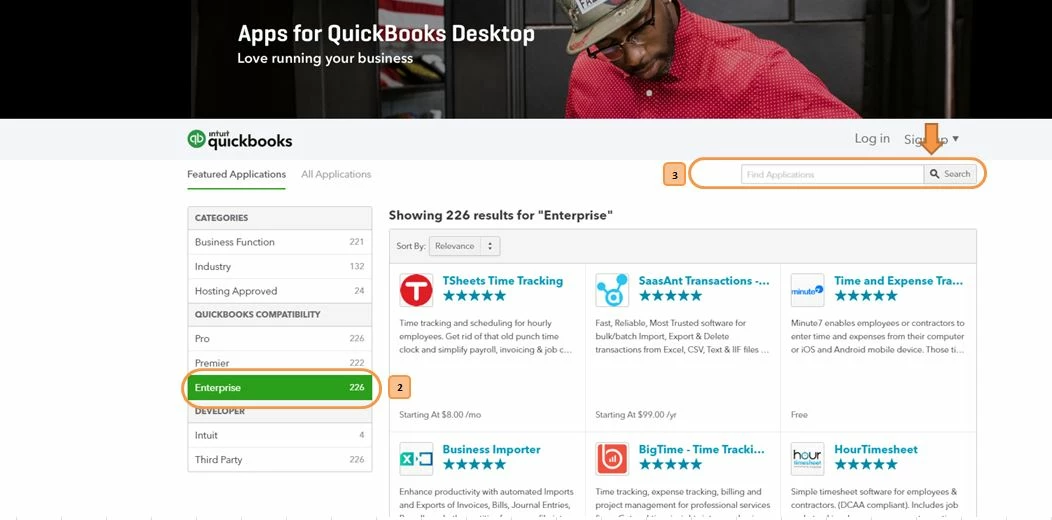
 

  1. Go to our App Store.
  2. From the QuickBooks Compatibility section, choose the QuickBooks Desktop version you're using.
  3. Type in the clue word of the specific app you're looking for in the Search field and click the magnifying glass to search. 


For more info, refer to these articles:


You're always welcome to post again if you have further questions about restoring the company file. We're here to help you.

1 reply

Fiat Lux - ASIA
March 22, 2023

You can't do that. If you need a workaround, convert data data to QBD 2022 to QBO and convert it back to QBD 2020. But you will find some transaction types will be deleted due to limitation of double conversion process (e.g estimate, purchase order)..


LieraMarie_A
March 22, 2023

Hi there, @pakeezalarkee. Let me share some insights concerning opening files in prior QuickBooks Desktop (QBDT) versions.


Yes, I agree with Fiat Lux - ASIA. You're unable to open the upgraded file in the older version. As a workaround, you'll want to manually re-enter the transactions you have entered in the upgraded version. You may also use a different application as an alternative solution.


Here's how:


  1. Go to our App Store.
  2. From the QuickBooks Compatibility section, choose the QuickBooks Desktop version you're using.
  3. Type in the clue word of the specific app you're looking for in the Search field and click the magnifying glass to search. 


For more info, refer to these articles:


You're always welcome to post again if you have further questions about restoring the company file. We're here to help you.

March 27, 2023