I’m here to help recover your account and provide information about the report, @BLM14.
In QuickBooks Online, there's no password expiration. It depends on the account's master admin if they’d change it at certain times.
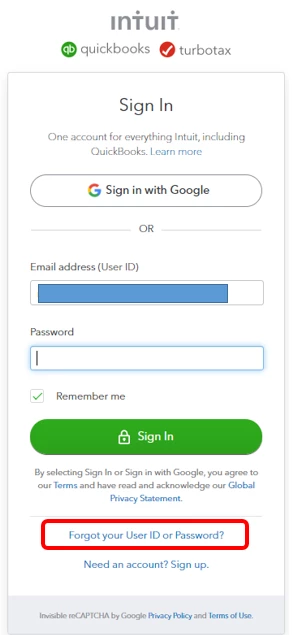
Since the account is locked out, you can select the "Forgot your User ID or Password?" link to update your credentials. This way, you can access your account smoothly. I’m glad to show you the steps.
- Go to the QuickBooks Online sign-in page.
- Select Forgot your User ID or Password?
- Follow the onscreen instructions.
If you're still unable to recover your account, you can contact our Customer Care team to get you back working.
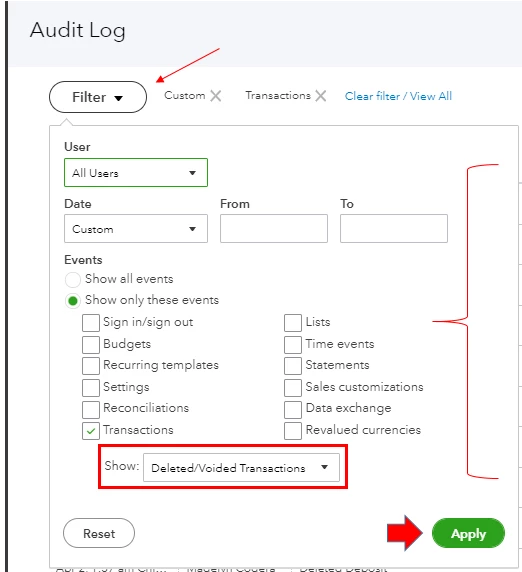
At this moment, the Voided/Deleted Transactions Summary report is unavailable in QBO. You may consider using the Audit log to track the voided and deleted transactions. Here’s how:
- Select the Gear icon, then select Audit log under Tools.
- Click the Filter button.
- Select the User, Date, and Transactions under Events.
- In the Show section, select Deleted/Voided Transactions.
- Press Apply.
You can use these resources to learn more about reports in QBO and how to update credentials from Intuit Account Manager:
I’ll be here if you need further assistance with reports and the QuickBooks account. Just add your reply below. Always take care!

