

February 12, 2022
Solved

QBO - Moving clients from one "Company" to another

  • February 12, 2022
  • 1 reply
  • 0 views

Hello,


I am a tax preparer and have several clients that I work on in QB ONLINE to check on their financials when filing season comes. These were also clients that were shared with me before, but I don't remember how it became three "Companies". Here's a screenshot:
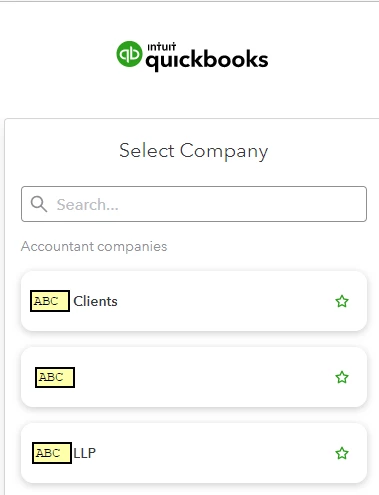


Basically, I just want to move all the clients from "ABC" and "ABC LLP" to "ABC Clients" - so it's easier to navigate through if I need to switch to another client. Also, I cannot see which clients are under each "Company" now - so I always have to try and get into one of them first to see if it was added on that "Company"


Hope this makes sense. And hopefully someone can assist me on this.


Thank you!

Best answer by AileneA

Hello, cllamoso. 


Thank you for getting back here in QuickBooks Community. You can easily move all clients from one profile to another. Let me show how:  


  1. Sign in to QuickBooks Online Accountant as a master admin.
  2. Choose the Gear icon and then select Transfer clients.
  3. Review the profile in the Transfer to section and then click Next.
  4. In the Transfer from section, select the profile you want to move clients from and then choose Next.
  5. Tick the checkboxes for the clients you want to move to. 
  6. When you're ready, click Transfer clients


For more information, you may check this on how to manage clients in QuickBooks Online Accountant.  


Please don't hesitate to leave a reply below or post again if you have other questions. You take care always and have a great day!

1 reply

February 12, 2022

No need to move them, @cllamoso. I'll help you navigate through all your client's accounts easily.


With the new navigation in QuickBooks Online and Online Accountant, each company is now listed separately. You don't need to move them, easily navigate through your clients' accounts via your QuickBooks Online Accountant account.


Use this screenshot for reference:


I'm adding a relevant link to help you out with the preparation for the coming year-end: Close the Year Smoothly and Get Ready for 2022.


Post again if you have other tasks and navigations in QuickBooks Online. I'll be right here to help anytime. Take care always!

cllamosoAuthor
February 12, 2022

Thank you.


However, this does not show the clients I have on the other "Company" - only the ones in that group.


So, using the same screenshot I had on the original post, clients under "ABC" cannot be viewed using that tool if I'm in "ABC Clients" - I always have to switch companies.

AileneAAnswer
February 12, 2022

Hello, cllamoso. 


Thank you for getting back here in QuickBooks Community. You can easily move all clients from one profile to another. Let me show how:  


  1. Sign in to QuickBooks Online Accountant as a master admin.
  2. Choose the Gear icon and then select Transfer clients.
  3. Review the profile in the Transfer to section and then click Next.
  4. In the Transfer from section, select the profile you want to move clients from and then choose Next.
  5. Tick the checkboxes for the clients you want to move to. 
  6. When you're ready, click Transfer clients


For more information, you may check this on how to manage clients in QuickBooks Online Accountant.  


Please don't hesitate to leave a reply below or post again if you have other questions. You take care always and have a great day!