

October 18, 2022
Solved

Setting Inventory to zero

  • October 18, 2022
  • 1 reply
  • 0 views

The business I work for uses Shopify in order to keep their inventory updated rather than doing it all manually. However, we changed the names of the inventory items in Shopify to make them easier to read for customers. We now need to reset the import from Shopify, but I'll have to temporarily delete all of the current, incorrectly named inventory before the import goes through. Or else the inventory will be recorded way above what we actually have in stock. Is there a good way to go about this? Or will I need to manually delete each unique inventory item? P.S. I am pretty new to QuickBooks. Thank you in advance.
Best answer by MichelleBh

Welcome to the QuickBooks family, @kevwiz99


I'm happy to help you reset the import feature from Shopify and update the item names in bulk. This way, the inventory name is correct when imported into QuickBooks Online (QBO).


If items have already been imported into QBO, I'd recommend disconnecting the connection. Perform the following actions:


  1. Log in to your QBO account and select the Apps tab. 
  2. Choose My Apps
  3. Find your Shopify and click Uninstall this store.  
  4. Follow the on-screen instructions. 


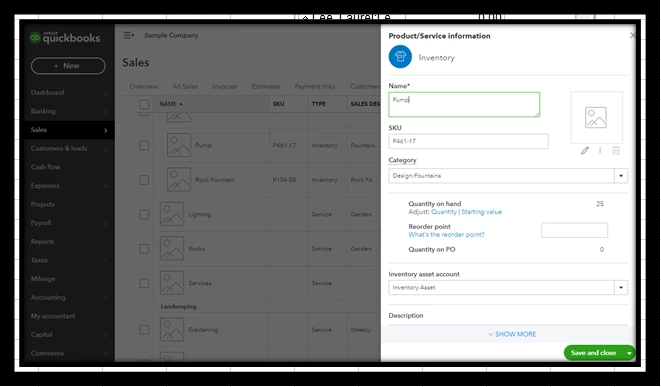
Once done, manually edit the inventory items in QBO. Proceed with the following steps:


  1. Go to the Sales menu, then select Product and services
  2. Double-click the items and modify the name. 
  3. Click Save and close


When you are ready to re-connect your store to QuickBooks, you can follow this article for detailed steps: Connect Shopify to QuickBooks Online


Additionally, ensure to map the items again accurately. I recommend contacting Shopify support if you need additional help with mapping.


To know about how Shopify works in QBO, read through this article below: Shopify and QuickBooks Online Integration Guide.


Take care! Please let me know if you have more concerns about managing inventory items or have other questions. I'm here to assist you anytime.

1 reply

MichelleBh
October 19, 2022

Welcome to the QuickBooks family, @kevwiz99


I'm happy to help you reset the import feature from Shopify and update the item names in bulk. This way, the inventory name is correct when imported into QuickBooks Online (QBO).


If items have already been imported into QBO, I'd recommend disconnecting the connection. Perform the following actions:


  1. Log in to your QBO account and select the Apps tab. 
  2. Choose My Apps
  3. Find your Shopify and click Uninstall this store.  
  4. Follow the on-screen instructions. 


Once done, manually edit the inventory items in QBO. Proceed with the following steps:


  1. Go to the Sales menu, then select Product and services
  2. Double-click the items and modify the name. 
  3. Click Save and close


When you are ready to re-connect your store to QuickBooks, you can follow this article for detailed steps: Connect Shopify to QuickBooks Online


Additionally, ensure to map the items again accurately. I recommend contacting Shopify support if you need additional help with mapping.


To know about how Shopify works in QBO, read through this article below: Shopify and QuickBooks Online Integration Guide.


Take care! Please let me know if you have more concerns about managing inventory items or have other questions. I'm here to assist you anytime.