Solved
When displaying Chart of Accounts, it will indent the sub-accounts with numbers. However, none of the reports can be modified to indent the sub-accounts, correct?
Original commenter did not share additional details


Thanks for posting here in the Community space, cpizzullo. Let me provide information regarding indenting the sub-accounts when running the report.
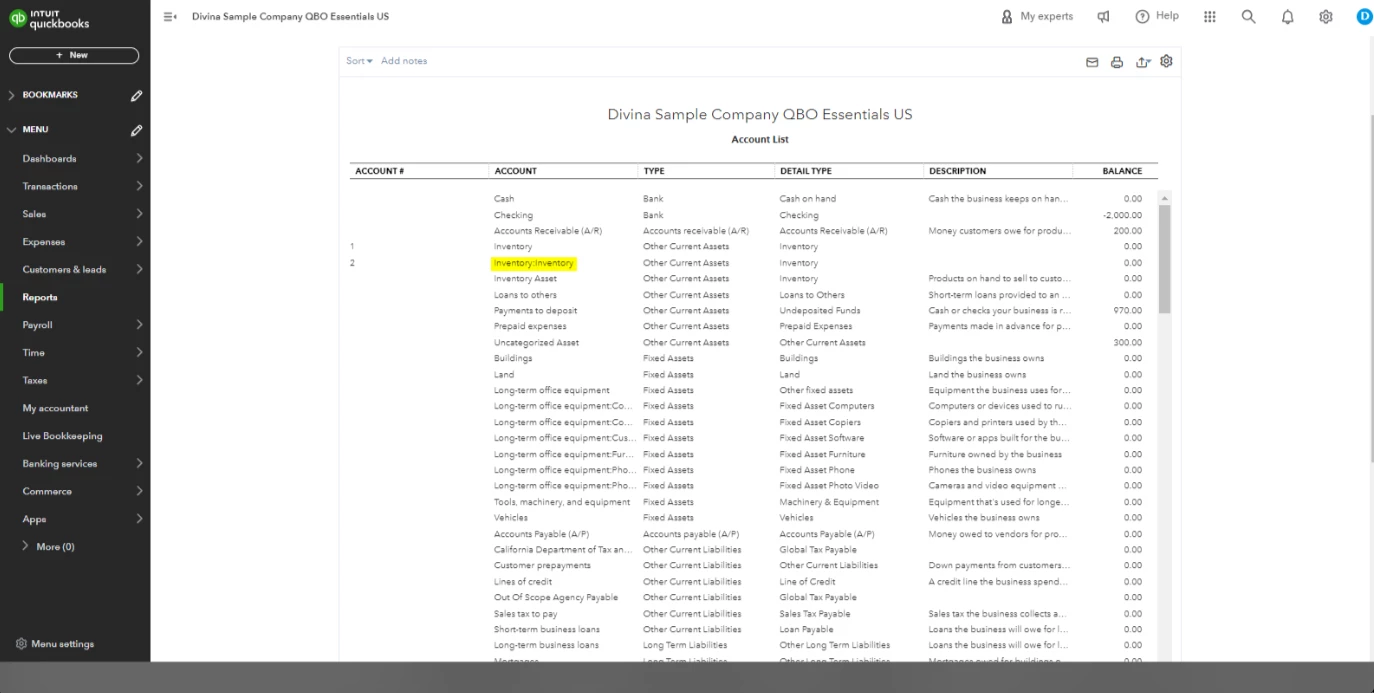
QuickBooks Online (QBO) provides you with the functionality to create sub-accounts within your main account, which allows you to categorize and track your income, expenses, and other account types effectively. Although running a report through the Chart of Accounts will display all the accounts, it does not indent the sub-accounts to distinguish them from the main account. Instead, QBO uses a colon to display the relationship between the parent account and its sub-accounts, making it easy for you to identify which accounts are sub-accounts.
You can refer to the attached image below for a visual guide:
On the other hand, if you want to make an account inactive in the future, you may visit this guide to get a reference: Make an account inactive on your chart of accounts in QuickBooks Online.
Reply to this post for any questions regarding managing your accounts inside QBO. I'm more than happy to help. Take care!
Enter your E-mail address. We'll send you an e-mail with instructions to reset your password.