July 27, 2022
Solved

Where is the Sign In & Security section?

  • July 27, 2022
  • 1 reply
  • 0 views
Original commenter did not share additional details

Best answer by SarahannC

Welcome to QuickBooks Community, teoffice!


We can go to Intuit account page to view the Sign In & Security section. I'm happy to show you the complete steps. Here's how:


  1. Let's sign in to your Intuit account.
  2. Click the Sign & security section.

Here's a sample screenshot for your additional reference:
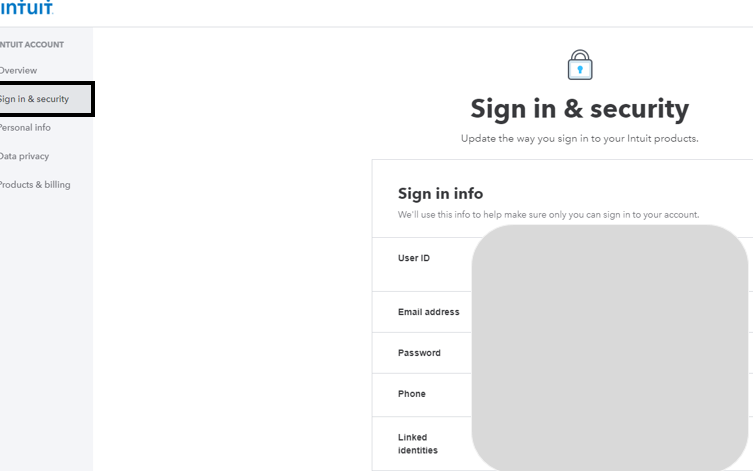
 

That's it. Also, we can read through these articles to learn more about account management:


If you have other QuickBooks concerns or want me to guide you further in finding some of your information, just let me know by adding a new post below. I always got your back. Take care and have a good one.

1 reply

SarahannCAnswer
July 27, 2022

Welcome to QuickBooks Community, teoffice!


We can go to Intuit account page to view the Sign In & Security section. I'm happy to show you the complete steps. Here's how:


  1. Let's sign in to your Intuit account.
  2. Click the Sign & security section.

Here's a sample screenshot for your additional reference:


That's it. Also, we can read through these articles to learn more about account management:


If you have other QuickBooks concerns or want me to guide you further in finding some of your information, just let me know by adding a new post below. I always got your back. Take care and have a good one.

July 28, 2022
As part of an effort to help secure your account, Google offers security recommendations. If there are outstanding issues, these will be listed ...
MyEnvoyAir Login
