February 12, 2020
Solved

Why does Quickbooks Desktop Pro 2020 ask me to verify my email address every time I open it? How do I prevent this?

  • February 12, 2020
  • 1 reply
  • 0 views
Original commenter did not share additional details

Best answer by AlexV

I know how to resolve this prompt, spotprog.


We can reset your Intuit ID settings, then let's log back into your Intuit account. These are the steps to follow:

  1. From the Help menu, select Reset Intuit ID Settings.
  2. Enter the word YES in the confirm field.
  3. Click OK.

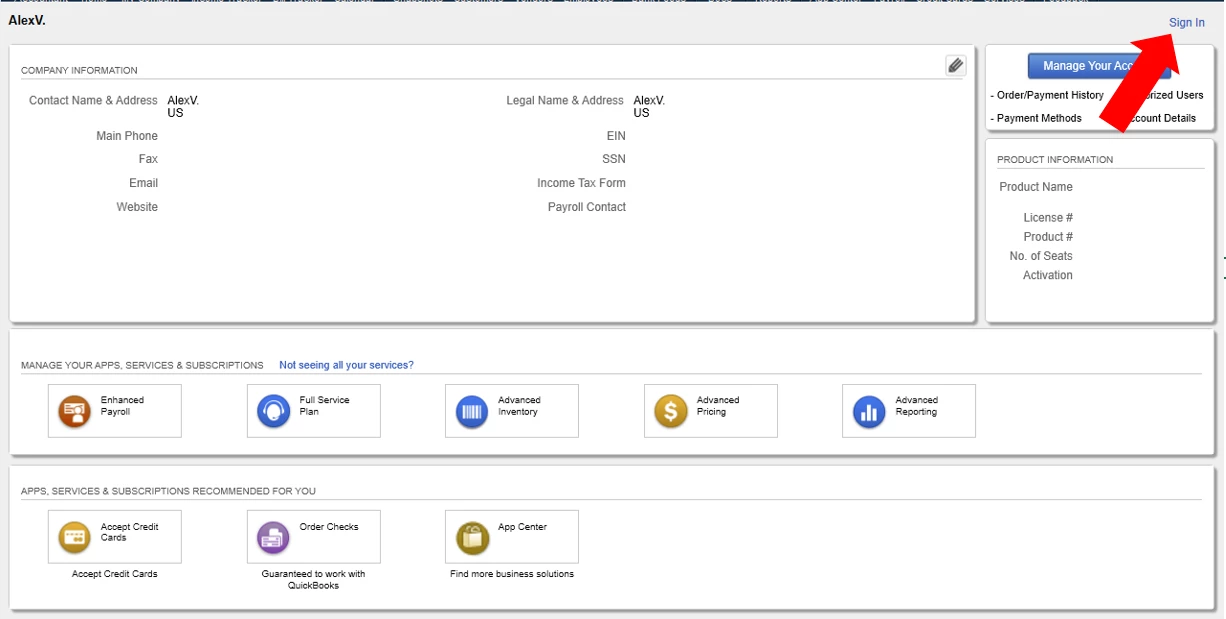
Once done, let's go to the Company menu and select My Company. Then, click on the Sign In button. On the pop-up, enter your Intuit credentials, then hit Sign In.

I've included these articles to make sure all details on your Intuit account are updated:

Keep on posting if you need more assistance. Wishing you all the best!

1 reply

February 12, 2020

Hello there, @spotprog


It's possible that the email service is blocking the connection from QuickBooks.


In the meantime, let's make sure that your QuickBooks Desktop is updated to the latest release. Then, review your email app preferences by following step 2 in this article: Fix webmail password issues in QuickBooks Desktop. This includes different email providers.


If you're getting the same result, you can reach out to our Customer Care Team.

  1. Click Help inside QuickBooks.
  2. Go to QuickBooks Desktop Help.
  3. Click Contact Us.
  4. Enter "QB does not recall last transaction information" in the description field, then click Continue.
  5. Select either Message an Agent or Talk to a Specialist

Visit the Community if you have other concerns. We'll be here for you. 

spotprogAuthor
March 12, 2020

I verified that I have the latest updates.  And, I don't think the email instructions apply here.


See the attached picture.  After I check Yes and click Continue, I get a message saying my address has been verified.  


I can understand wanting to verify users' email addresses occasionally, but every day?

AlexV
AlexVAnswer
March 12, 2020

I know how to resolve this prompt, spotprog.


We can reset your Intuit ID settings, then let's log back into your Intuit account. These are the steps to follow:

  1. From the Help menu, select Reset Intuit ID Settings.
  2. Enter the word YES in the confirm field.
  3. Click OK.

Once done, let's go to the Company menu and select My Company. Then, click on the Sign In button. On the pop-up, enter your Intuit credentials, then hit Sign In.

I've included these articles to make sure all details on your Intuit account are updated:

Keep on posting if you need more assistance. Wishing you all the best!