March 3, 2022
Solved

How do you undo a bank reconciliation?

  • March 3, 2022
  • 12 replies
  • 0 views
Original commenter did not share additional details

Best answer by LieraMarie_A

I have all the steps to undo your reconciliation, @catherine-conner.


You can only un-reconcile one transaction at a time. If you need to start over, I'd suggest reaching out to your accountant. They can undo the entire period at once using QuickBooks Online Accountant.


Here's how to invite your accountant:

  1. Click the Gear icon in the upper-right corner, and select Manage Users.
  2. Go to the Accounting firms tab, and click the Invite button.
  3. Enter the accountant's information.
  4. Click Save.
  5. Let your accountant undo the entire reconciliation.


If you prefer to do it by yourself, follow these instructions to undo reconciled transactions one at a time:
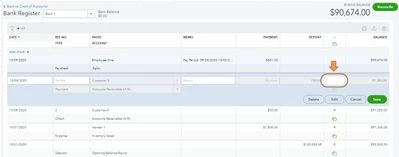
  1. Go to the Accounting menu. Then select Chart of Accounts.
  2. Find the account and select View register
  3. To help you focus on this task, filter the register to only include the last 60 days of transactions.
  4. Review the check column. If the transaction is reconciled, you’ll see an “R.”
  5. Select the box and keep clicking it until it's blank. It removes the transaction from the reconciliation.


  6. Select Save. Then close your register.


I've added here an article that will help you in case you encounter reconciliation issues: Fix issues when you're reconciling accounts.
 

If you want hands-on help, you can get a QuickBooks-certified bookkeeper to show you how to do reconciliations and other tasks: Check out QuickBooks Live.


Please come back if you need any further assistance with this process. 

12 replies

LieraMarie_A
March 6, 2022

I have all the steps to undo your reconciliation, @catherine-conner.


You can only un-reconcile one transaction at a time. If you need to start over, I'd suggest reaching out to your accountant. They can undo the entire period at once using QuickBooks Online Accountant.


Here's how to invite your accountant:

  1. Click the Gear icon in the upper-right corner, and select Manage Users.
  2. Go to the Accounting firms tab, and click the Invite button.
  3. Enter the accountant's information.
  4. Click Save.
  5. Let your accountant undo the entire reconciliation.


If you prefer to do it by yourself, follow these instructions to undo reconciled transactions one at a time:

  1. Go to the Accounting menu. Then select Chart of Accounts.
  2. Find the account and select View register
  3. To help you focus on this task, filter the register to only include the last 60 days of transactions.
  4. Review the check column. If the transaction is reconciled, you’ll see an “R.”
  5. Select the box and keep clicking it until it's blank. It removes the transaction from the reconciliation.


  6. Select Save. Then close your register.


I've added here an article that will help you in case you encounter reconciliation issues: Fix issues when you're reconciling accounts.
 

If you want hands-on help, you can get a QuickBooks-certified bookkeeper to show you how to do reconciliations and other tasks: Check out QuickBooks Live.


Please come back if you need any further assistance with this process. 

May 22, 2022

This is not helpful if you are an accountant directly employed with the organization.

June 2, 2022

@LieraMarie_A 


I used this to help a customer, I wanted to know if she went to reconcile the 2 months she unreconciled will that make a mess of things?  Or as long as she's sure to have the actual bank statements with the correct opening balance she can reconcile again with no problems?

katherinejoyceO
June 2, 2022

Thanks for following this thread, @ExpertKellum. That's correct. You can reconcile previously unreconciled transactions for as long as you have a correct opening balance. 


And it's always advisable to have an actual bank statement for accuracy. You also want to do a "special reconciliation" for this process. This method uses an "off-cycle" reconciliation date to correct it.


Here's how: 


  1. Go to the Banking menu and select Reconcile.
  2. Select the bank account with the transactions you need to reconcile, then enter date for an "off-cycle reconciliation." It can be any date between your last reconciliation and the next scheduled one. Note: When you enter an "off-cycle" date, QuickBooks will remind you that you're doing a mini reconciliation. This puts previously unreconciled transactions back without affecting the "cycle" that they follow.
  3. In the Ending Balance field, enter the balance of your last successful reconciliation. Then, select Continue.
  4. In the Reconcile window, check off the transactions you are fixing and re-reconciling.
  5. Make sure the Difference field shows $0.00, then select Reconcile Now.


Visit this article to learn more ways to reconcile previously deleted and re-entered checking or credit card transactions in QuickBooks.


Come and visit us if you have any further questions. I'll be glad to assist you again soon.

July 29, 2022

I invited my accountant and she was not able to undo the reconciliations

July 29, 2022

Hello there, @fionahutchinson.


Let me clarify things about undoing reconciliation with the help of your accountant.


Just to confirm, is your accountant using the QuickBooks Online (QBO) Accountant version? If so, they should have a special reconciliation tool that allows them to undo the entire reconciliation. You can share these steps with your accountant to undo the reconciliation:


  1. Let your accountant sign in to their QBO Accountant account.
  2. Open the client's QuickBooks Online company.
  3. Go to the Accounting menu, then select Reconcile.
  4. Select History by account.
  5. Choose the account you want to reconcile and the date range from the drop-down.
  6. Find the reconciliation on the list.
  7. Open the Reconciliation Report by clicking the View report.
  8. Review any discrepancies and changes your client wants to make.
  9. Once you’re ready, select the Undo from the drop-down under the Action column.
  10. Click Yes, then Undo to confirm.


I'm adding this article for more guidance: Undo a client’s reconciliation in QuickBooks Online Accountant.


However, if they don't have a QBO Accountant account, your accountant can undo the reconciliation manually. You can follow the steps shared by my colleague LieraMarie_A above.


Just in case you encounter issues reconciling accounts in the future, this article will help you fix it: Fix issues at the end of a reconciliation in QuickBooks Online.


Please let me know how things go, @fionahutchinson. I'll be around to provide further assistance. 

July 30, 2022

Hi Mark_R,


I am the accountant and the only user of ,my account. I seem to have been issued the third world version of QBO for Barbados and I don't have an accountant view. This is a huge fail for QBO that I can't undo a reconciliation and even if I manually undo all the reconciled items, the record of a reconciliation with the incorrect date is still evident

September 5, 2022

Why can I undo a reconciled month without my accountant?  I pay for the subscriptions!  

September 5, 2022

Why can’t I undo a reconciled month without my accountant?  I pay for the subscriptions!  

September 12, 2022

I am a single user of this particular company as I am the accountant. My version does not allow me to invite an accountant. I am trying to undo multiple bank reconciliations so it is not practical to do so manually.


Still waiting for a solution!

LieraMarie_A
September 12, 2022

Hi there, @Fiona11_2.


Thanks for following up on this thread. Allow me to chime in and share a workaround on how to save time unreconciling transactions.


Which QuickBooks Online (QBO) version do you have? You can invite up to two accountants in QBO Simple Start, Essentials, and Plus, and up to three in Advanced. Only accountant users have the privilege to undo multiple reconciliations using their QuickBooks Online Accountant (QBOA). If you're the only one who manages the books, don't worry. You can sign up for QBOA for free. All you have to do is to send an invite to your email address.


Follow these steps to invite yourself or your accountant:


  1. Sign in to QBO as a primary admin.
  2. Go to the Gear icon and then Manage users.
  3. Under the Accounting firms tab, select Invite.
  4. Enter your accountant's info or yours.
  5. Hit Save.


After that, open the invite email and select the Accept Invitation link. Follow the steps to create an account or connect. Once done, here are the instructions to undo the previous reconciliations:


  1. Sign in to QBOA.
  2. Find and open your QBO company.
  3. Go to the Accounting menu and then the Reconcile tab.
  4. Click the History by account link.
  5. Select the account and date range from the dropdowns.
  6. Find the reconciliation on the list.
  7. Select View report to open the Reconciliation Report.
  8. When you’re ready, select the dropdown under the Action column, and then Undo.
  9. Hit Yes and then Undo to confirm.


Finally, if there are any discrepancies, check out this article to help you resolve them: Fix Issues When You're Reconciling Accounts.


Please let me know how these steps turn out or if you need any more help with this process. The Community is always here. It's us to ensure your success! Have a wonderful day!

September 13, 2022

As I have explained to multiple people, I have the third world version of QBO in Barbados. I can't link bank accounts and I am not able to undo bank recs as the accountant.


Still looking for a resolution!

March 23, 2023

I canceled all postings a few months ago and want to reconcile everything.  but the program does not allow me to enter a balance on a bank statement of that period.  Nothing has changed since the bank reconciliation was cancelled.  what should I do?

March 23, 2023

Hey there, @Svitlana_M2022. I see it's your first time posting here in the forum. A warm welcome, and know that we're always here to listen and find the best solution for you.


Could you tell me what error you encounter when you say the program does not allow you to enter a balance on a bank statement for that period?


However, you may want to create a journal entry to enter a balance on a bank statement for that period. Here's how:


  1. Go to + New.
  2. Select Journal entry.
  3. On the first line, select an account from the Account field. Depending on whether you need to debit or credit the account. Enter the amount in the correct column.
  4. On the following line, select the other account you're moving money to or from. Depending on if you entered a debit or credit on the first line, enter the same amount in the opposite column.
  5. Check the amounts - you should have the same amount in the Credit column on one line and the Debit column on the other. It means the accounts are in balance.
  6. Enter information in the memo section to know why you made the journal entry.
  7. Select Save and new or Save and close.

Refer to this article for detailed information: Create journal entries in QuickBooks Online.


Also, I recommend consulting with your accountant to ensure your records are in tip-top shape, especially with matters like closing the book.


You can visit this link to learn how to run different types of reports in QuickBooks Online: Run Reports In QuickBooks Online.


Feel free to reach us back if you need further help. We're available 24/7 to lend a hand in resolving each of your concerns. Have a good one!

August 7, 2023

Our bank hadn't been reconciled since 2020.  I put in an ending balance and then clicked ALL the entries to the current period - it's $24k out - I want to unclick all the entries to cancel the partially reconciled entries ("C") without doing them one-by-one, like your suggestion about.  Any ideas, other than contact your accountant as we don't have an accountant that has Quickbooks.  Also, the reconciliation was never finalized, so I'm actually asking how to cancel an unfinalized reconciliation.  Thank you!

August 7, 2023

Thank you for joining this thread, AndromedaDrake.


I can see the urgency of correcting the discrepancy in your reconciliation. Let me share an alternate solution on how to fix the issue.


You can consider reaching out to our ProAdvisors for further assistance. They can help make sure your books are up-to-date, accurate, and ready for tax time. Simply click on the following link and enter your city or ZIP to speed up the process: ProAdvisor.


Otherwise, you'll have to unreconcile the transactions one at a timeHere's how:


  1. Go to Bookkeeping or Accounting and choose Chart of accounts.
  2. Find the account that has the reconciled transaction and click the View register link.
  3. Look for the transaction you're working on. If the entry is reconciled, you’ll see an “R” in the checkmark ✔ column.
  4. Click on it to expand the view.
  5. In the checkmark ✔ column, select the box with the “R” until the box is blank.
  6. Press the Save button and close the account register.


Please know that It's a good idea to reconcile your bank, savings, and credit card accounts once a month. This is to keep your books in order. 


In addition, these resources cover all the details about matching your bank and credit card statements, as well as troubleshooting beginning and opening balances issues:


The Community is always open if you have further questions about clearing old transactions. I'll be here to continue helping. Have a good one.

September 11, 2023

What about customers that don't have an accountant (and no I don't need one nor do I need you to recommend one to me)??. Is this ever going to be changed where your non accountant users can undo their reconciliations like you could easily do in the desktop version??  This is absurd and from all of the complaints I see going back as far as 2019 you would think your developers would have fixed this by now.     

Candice C
September 11, 2023

Hey, @THP2


Thanks for coming on this thread about undoing a bank reconciliation. 


Yes, the only way to undo an entire reconcile would be through an accountant account. If you don't have or use an accountant, you'll need to use the steps in this guide listed below for unreconciling a single transaction: 


Undo or remove transactions from reconciliations in QBO


I also recommend submitting feedback to our Product Developers so they can consider improving the way to undo a reconcile in QBO. 


I hope this helps answer your question. I'm only a post away if you need me again. Take care! 

November 30, 2023

Hello , thanks your the input 

one question though 


can I do this for several transactions. Let’s say for a whole month of transaction ? 

December 1, 2023

I understand the importance of undoing bank reconciliation in QuickBooks Online (QBO), Anabanaba. I'm here to share insights about this. 


As mentioned by my colleague above, the only way to undo the entire reconciliation would be through an accountant. As a workaround, you can manually reconcile the transaction from the bank register to ensure the accuracy of your books. 


Here's how:


  1. Go to the Bookkeeping menu and select Chart of Accounts (COA).
  2. Locate the account you previously reconciled and click View Register.
  3. Locate the transactions and select them to expand the view.
  4. Review the check column. If the transaction is reconciled, you’ll see an “R.”
  5. Select the box and keep clicking it until it's blank. It removes the transaction from the reconciliation.
  6. Click Save. Then close your register.


I've added here an article that will help you in case you encounter reconciliation issues: Fix issues when you're reconciling accounts.
 

Please come back if you need any further assistance with this process. The Community is always here to help.

January 4, 2024

This is absurd. The problem is not the countless users who are forced to needlessly waste their time and/or money needing to involve an accountant to do something so basic as undoing a bank reconciliation.  The problem is Intuit putting essential features behind paywalls.  Include the missing undo reconciliation feature in QBO Plus.  I'm so done with this.
