

November 10, 2022
Question

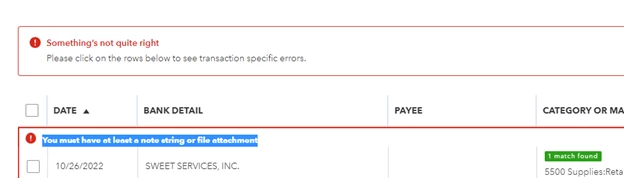
You must have at least a note string or file attachment - getting this error when trying to match an uploaded receipt
  • November 10, 2022
  • 15 replies
  • 0 views


I get this error when I try to match a transaction to an uploaded receipt. - this just started happening this week.   Any idea how to fix? 


Instead of being able to quickly match receipts, I now have to review and categorize them all.  So time consuming!

15 replies

Tori B
November 10, 2022

Thanks for sharing your concerns here in the Community, @erbrel


Web browsers collect cache to save time when loading repetitive data and images. Over time these files can become outdated and corrupted, causing issues like the error message you're receiving. With that said, let's try uploading your attachments using a private or incognito browser. That way, we can isolate the issue and, if needed, clear the cache from the browser. 


To do this, you can use any of these keyboard shortcuts: 


  • Google Chrome: Ctrl + Shift + N
  • Mozilla Firefox: Ctrl + Shift + P
  • Safari: Command + Option + P


If you can upload attachments successfully, I recommend Clearing the cache


Lastly, you'll want to ensure that your attachments meet the specific requirements. Here are the file types you can attach to customer and vendor profiles, as well as their transactions:


  • PDF
  • JPEG
  • PNG
  • DOC
  • XLSX
  • CSV
  • TIFF
  • GIF
  • XML


You can browse this article for more detailed information: Attachments in QuickBooks Online.


Please let me know if you have any questions or concerns. Take care!

November 10, 2022

I am having the same problem. I tried incognito window and clearing cache and still won't work. And if I go to receipts it doesn't even show the transaction to match it with.


JessT
November 10, 2022

Hi mbengs,


Thank you for joining the conversation and for doing the troubleshooting steps.


Our log shows an open investigation regarding the above error message. While waiting for a solution, please contact our QBO Support so they can get your details into a more secure environment and link your account to it.


  1. Click on Help and click the Search tab.
  2. Click Contact Us at the bottom.
  3. Enter the error message in the description box and click Continue.
  4. Choose Start a chat or Get a callback.


Feel free to go back to this thread if you have more questions in mind. Have a good one!

November 11, 2022

I have started receiving the same error this week.  I followed the trouble shooting steps...still not resolved.  Pretty frustrated to pay a monthly service fee with limited support on this problem.

November 14, 2022

I'm having the same issue.

November 14, 2022

I started having this same issue 2 weeks ago, what did Quickbooks change and why?

November 14, 2022

Having the same issue.  When will this be fixed??  

November 14, 2022

Thanks for joining us here in the thread, @nealinator.


As of now, we don't have a timeline for when troubleshooting will be available to get this issue sorted out. But rest assured, our engineers are aware of it and are doing their best to find a solution to fix this.


For now, I recommend contacting our QuickBooks Customer Care Team. This way, they can add you to the list of affected users, and you'll receive updates once a fix is available. I'll gladly input the steps below so you can proceed. To begin, here's how:


  1. Access your QuickBooks Online company.
  2. On the top right corner, click the Help (?) icon.
  3. Select either tab to get started:
  • Assistant: Get quick, personalized answers. Select a suggested option, or type a question or topic you need help with. If you decide you need further help, you can still Talk to a human.
  • Search: Search the QuickBooks Online knowledge base directly, or select Contact Us and choose a way to connect with us:
  • Start a chat with a support expert.
  • Get a callback from the next available expert.


Also, please know if you're using Plus, Essentials, or Simple Start. You can reach out to our support from Monday to Friday from 6 AM to 6 PM PT, and on Saturday, you can reach out to our support from 6 AM to 3 PM PT. If you're using QuickBooks Online Advance, you can contact our support team anytime and any day.


Additionally, I've got you this article to help you manage newly added business transactions in QBO: Categorize and match online bank transactions in QuickBooks Online.


You can also check this page to learn more about reconciling an account in QBO: How to Reconcile in QuickBooks Online.


@nealinator, the Community is open 24/7 if you need further assistance getting your receipts into QuickBooks. You can also post here again if you have any additional QuickBooks-related concerns. I got your back. Take care, and have a nice day. 

November 14, 2022

Same problem here. I can't match or confirm transactions. All I get is this error.

November 14, 2022

This has been a problem for myself as well. The receipts are forwarded via email to @qbodocs.com and when I go to reconcile it doesn't allow me with the same message... "You must have at least a note string or file attachment". 


Please fix this problem.

November 14, 2022

I am having the same issue.  This needs to be fixed immediately. Stop making changes to things that are not broken. 

AlcaeusF
November 14, 2022

Hi @tinkirbellz9,


I know how important being able to get back on track and use the feature again. An issue like this causes delays to productivity and increases workload.


Let me chime in and assist you with this concern. I can share some updates about the error when matching uploaded receipts in QuickBooks Online.


The investigation is still open, and our team has not declared a specific time frame for the complete fix. Our engineers are still working on it and conducting a further investigation because of the unusual behavior.


Rest assured, we take this issue with urgency and high regard. I recommend contacting support for our team to create a ticket on your behalf.


Once we have an update, our team will send out notification emails. Our support for Plus, Essentials, Simple Start is available from 6 AM - 6 PM PT (Monday - Friday) and 6 AM - 3 PM PT (Saturday). For Advanced, any time, any day.


Here's how you can reach them:


  1. Click the Help tab in the upper-right corner.
  2. Go to the Assistant tab.
  3. Click Get help from a human.
  4. Choose Chat with us or Have us call you.


Also, did you know you can upload receipts from your computer or Google Drive or email receipts to QuickBooks? I've attached an article you can check out to learn more about it: Upload your receipts to QuickBooks Online.


Drop me a comment below if there's anything else I can help with related to the uploaded receipts. Take care.

November 14, 2022

Here's a quick work around. 

Delete the attached receipt pdf/jpeg in the bank feed. Then it will let you save. 
You can later go back into the RECEIPTS function and match the receipt to the transaction again.   

MJoy_D
November 14, 2022

I'll take note of this, @G2R.

Thank you for sharing with us how you've resolved the issue with receipts. It'll undoubtedly benefit our other customers who are having the same problem. 

If you have future concerns about QuickBooks, let us know. The Community is always here to help. Have a great rest of the day!

November 15, 2022

Also having the same issue.