

November 10, 2022
Question

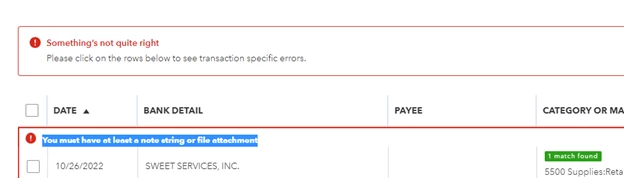
You must have at least a note string or file attachment - getting this error when trying to match an uploaded receipt
  • November 10, 2022
  • 15 replies
  • 0 views


I get this error when I try to match a transaction to an uploaded receipt. - this just started happening this week.   Any idea how to fix? 


Instead of being able to quickly match receipts, I now have to review and categorize them all.  So time consuming!

15 replies

November 15, 2022

I also started having this issue.  I was able to download the receipt, delete it from the transactions, then upload the downloaded copy and match successfully.  Obviously, this is not an ideal solution, but it will get the job done (hopefully) until they come up with a fix.  

December 21, 2022

If you remove the popup window for the attachment but not the actual attachment, it does work.

December 21, 2022

If you remove the popup window for the attachment but not the actual attachment, it does work.

November 13, 2023

I'm having this issue today. Did the original problem get resolved? I'm based in the UK.

November 13, 2023

Me too.  I was on the phone to support, but got cut off.  I thought she might call me back, but no, she has just dumped my from the Smartview session!

November 20, 2023

Same issue here — have followed all suggestions in this thread and none of them work. 


QB needs to fix this error ASAP, and if someone from QB responds to my comment saying that I need to follow the same trouble shooting steps listed here, I will scream! This isn't user error. This is a problem with QB.

November 20, 2023

Hello there, Rumco. Thank you for joining the thread and sharing your concern here. I see you have followed all the suggestions in this thread, and none of them work in fixing the error when matching an uploaded receipt. I've got you! Here is some information relating to this issue.


We currently have an open investigation (INV-95559) into this concern. For now, it is best to contact our QuickBooks Online Support. So, they can include you in the list of affected users. This way, they will be able to notify you as soon as any solution is available.


To speak with one of our experts from QuickBooks Online Support. Please follow the steps below to contact support:


1. Sign into your QuickBooks Online company. Select Help (?).

2. Choose either tab: Assistant or Talk to a Human.

3. Search or click Contact Us.

4. Start a chat with a support expert.


You can contact us from Mondays to Fridays, 6 AM to 6 PM PT, and Saturdays, 6 AM to 3 PM PT.


I'm including these articles you may find useful in the future while working on a task in QuickBooks Online:


Your patience on the matter is well appreciated. Our engineers are working hard to come up with the best solution to rectify this error when matching an uploaded receipt. If you have further questions about your receipt, drop a comment below, and I will answer them in any possible way. That's it for now. Have a good one!

November 27, 2023

I'm having this issue as well now.  Not for every expense but some of them.  I was told by tech that it's a known ongoing issue reported as INV-95559.

No estimation of resolution.  


I continue to be disappointed with QB and its price increases but horrible quality control and testing with code releases.  


November 27, 2023

I get the error when I tried to change the category. I tried to get help. Honestly, their service desk is the worst I have ever come across. It's so aggravating. She asked me what resolution I wanted. I said to not have it be broken. Glad I'm not alone.

March 10, 2025

This is not unique to what you were working in. I have had this error occur while setting up a Product/Service item, banking, as well as when creating a bill. They have done something that has broken code somewhere. You cannot resolve this by clearing the cache or in an incognito window. You need to close the program and open it in another platform (e.g.: Edge, Chrome, FireFox, etc.). This error will happen in all of them at some point. If for some reason it continues, you'll need to restart your computer and pick a different platform. I wish I was kidding.