January 10, 2021
Question

Credit Card Credit to Credit Card Payment

  • January 10, 2021
  • 1 reply
  • 0 views

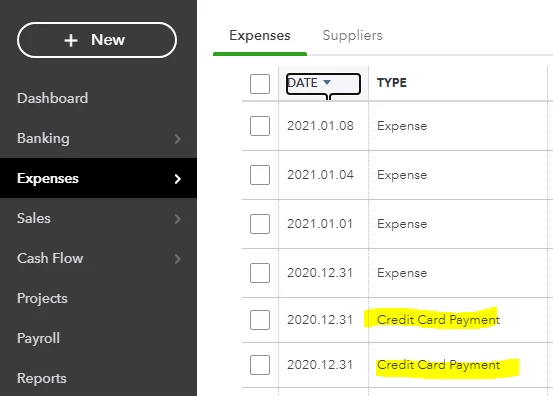
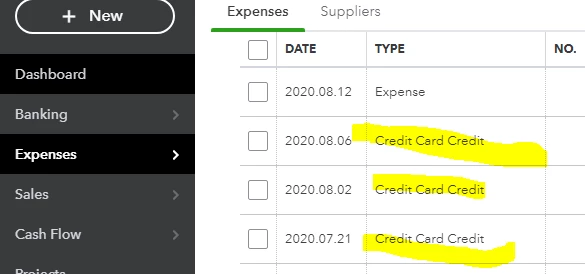
With the recording practice of this link in mind, how can one change the Credit Card transaction 'type' from "Credit Card Credit" to "Credit Card Payment" as illustrated in the following captures of the same account.  They have very different detailed information that I don't see an option to adjust.
 

1 reply

January 11, 2021

Hello jastolfi,


It's great to see that you've already been exploring our Community forums on your own. QuickBooks Online offers separate functions for creating Credit Card Credits and Credit Card Payments to help you keep your credit cards transactions in order. I'd be happy to shed some light on this for you. 


You're correct that an existing Credit Card Credit cannot be switched to a Credit Card Payment and vice versa once they're created. Rather, the transaction must be deleted and recreated as the proper transaction type in order to correct this. The first step will be navigating to the screen shown in your screenshot and clicking on the transaction to bring up the Credit Card Credit window. From there, select More towards the bottom of the screen, then click the Delete button. If this transaction was previously matched to a banking transaction, that transaction will now move back to the For Review tab of the Banking screen. 


Once the first part is complete, you can then record the payment as a Credit Card Payment by following these steps:

  • Select + New.
  • Select Pay down credit card. (Note: It'll either be under the Other column or the Money Out column depending on whether your company is set to Business or Accountant view.) 
  • Select the applicable credit card.
  • Enter the payment amount.
  • Enter the date of the payment.
  • Select the bank account you paid the credit card with.
  • If you made a payment with a cheque, select the tickbox I made a payment with a cheque. In the Cheque no. field, enter the cheque number. If you paid electronically, enter the EFT number there instead.
  • If you want to add notes or file attachments, select Memo and attachments and follow the instructions on the screen.
  • Select Save and Close.


The transaction will now show up as a Credit Card Payment. You can then go into your Banking to rematch the transaction if necessary. If you'd like to learn more about recording credit card payments, I recommend checking out this Community article: Record your payments to credit cards


Please let me know if you have any other questions about this process, I'm here to help!