

October 8, 2022
Solved

Error paying US Credit Card from US denominated bank [Quickbooks Canada - multicurrency enabled]

  • October 8, 2022
  • 1 reply
  • 0 views

Hi there,

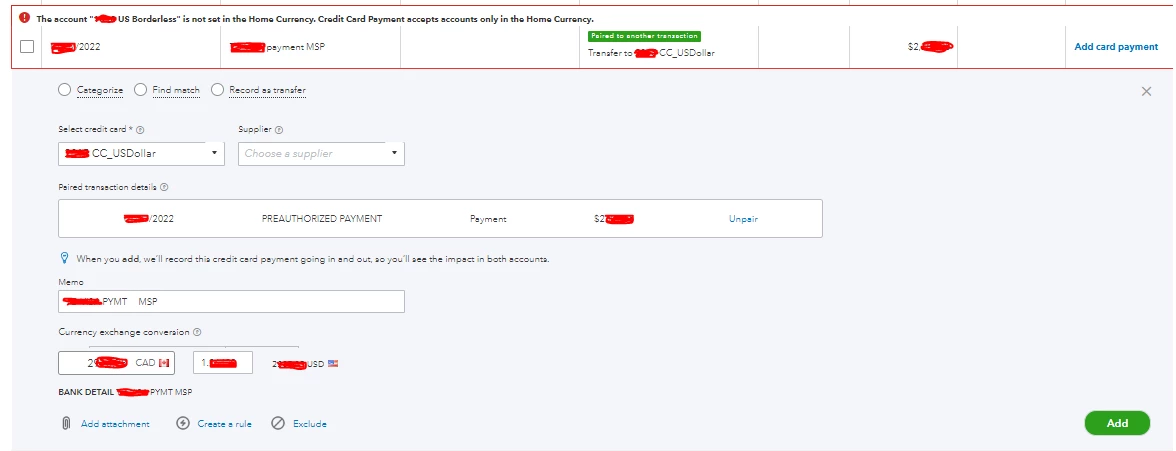
I have a Canadian business, but I also have a US denominated bank account, and a US credit card. When I try to pay my US credit card from my US bank account I get this error. Any recommendations how to resolve it? I'm assuming some manual work around is required. (Note some info is just redacted)

Thanks in advance!
Best answer by mv32

Thanks for joining the Community, @dneilson.


I appreciate you for keeping the account transaction secure. You're correct that this needs manual work since the US Borderless bank account currency can't be set to Home Currency.


In your case, first, we'll need to exclude the transaction and take note of the details since this is applicable for Home Currency only.


Next, I suggest creating a journal entry and ensure consulting your accountant about the accounts to use to mimic the transaction for paying US Credit Card from US denominated bank account.


Additionally, here are alternative ways to record your payments to credit card.


That's all there is to it. If you have any other questions, please don't hesitate to place a comment to our QuickBooks Support team. More power to your business!

1 reply

mv32Answer
October 9, 2022

Thanks for joining the Community, @dneilson.


I appreciate you for keeping the account transaction secure. You're correct that this needs manual work since the US Borderless bank account currency can't be set to Home Currency.


In your case, first, we'll need to exclude the transaction and take note of the details since this is applicable for Home Currency only.


Next, I suggest creating a journal entry and ensure consulting your accountant about the accounts to use to mimic the transaction for paying US Credit Card from US denominated bank account.


Additionally, here are alternative ways to record your payments to credit card.


That's all there is to it. If you have any other questions, please don't hesitate to place a comment to our QuickBooks Support team. More power to your business!