


Ami_D
September 21, 2022

Connect with QuickBooks: Feature Requests and Bugs
  • September 21, 2022
  • 13 replies
  • 0 views


Welcome to Connect with QuickBooks! This thread is your opportunity to ask your questions about features, updates, and bug fixes to the QuickBooks Tier 3 Support Team. 


This team includes senior support specialists and engineers with an advanced level of QuickBooks knowledge and insight into the product roadmap. They are the perfect team to answer your questions about if a certain feature is in the works, if a bug is on track to be fixed, or if there is a workaround for something you’re struggling to accomplish.


The team will be available on 9/22 from 11am - 2pm PT. Simply post your question as a response to this post and you'll receive an answer as soon as possible. 

If you're new to the community, here's how to participate:
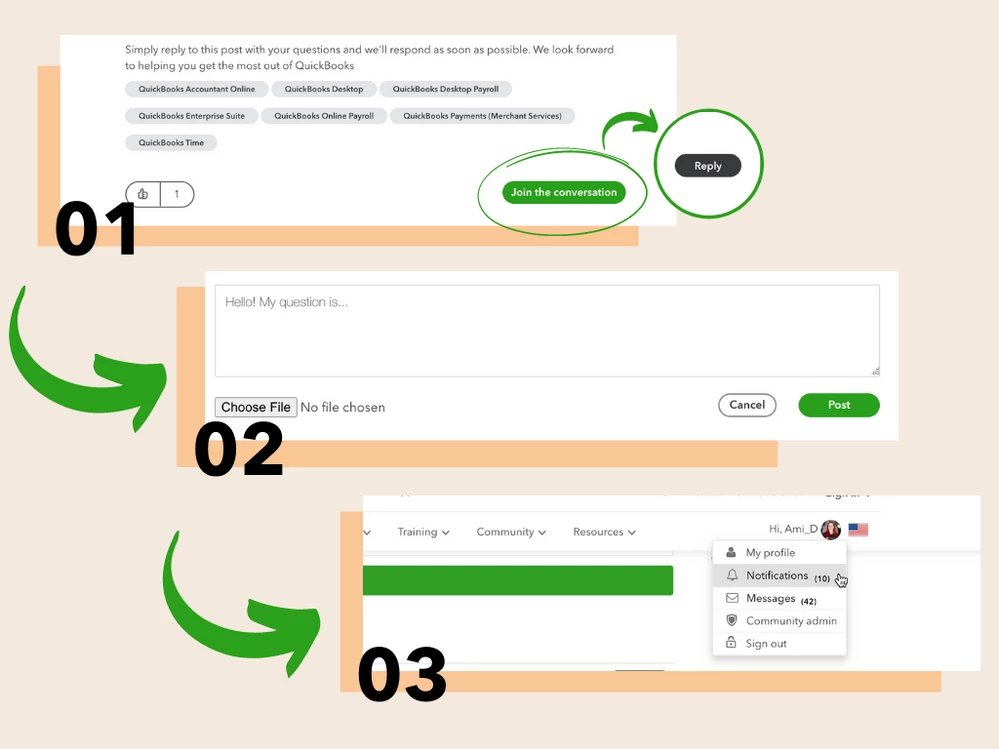


  1. Press Join the Conversation to log in to the community. Once logged in, press Reply.
  2. Write your question as your reply to the post. Press Post to submit.
  3. Keep an eye on your notifications for a response from one of our QuickBooks experts.

    We look forward to chatting with you!

13 replies

September 21, 2022

Hi,

I was trying to look for a transaction from 2017 and couldn't find it in Quickbooks online plus, I was wondering if the search function is limited to a certain amount of time? Is it different in other versions of Quickbooks?

Are there any plans to change it in the future?


john-pero
September 22, 2022

When I attempt to record a customer bounced check in Desktop Pro Plus 2022  (only allowed in single user mode which is a hindrance o fits own) the program aborts and shuts down

September 22, 2022

@john-pero The experience you are describing is similar to a known issue whereby an unrecoverable error is hit when trying to record a bounced check in QBDT 2022.  This error happens when a bounced check is being recorded and applied to 3 or more invoices.

Does this error occur when you are recording a bounced check against multiple invoices?  If so, the best work around is to limit applying bounced checks to 2 or fewer invoices.

I added you to the list of impacted customers and you'll receive email updates as we make progress. This will help you stay up to date on the status of the investigation.

September 22, 2022

When/IF are you planning on fixing the massive crash errors in QuickBooks desktop dating back to the last set of patches?  This has been ongoing for months.

September 22, 2022

I did an update on my desktop the other day.  It made some "critical" fixes.  My Enterprise 22 crashes when I am in the Customer/Job files.  I review a report where I have to go into the customer files.  Last month my system crashed 21 times.  When I did this the other day I only had 3 crashes.  Are you still working on this issue so I have no crashes?  I will be doing month-end billings next week and not having it crash every 7th client would be wonderful considering we have between 250-300 invoices each month.

September 22, 2022

I am using QuickBooks2022 Desktop.  When I log in, QuickBooks attempts to open and I get a message that QuickBooks has stopped working.  I have used QuickBooks tool Hub - Quick Fix my program. It will work for that one time and then the next day we go through it again.  Sometimes I have to use the QuickBooks Diagnostic Tool to get it to work.  I have tried uninstalling and reinstalling QuickBooks with the help of one of your agents but that did not help either.  I am at a loss as to what to do to solve this issue.  Seems like Intuit needs to come up with a fix for this problem.

September 22, 2022

My issue is that QuickBooks Desktop crashes Windows File Explorer while trying to open a file or move a file.  I have seen that there are many people with this same problem but no solution so far.  Has there or will there be a 'critical fix' soon.

john-pero
September 22, 2022

I had that issue and found a windows 11 update that had not completed causing the even just hovering over a file, specifically accountant copies and wanting to select multiple would crash explorer. After using a windows recovery restore point and then updating windows 11 that particular issue went away. QBDT still crashes on its own but no longer affects File Explorer

September 22, 2022

1. I'd like to hear an update on the crashing issues that many QB Desktop 2022 Pro Plus users have been experiencing since the R5 release.  Intuit has said there's a team working on the problem.  When can we expect a fix?  I'd also like to report after taking some steps recommended by Intuit--disabling pop up windows; turning off the company homepage screen; and turning off the left-hand icon bar--I have not had one crash.  Before that, QB crashed one or more times daily upon start up since May.  Occasionally, it would also crash in the middle of a work session.  Also, Chrome would sometimes crash when Chrome and QB were open at the same time.


2. Since updating to version R5, I have also had trouble with the functionality of the Adobe Acrobat program, specifically with not being able to use the "comment" function in Adobe.  Searching the Quickbooks Community help pages, I am not the only one experiencing this issue.  I often have to use both programs simultaneously, and this has been disastrous for my work flow.  If I want to use Adobe with all of its functionality, I have to quit Quickbooks.  Help!

September 22, 2022

And one more feature request.  I am using QB Desktop pro Plus 2022.  I'd love a way to make a credit card "sticky."  When I go to "pay bills", the credit card that pops up is always the credit card last used to make any sort of credit card transaction EXCEPT a credit card payment.  Unfortunately, because of my particular work flow, this means the credit card I use the least is often the one to "stick." 


I'd love to see a feature in preferences where we can choose the credit card that automatically pops up in the "make payments" window.  In preferences->checking, there is an analogous feature to select which checking account to use in the "pay bills" window.  I'd love to see a similar preferences options for credit cards.  This would save me a lot of time every day!

September 22, 2022

@lk32  I love your suggestion about being able to select a preferred credit card for payments. I can see how that would be valuable to your workflow, and for others as well.

I am unaware of any features like this on the product roadmap, but I will make sure to share this with the product team so that they are aware of the positive impact it would make in your day-to-day work in QuickBooks.

September 22, 2022

Good morning. I'm interested in 2 issues: quickbooks crashing, and stuck paychecks. 

September 22, 2022

@Janetccc 
Hello Janet,


May I ask for more details on the stuck paychecks? 

Where are they appearing stuck and are you receiving any error messages when trying to edit or delete them?

September 22, 2022

It's is a problem known by Intuit. Payroll error PS038. Paychecks get stuck as "online to send" related to downloading tax table updates. We had a huge number of checks that had to be deleted and re-entered due to this error, it took us many hours of time and frustration. We do not want to go through that ever again!!

September 22, 2022

I'd like to know what is being done about the continuous crashing of QBDT 2020, QBDT 2021, QBDT 2022? This has gone on since earlier this year, after the last update. Countless hours have been lost trying to rectify this issue. Countless hours have been wasted contacting support. Countless hours have been wasted perusing the threads in search of a solution. All this to only receive canned responses from phone/online support about downloading the QB tool hub, to do this or that, to stand on our heads and hold our breath, and STILL NO ANSWERS! It's downright pathetic. We all paid 100% of the purchase price and have not received 100% of a product. That's outright theft! Will we be receiving refunds? Who at Intuit do I invoice for wasted hours?? 

September 22, 2022

Upgraded from QB2019 to 2022 (not because wanted to, but because is a QuickBooks rule)

Had crashing issues with 2019 and then in the 2022 version….and now being charged an annual fee, way more than the every 3 year fee without me using any ‘updated’ technics, and is VERY STRESSFUL worrying about if QuickBooks will CRASH while trying to get my job done.

The primary time mine crashes is almost EVERY TIME I 'memorize/replace' memorized transactions or click ‘Reminders’. 

I used one of the work arounds to stop other crashes, ie:home page, and created shortcuts/tabs to click links I had used on the home page, but still have a CRASH here and there, while constantly sweating as the cursor heads towards something, or I move the cursor as quick as I can in hopes I can click ‘save’ before it crashes.

I SIMPLY DREAD having as many issues that I am reading about, and am sad this is an issue even our best of the best techies in our own lives, and in the QuickBooks world, have not resolved.

September 22, 2022

Where are the Intuit techs? I thought they were going to be interacting. Thank you.

Ami_D
Ami_DAuthor
September 22, 2022

Good morning @Janetccc, and all! Thank you for joining the conversation! Yes, our Intuit techs will be here today from 11am - 2pm (in about 2 hours from now) and will answer all of the questions/comments that came in early. We're looking forward to it!

September 22, 2022

When will QB fix this problem??

I am forced to login 4 times before I am able to start working.

It's been more than 2 months now.

Intuit should reimburse all its desktop users on the 2022 version, since the product they sold us is DEFECTIVE! 

I am actively trying to find a replacement to QB.