


EstherY
November 15, 2018
Question

Import your invoices into QuickBooks

  • November 15, 2018
  • 11 replies
  • 0 views

If you’re using spreadsheets to record invoices and wish to start using QuickBooks to track them going forward, you can import them into QuickBooks using our Import your Invoice functionality.


Before you start, make sure that your excel spreadsheets are ready and in a format that is accepted by QuickBooks. You can download a sample here. If your file includes details of customers and/or products, they can be added in QuickBooks automatically, so you don’t have to manually create them.


Things to look out for

  • Invoices can be imported with multiple line items OR as a total value for each invoice. If no line item is present QuickBooks will populate this field with a generic item called 'Sales'.
  • Multi-Currency is supported.
  • Product categories are supported.
  • VAT codes are mapped so there is no need to change your VAT codes to QuickBooks VAT code formats before importing.
  • We recommend that no more than 100 invoices are imported at any one time.
  • When new customers are imported, if no currency is specified QuickBooks assumes the customers home currency is GBP.
  • To import line items with Product Categories, enter the category with a colon separator between the product/service (e.g. category:Product/service).
  • When invoices have multiple line items please ensure the first line entry specifies the invoice number, customer, Invoice Date etc, line items 2 onwards, of the same invoice number only require the invoice number as seen in the example csv file, specifically invoice 1001.
  • To retain invoice numbering in your csv file, please ensure Custom Transaction Numbers is switched ON
    • Select the Gear icon at the top, then Account and Settings.
    • Select Sales tab, navigate to the Sales Form Content.
    • Click on the edit icon and change Custom Transaction Numbers from Off to On using the check box and select Save.


When you are ready

  1. Select the Gear icon at the top.
  2. Under Tools, choose Import Data.
  3. From the list, select Invoices or Bills.
  4. Select the Browse button.
  5. Select your Excel file, click Open then select Next to continue.
  6. If you would like QuickBooks to auto create contacts and/or product/service items then select the applicable option(s) and select Next.
  7. Map the headers in your Excel file to the fields in QuickBooks, then click Next.
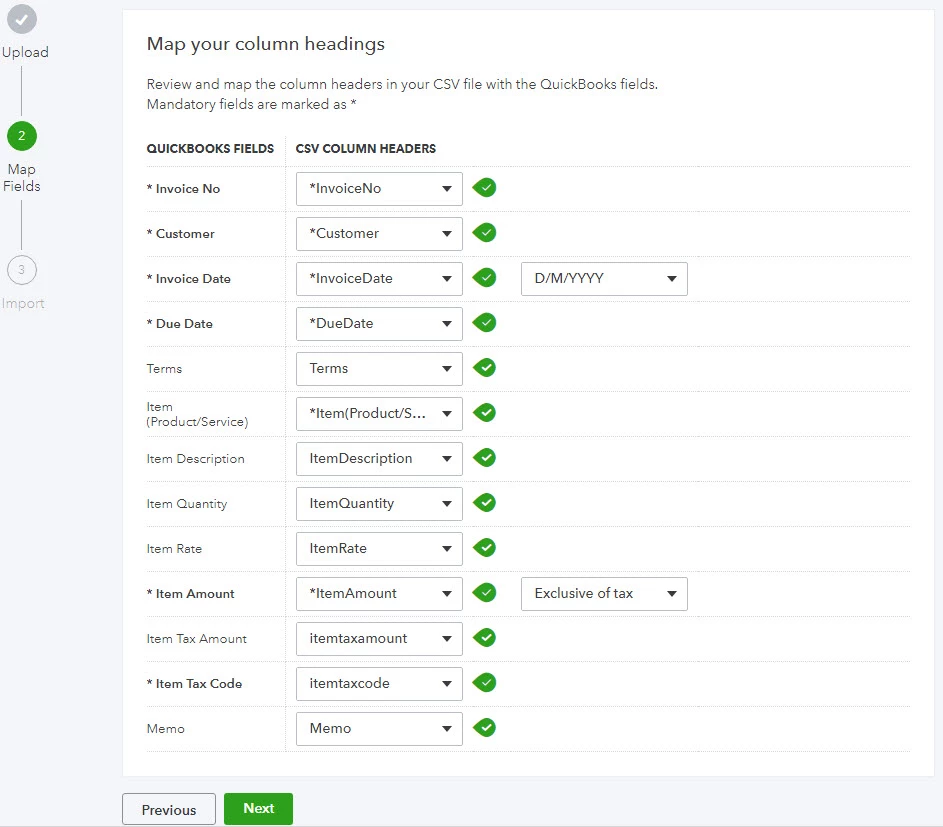
     

  8. If you are VAT registered, map your VAT codes to those of QuickBooks, then select Next.
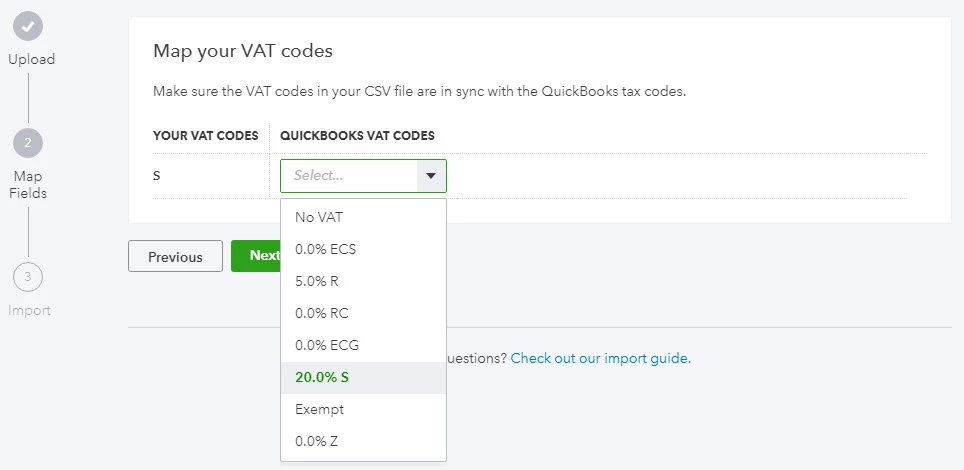
     

  9. You’ll now see a summary of your import. Adjust your data if necessary then select Import.

    11 replies

    January 4, 2019

    Can QB online import an invoice generated by another company who also use Quickbooks online. E.g. Company A imports a QBO generated invoice from Company B.


    Thanks,


    Tim.

    January 4, 2019

    Good Morning


    Thank you for contacting us on Community.


    Are you looking to use the invoice as a template for future invoices or are you looking to upload the invoice as a sales transaction?


    Kind regards


    Emma

    January 4, 2019

    I have lots of Company A sending to Company B, where I do the accounting for both. It would be so good to have a ‘direct invoice’ concept where it could flow from one QBO client to another directly. Obviously a mapping would need to go in place.


    To answer your question directly, it would be a template for future use. It is a monthly recurring expense recharge.


    Thanks,


    Tim.

    November 27, 2019

    How do you do this with Quickbooks desktop? The desktop version does not have the Gear icon. I can only find a way to upload the customer's info not their invoices.

    Fiat Lux - ASIA
    November 27, 2019

    @samc89 

    Utilize the 3rd party importer tool

    https://transactionpro.grsm.io/qbd


    December 1, 2019

    Does it meam Quickbooks Desktop Pro, no matter which version, 2017 to 2020, does not support importing invoices from excel or csv files? 

    January 7, 2020

    I don't have an option to import invoices. I'm not sure what to do and I'm quite frustrated. I have over 300 invoices to import and there's no way I can do it manually. A screenshot of my options are below.

    1.PNG

    Fiat Lux - ASIA
    January 7, 2020

    @Lalolo 

    We can't see your image. If you are using QBO UK version, visit this link for your reference

    https://quickbooks.intuit.com/learn-support/en-uk/help-articles/import-multiple-invoices-at-once/01/338726#M2337


    Another options, you may consider the importer tools that I have mentioned above.


    Good luck!

    January 7, 2020

    Thank you! I tried the app and it worked. Took a LOOOT of fiddling but it's exactly what I need.

    January 24, 2020

    Do I have to select the mappings each time I import my invoices from a csv file?  Is there no way to save the mappings or have them default which would save me a lot of time.


    Thanks

    Richard

    January 24, 2020

    Hi Richard, currently there is no option to save defauls for mapping in the import tool, these have to be selected each time - thanks!

    July 15, 2020

    I find it odd that you say that mappings have to be set each time. The 'mandatory fields' in the example given by Quickbooks Online don't have to be selected each time, but the exceptions is that ItemAmount has to be selected each time, as well as Exclusive/Inclusive of tax and Invoice Date format. Surely Intuit can make a default setting so that we can always make sure our csv file matches the default.  I have uploaded a PNG File to illustrate. It really is an error prone time waste each week.

    January 31, 2020

    When I export transactions and re-import them (from and to Quickbooks uk self employed online), it doesn't import categories. Note also that there is no option to assign the category column as a category colum (see screenshot). How can I import categories? It's a lot of data to have to enter manually otherwise.

    Kristine Mae
    January 31, 2020

    You're unable to import the categories, Chimmy. You'll have to enter them manually.


    I can see how convenient it is to import this detail with ease. I'll take note of your concern and pass this along to our management team. This will be submitted to our software engineers who review our customers' feedback. This might be included in our future updates. 


    If you have other questions, just leave a comment below. The Community is open 24/7.


    May 1, 2020

    Hi, could you please let me know is it possible to save the mapped fields once set?


    We import invoices weekly but last week a member of staff selected inclusive of vat instead of exclusive which caused a problem with invoices being for the wrong amounts, if not spotted could cost a lot of loss

    May 1, 2020

    Hello SusieMurphy, 


    Welcome to the Community page, 


    There is no way of pre-saving a mapped field for uploading invoices. It is a case of having to map it each time you upload any invoices into the system. 

    May 1, 2020

    OK thank you anyway.

    September 30, 2020

    Hi,


    When I import invoices, QB automatically sends the invoices via email.  Is there a way to prevent this?


    Thank you!

    Fiat Lux - ASIA
    September 30, 2020

    @ehughes2309 

    You may prepare the Invoice data with the following template and make sure to fill the column of "ToBeEmailed" is N


    RefNumberCustomerTxnDateDueDateShipDateShipMethodNameTrackingNumSalesTermLocationClassBillAddrLine1BillAddrLine2BillAddrLine3BillAddrLine4BillAddrCityBillAddrStateBillAddrPostalCodeBillAddrCountryShipAddrLine1ShipAddrLine2ShipAddrLine3ShipAddrLine4ShipAddrCityShipAddrStateShipAddrPostalCodeShipAddrCountryPrivateNoteMsgBillEmailBillEmailCcBillEmailBccCurrencyExchangeRateDepositToBePrintedToBeEmailedAllowIPNPaymentAllowOnlineCreditCardPaymentAllowOnlineACHPaymentShipAmtShipItemDiscountAmtDiscountRateTaxRateTaxAmtDiscountTaxableLineServiceDateLineItemLineDescLineQtyLineUnitPriceLineAmountLineClassLineTaxable
    101Janice Johnson01/10/2020 01/12/2020Ground Net 30  110 Main StreetSuite 2000  DallasTX99875 110 Main StreetSuite 2000  DallasTX99875 Special HandlingThank you for your order!     0NYNNY12Shipping 0.02  Y Leather CaseLeather Case210  TAX
    101Janice Johnson01/10/2020 01/12/2020Ground Net 30  110 Main StreetSuite 2000  DallasTX99875 110 Main StreetSuite 2000  DallasTX99875 Special HandlingThank you for your order!     0NYNNY12Shipping 0.02  Y Gift CardsGift Cards25  TAX
    102Leonard Walker Inc01/10/2020    Net 30  9 Winding Road   WinchesterNY12345 9 Winding Road   WinchesterNY12345  Thank you for your order!     0YNNNY      Y HandheldsPortable Game Player1100  TAX


    then utilize the trial period of TPImporter to proceed.

    https://transactionpro.grsm.io/qbo


    September 30, 2020

    Thank you!!!

    January 12, 2021


    I did a search and stumbled across this discussion.  It wasn't clear what product this is for.  We are using QuickBooks Enterprise, so I am not seeing some of the options mentioned in the steps.  I assume this must be for QB On-line?   We would like to import spreadsheet information into a specific customer account and have each line in the spreadsheet create a new auto-number invoice.  If you can refer me to more specific information, it would be appreciated.  In summary, we want to import customer Amazon Payment orders into our Amazon Fulfillment Center Account as separate invoices with the desired fields highlighted above (Date, Invoice Number, Amazon Purchase Order Number, Our Item information.  In QB Enterprise, there is an option File\Utilities\Import... Would simply using an Excel file with the correct Column header names accomplish this?


    Thank You


    January 12, 2021

    I noticed QB Enterprise does not have an option to import invoices.  Is there an add-on or other method to do this?  Thanks again.

    Jen_D
    January 12, 2021

    Thanks for posting here, @iwidjaja,


    Yes, the steps in this thread is about QuickBooks Online. Don't worry, you can import custom forms invoices, sales receipts, estimates, statements, and purchase orders in the program.


    Refer to the steps below:

    1. Open the company file that you want to import the template into.
    2. Go to the Lists menu, select Templates.
    3. Choose the Templates ▼ dropdown, select Import.
    4. Press the template you want to import, then select Open.
    5. Enter the name of the imported template. You can keep the original name or change it.
    6. Hit OK. You should now see the imported template on the template list. Go to the Lists menu and select Templates.


    See this article to learn more about this process: Use and customize form templates


    QuickBooks is using a default mapping for the fields on the template, if there are information that you can't include, I have another option for you. We have a website where you can find invoicing tools that also allow custom templates. They are compatible with the program so there is no problem with the integration. Here's the link: https://desktop.apps.com/home


    We also have a separate forum called Intuit Developers where you can find engineers who can help suggest third-party apps and help with program integrations. Here's the link to the website: Intuit Developers Community.


    Please know that I'm always here for your questions and concerns about QuickBooks. If you need any help, tag me or post here anytime.

    March 25, 2022

    My home currency is CAD and MC function is enabled. Need to import invoices with both CAD and USD. when I upload csv file in QBO, for USD it returns the message "the currency doesn't exist in QB" although I have several USD invoices sitting in QB. In my csv file, I am using CAD and USD under the currency column. How to fix?

    JessT
    March 25, 2022

    I’m glad to see you posting here on a Friday morning, Muzaffar Hashmi!


    I'll share information on what could have triggered the error you mentioned, so you can be guided on what to do next.


    You will only get such an error if you jumbled the letters USD, like in the screenshot below. Would you mind checking your file again? The currency may also contain a special character, such as a comma or a period, making it unrecognizable in QuickBooks.


    If the letters are in the correct order and there isn't a special character, let's do some troubleshooting steps. You may be experiencing random browser issues.


    To start, you'll want to sign in to QuickBooks using a private browser. This step disables its extensions and stops the cache from saving your browsing history.


    • Google Chrome: Ctrl + Shift + N
    • MS Edge and Firefox: Ctrl + Shift + P
    • Safari: Command + Shift + N


    If you're able to import your USD invoices, you can go back to your regular browser and clear its cache. If not, please try other browsers to see if we get the same thing.


    We'll get your invoices imported into QuickBooks. Let us know if you can discover new information or if you have other questions in mind. Stay safe!

    March 26, 2023

    Ho Could I import Bulk invoices that are in foreign currency and exchange rate into quickbooks online?

    Zed Axis
    March 26, 2023

    Hi @Mahmoud5,


    QuickBooks Online has importing bulk invoices in the roadmap for US with Sales Tax.  In the meantime you can import invoices in batch with Sales Tax and multicurrency using Axis Online that is a an addon app you can find in the Intuit App Store.


    Steve