November 22, 2018
Solved

Add payroll to a QuickBooks online account?

  • November 22, 2018
  • 2 replies
  • 0 views

I have an existing QuickBooks online account and want to add the basic payroll option.  I can see where to start a whole new account but not just add to an account.

Best answer by JenoP

You can activate the payroll service inside your existing QuickBooks Online account, Wec2it.


To turn it on, please follow these steps:

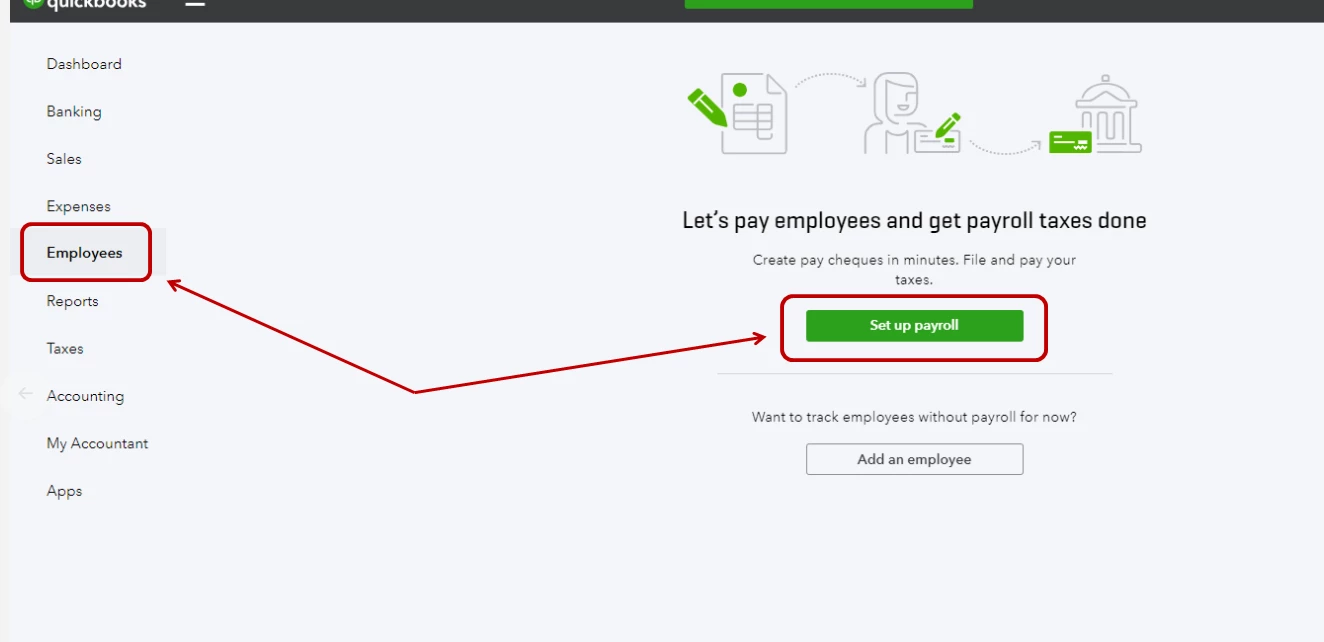
  1. Go to the Workers menu and click Employees.
  2. Click Get Started or Set up Payroll.
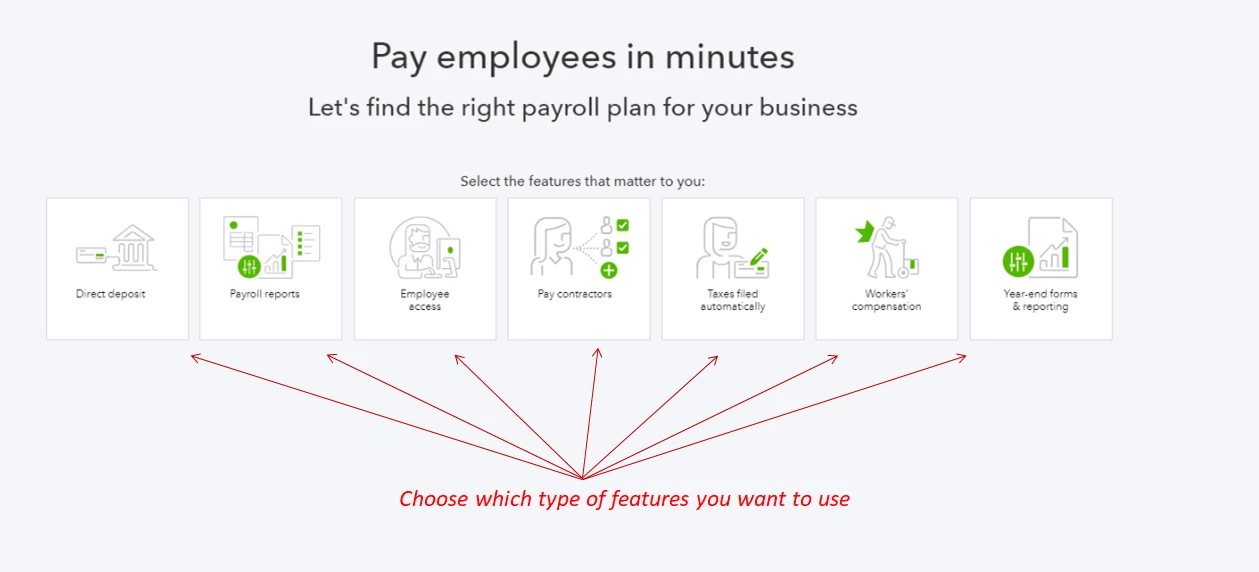
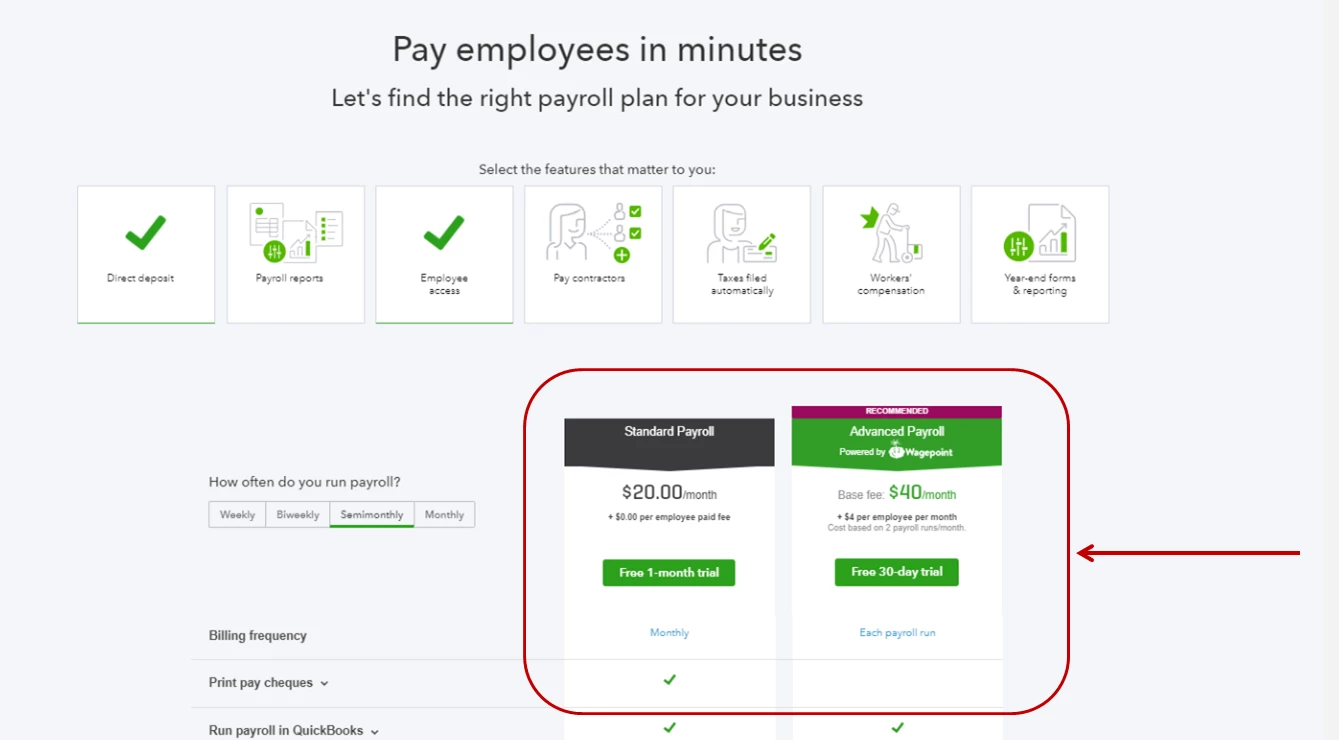
  3. Choose the type of service that you want to use.
  4. Follow the onscreen instructions to complete setting up your payroll account.

I would also recommend checking out the QuickBooks Online Payroll Hub. It will link you to the Help articles that'll guide you through basic payroll setup and functions.


Leave me a note below if you have other questions.

2 replies

JenoP
JenoPAnswer
November 22, 2018

You can activate the payroll service inside your existing QuickBooks Online account, Wec2it.


To turn it on, please follow these steps:

  1. Go to the Workers menu and click Employees.
  2. Click Get Started or Set up Payroll.
  3. Choose the type of service that you want to use.
  4. Follow the onscreen instructions to complete setting up your payroll account.

I would also recommend checking out the QuickBooks Online Payroll Hub. It will link you to the Help articles that'll guide you through basic payroll setup and functions.


Leave me a note below if you have other questions.

October 4, 2020

Hi. When I click on the employee to open the payroll, I can see only add employees. There is no option for payroll. I need help please

October 4, 2020

Hello, THYRO. 


The Employees tab is where you'll go to do things like update employee information, add new employees, and run payroll. It's so important for all areas of your QuickBooks Online account to be working as intended. I'd be happy to help you get the payroll working again. 


Try clearing the cache and cookies in your web browser. Stored Internet files that cling to the background of your browser can cause latency and loading issues in sites like QuickBooks Online. Here's how to clear them: How do I clear my browser cache and temporary Internet files? 


If the issue persists, try using an Incognito window in Google Chrome, press CTRL Shift N, Mozilla Firefox: press CTRL Shift P, Safari: press Command Shift N. This is a private window that runs separate from the rest of your browser. Here's how it works: Browse in private. You can also try using a different browser all together.  


I'm here anytime you need help or if you have other questions about your employee's payroll. Have a good one. Keep safe!

July 4, 2019

@Wec2it wrote:

I have an existing QuickBooks online account and want to add the basic payroll option.  I can see where to start a whole new account but not just add to an account.



@Wec2it wrote:

I have an existing QuickBooks online account and want to add the basic payroll option.  I can see where to start a whole new account but not just add to an account.


@Wec2it wrote:

I have an existing QuickBooks online account and want to add the basic payroll option.  I can see where to start a whole new account but not just add to an account.


JenoP
July 4, 2019

Good day, vireshBhatt.


We have a separate Community site specially created for API questions and developers like you.


Please visit this link so our developer support and other API users can help with your question about adding employees and running payroll through API: https://help.developer.intuit.com/s/.


Just click General Questions tab, then click Ask A Question


I'll be around if you have other questions.