Thanks for reaching out and sharing your situation about adding Michigan Sales Tax to your Form 5080, @BellFinance.
Instead of submitting a separate Form 5080 for your sales tax return, I'd suggest contacting our payroll Customer Care Support team to help update the form. I can provide the steps below to reach out to them.
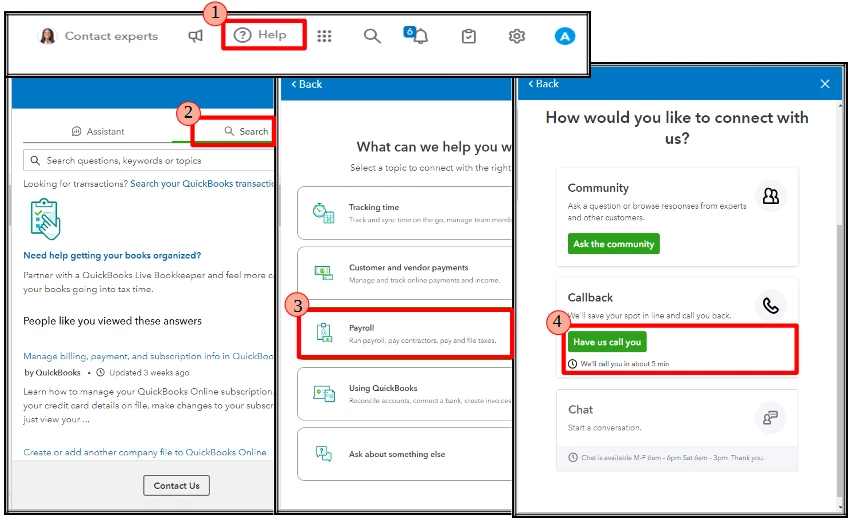
Although there's no direct way to edit Form 5080 in your QBO account to include the Sales and Use Tax details, our payroll support team can update the form on your behalf since you've e-filed using QuickBooks Online (QBO) Payroll. They can also recommend steps in handling this situation moving forward. Here's how you can contact them:
- In your QBO account, go to (?) Help.
- Select the Search tab. Then, click on Contact Us.
- Choose Payroll.
- Click on Have us call you.
Our support team for QBO Payroll Elite subscribers is available 24/7.
If you need to manually record a sales tax payment after updating the form, you can refer to the Record a sales tax payment section of this article: Manage sales tax payments in QuickBooks Online.
For future reference, I've included an article about running financial reports to help you verify sales tax payments in your records: Run reports in QuickBooks Online.
If you have more questions about updating payroll forms or recording sales tax payments in QBO, we'll be here in the Community to help.

