May 11, 2020
Solved

Adjust Payroll Liabilities for Taxes Already Paid

  • May 11, 2020
  • 1 reply
  • 0 views

Hello!


I have just implemented epay for payroll tax liabilities starting with my 5/15/20 payroll. Previous to this, the CPA handling the books for this group made deposits for taxes through EFTPS and then recorded journal entries to keep the payroll tax liabilities straight. My balance sheet is correct as of right now; all four employee's prior year and YTD numbers are correct. However, now that I've indicated I want to e-pay these things, I'm getting "overdue" liabilities red arrows for all my payroll tax liability payments for 2019 and 2020 up until today. My question is, how can I make these lines go away? The taxes have already been paid and accurately recorded (albeit via journal entry).


Thanks in advance for any help!

Best answer by MaryLandT

Thank you for contacting us, gharris198.


You'll want to enter those prior tax payments since you've already paid the. This will help remove those liabilities for 2019 and 2020.


To do so, I'm glad to provide you the steps on how to accomplish this:


  1. From the Help menu, choose About QuickBooks.
  2. Press Ctrl + Alt + Y or Ctrl + Shift + Y to open the Setup YTD Amounts window.
  3. Click Next until you reach the Enter prior payments section.
  4. Select Create Payment to enter all prior payroll tax and non-tax payroll liability payments you've already paid.
  5. Enter the Payment Date and For Period Ending date accordingly.
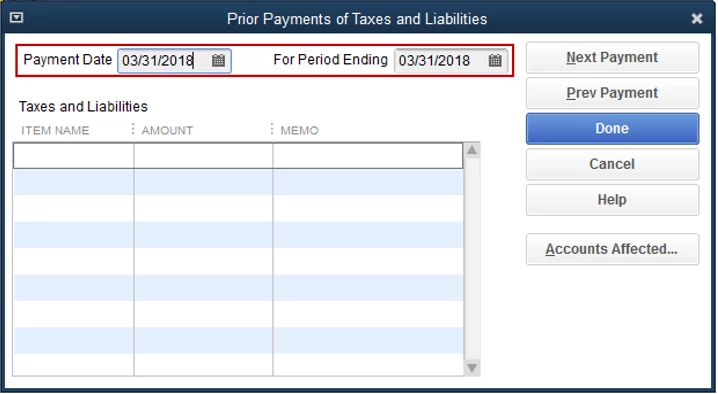
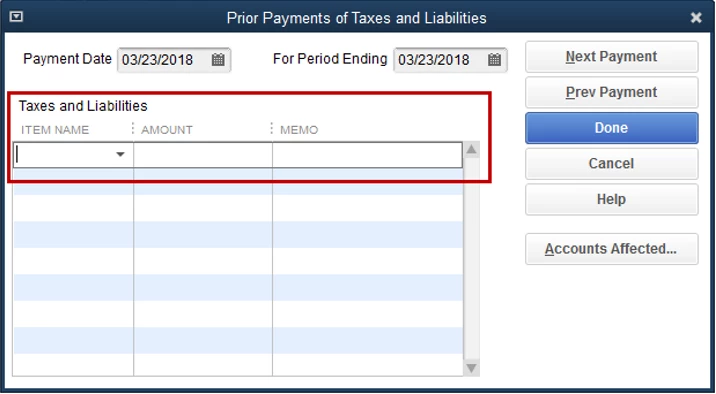
  6. In the Taxes and Liabilities field, choose the payroll tax item that you've already paid and want to record in QuickBooks Desktop. Then, enter the amount.
  7. Select test the Accounts Affected... button. This displays options for how you want the payment to affect your Chart of Accounts (COA).
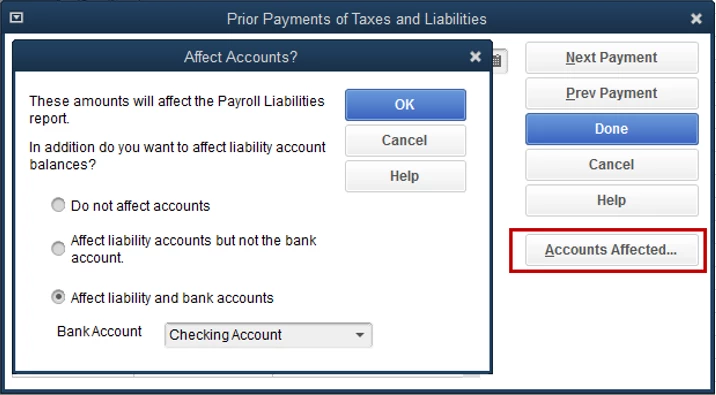
    • Do not affect accounts: Use this option if your QuickBooks accounts have correct balances. Selecting this option will cause the prior payment to not show up in the bank register.
    • Affect liability accounts but not the bank account: Use this option if your checking account has the correct balance. Selecting this option will cause the prior payment to not show up in the bank register.
    • Affect liability and bank accounts: Use this option if none of the account balances are correct. Selecting this option will cause the prior payment to show up in the bank register.Select test the Accounts Affected... button. This displays options for how you want the payment to affect your Chart of Accounts (COA).
  8. Choose Next Payment once your first payment is completed.
  9. Continue this process until you have completed all payments. Click Done to save your work, then  select Finish to close the window.

After that, you can start creating new paychecks. Then, pay and file your tax liabilities.


Let me know if there's anything else you need anything else by commenting below. I'm always right here to help.


1 reply

MaryLandT
MaryLandTAnswer
May 11, 2020

Thank you for contacting us, gharris198.


You'll want to enter those prior tax payments since you've already paid the. This will help remove those liabilities for 2019 and 2020.


To do so, I'm glad to provide you the steps on how to accomplish this:


  1. From the Help menu, choose About QuickBooks.
  2. Press Ctrl + Alt + Y or Ctrl + Shift + Y to open the Setup YTD Amounts window.
  3. Click Next until you reach the Enter prior payments section.
  4. Select Create Payment to enter all prior payroll tax and non-tax payroll liability payments you've already paid.
  5. Enter the Payment Date and For Period Ending date accordingly.
  6. In the Taxes and Liabilities field, choose the payroll tax item that you've already paid and want to record in QuickBooks Desktop. Then, enter the amount.

  7. Select test the Accounts Affected... button. This displays options for how you want the payment to affect your Chart of Accounts (COA).

    • Do not affect accounts: Use this option if your QuickBooks accounts have correct balances. Selecting this option will cause the prior payment to not show up in the bank register.
    • Affect liability accounts but not the bank account: Use this option if your checking account has the correct balance. Selecting this option will cause the prior payment to not show up in the bank register.
    • Affect liability and bank accounts: Use this option if none of the account balances are correct. Selecting this option will cause the prior payment to show up in the bank register.Select test the Accounts Affected... button. This displays options for how you want the payment to affect your Chart of Accounts (COA).
  8. Choose Next Payment once your first payment is completed.
  9. Continue this process until you have completed all payments. Click Done to save your work, then  select Finish to close the window.

After that, you can start creating new paychecks. Then, pay and file your tax liabilities.


Let me know if there's anything else you need anything else by commenting below. I'm always right here to help.

May 11, 2020

Thank you.  Just one follow-up.  In my QB "Pay Liabilities" tab, one of the taxes shown is "Federal 941/944/943."  But when I try to enter the prior payments as you describe, I don't see that description, only "Federal Withholding" and the various FICA-related items.  I expect I will need to break all of this out to make the total go away, or will it not matter since I am not wanting to affect accounts?


katherinejoyceO
May 11, 2020

Thanks for actively responding, @Gharris196. I understand that you'll want to ensure you're recording your previous tax payments correctly. 


To clarify, payments for prior quarters are entered as a lump sum, while for the current quarter are entered as per payroll. 


Hence, for your taxes paid from the first quarter (January to March) should be entered as a lump sum amount using the Federal Withholding for Federal 941/944/943. 


Then, enter your April tax payment separately as it belongs to the second quarter. 


For future reference, learn about how to set reminders for your upcoming payroll tax and liability payments through this link: Set up and pay scheduled or custom (unscheduled) liabilities.


Let me know if you have more concerns about anything else. We're always delighted to assist. 


Mark the post that answers your question by clicking on "Accept as solution".