September 1, 2020
Solved

Allocate a portion of an employee's paycheck to two different classes?

  • September 1, 2020
  • 1 reply
  • 0 views

I use Quickbooks Desktop Pro 2020. My company has a few different classes setup within the company file to track expenses for different parts of our company. I have an employee who works for the main company but also does some work for the DBA. He wants me to classify $150 of his total paycheck to be classified as the DBA company and the rest of his paycheck to be classified as the main company. We have two classes set up (one for the DBA and one for the main company), breaking down portions of expenses to two classes works with normal transactions by splitting the transaction. Is this possible with a paycheck? I know that I can assign one class to the paycheck, but I'm not sure if further breaking it down is possible. 

Best answer by BigRedConsulting

Yes, it's possible.

To do this, first turn on the preference.

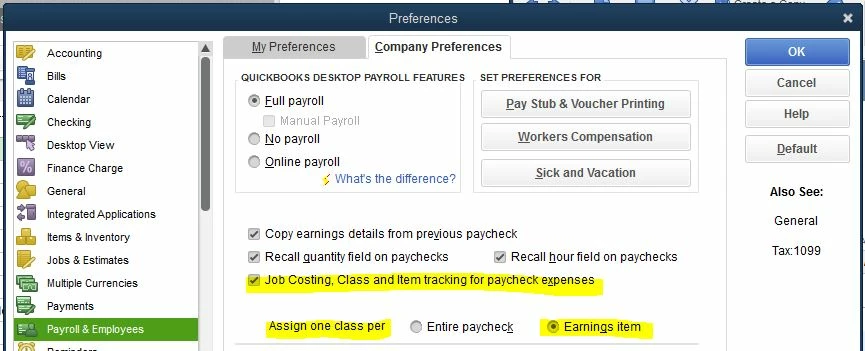
Go to Edit | Preferences | Payroll & Employees | Company Preferences.


The two highlighted preferences determine how classes can be added to paychecks:

To split up the earnings only, select the "one class per" Earnings item option.


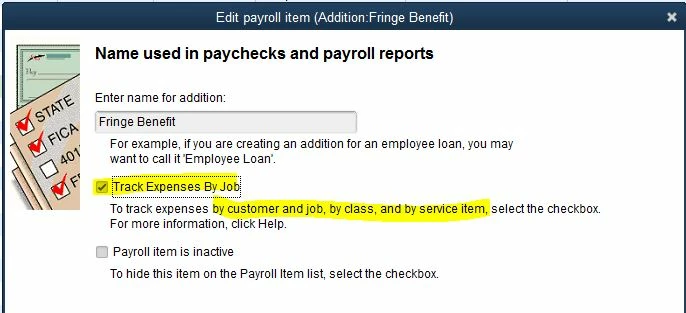
To also split other parts of the paycheck, select the first option.  For several types of payroll items (additions, deductions, and company expense item, I think)  you can then edit the payroll items from the payroll item list and select to job/class track that item:


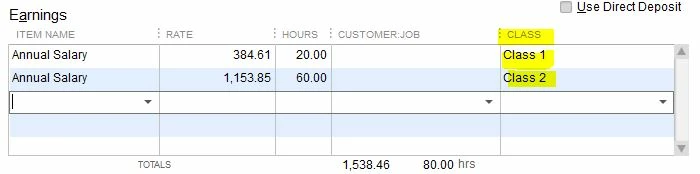
Once the preferences are set, the paycheck earnings table will look like this:


1 reply

BigRedConsulting
September 1, 2020

Yes, it's possible.

To do this, first turn on the preference.

Go to Edit | Preferences | Payroll & Employees | Company Preferences.


The two highlighted preferences determine how classes can be added to paychecks:

To split up the earnings only, select the "one class per" Earnings item option.


To also split other parts of the paycheck, select the first option.  For several types of payroll items (additions, deductions, and company expense item, I think)  you can then edit the payroll items from the payroll item list and select to job/class track that item:


Once the preferences are set, the paycheck earnings table will look like this:


viro1994Author
September 2, 2020

Thank you for your reply. I already process August payroll. Can I go back to August payroll and allocate this employees paycheck to be $150 to class1 and the rest to class2? Or does this setting only work going forward once it's been enabled? 

BigRedConsulting
September 14, 2020

Yes, you can go back and do this.  There is no need to enter Journals!:


- Edit each check and in the Review Paycheck area, change the items in the earnings table to suit.

- As long as the "lock net pay" checkbox remains checked, the paycheck will not recalculate taxes or wages.  Nifty feature.