December 23, 2020
Question

Bonus check problem

  • December 23, 2020
  • 1 reply
  • 0 views

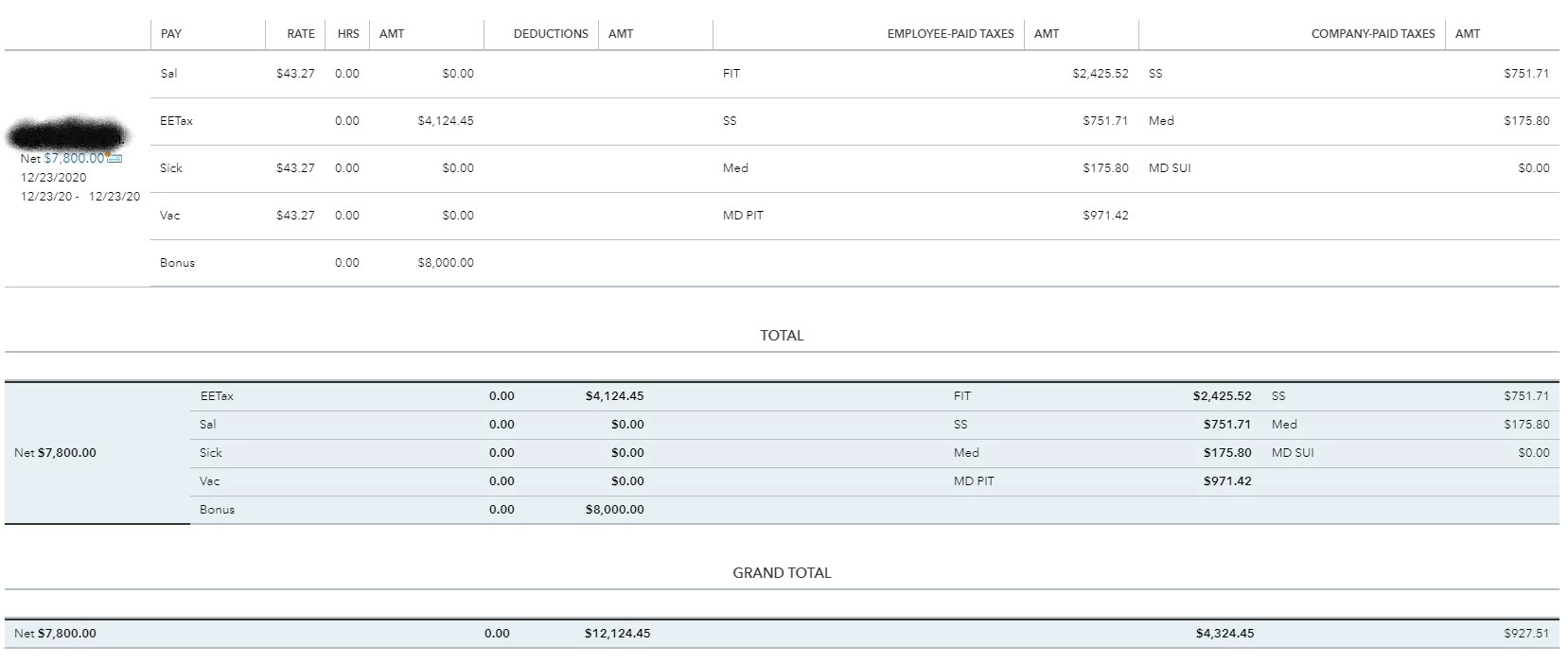
I am trying to write a net bonus check for $8000 to an employee. When I enter $8000 as net, Quickbooks changes the net pay to $7800. This is only occurring for 1 employee.

1 reply

December 23, 2020

I'm here to help you sort this out, jmcintosh.


The net pay changed to $7800 because the bonus amount of $8000 was added to the gross wage. Thus the total taxable wage as seen in the screenshot is $12124.45 (4124.45 + 8000). To resolve this, we'll have to create a separate bonus check to ensure the employee gets the exact bonus amount.


Before we proceed, there are things that we should know before issuing a separate bonus check. I suggest checking this article's Understand the tax settings for issuing a separate check section to learn more: Pay an Employee Bonus.


Here's how to create a separate bonus paycheck:

  1. Go to the Payroll menu and then select Employees.
  2. Click Run payroll and then select Bonus 
  3. Choose the applicable settings for the bonus paycheck, then select Continue.
  4. Select the employee, then enter the bonus amount.
  5. Click the edit icon beside Payroll options.
  6. Select the payroll options you want and then click Apply.
  7. Choose Preview and Submit payroll.
  8. If you selected As net pay, the pay stub includes Employee Taxes Paid by Employer in the pay section.


To learn more about the basics of payroll processing, I recommend checking out this article: Payroll 101


Additionally, I've included an article that'll help you learn more about federal and state payroll wage bases and limits. This is to ensure your payroll data is accurate: Payroll Tax Wage Bases and Limits.


It's our pleasure to assist you here in the Community. For other payroll concerns, please get in touch with us. This way, we'll be able to help you out.

jmcintoshAuthor
December 23, 2020

I did bonuses for 20 employees. This was the only employee that had their net bonus changed. For this employee I did "Bonus Only"-

I chose "Net Pay" in the next screen-

I entered $8000 for the employee "Net Bonus" which created a "Gross Pay" amount of $12,124.45

When I clicked "Preview Payroll" the Gross Pay amount was still $12124.45 but the Net Pay amount had changed to $7800.

When I "Submit Payroll" and go to the paycheck list, the Total Pay shows $12124.45 and the Net Pay shows $7800.

I'm not going to go through the effort of showing these same screenshots for every other employee, but please trust me that I am telling the truth that NO OTHER EMPLOYEES' Net Pay was changed like this.


I know I can create an additional Bonus Check for $200 so this employee receives her full $8000, but it is ridiculous and embarrassing that I have to.


Rose-A
December 24, 2020

I'm here to ensure you're able to write the bonus check without changing its net pay, jmcintosh.


To get this sorted out, as an initial step, you might want to check the employee's tax calculation. If the tax calculation is correct, let's delete and recreate the check.


Here's how to delete the bonus check:


  1. Click on Payroll at the left panel.
  2. Go to the Employees and tap on the Paycheck list link.
  3. Select the bonus check you want to remove, then tap the Delete button.

If you're still getting the result, let's do some basic troubleshooting steps to isolate the issue. Access your QuickBooks Online account using an incognito or private browser. Kindly use either of the following shortcut keys:


  • Google Chrome: press Ctrl Shift N  
  • Mozilla Firefox: press Ctrl Shift P
  • Safari: press Command Shift N

Once signed in, go back to your payroll and see if the net pay is correct. If it works fine in incognito mode, go back to regular browsing then clear the browser's cache. This method removes the cache history to start with a clean slate.


However, if the problem persists, I'd suggest creating a separate bonus check for the $200. Feel free to open the articles from this link in case you need guides while working with QuickBooks or payroll in the future.


Let me know how it goes, as I want to make sure this is fixed. I'll be right here if you need further help. Happy Holidays!
