I'm here to guide you in the right direction on how to handle your payroll concern, kb111.
Yes, you can generate an updated 941 form after running your payroll for May 31. Before we begin, download the latest maintenance release for your QuickBooks to apply critical fixes and resolve common errors or issues. Next, update the tax table version to get accurate rates and calculations for federal and supported state taxes.
For the updated 941 forms, you'll have to create or print a new one. Here's an article that outlines the complete details: Pay and file payroll taxes and forms manually in QuickBooks Desktop Payroll. Then, proceed directly to Step 2: Prepare and print or save your payroll tax form.
Also, let's pull up your Tax Form Worksheets to get the data for your W-2 tax return. Here's how:
- In your QuickBooks, navigate to the Reports menu at the top to select Employees & Payroll.
- Choose More Payroll Reports in Excel and Tax Form Worksheets.
- If necessary, follow the prompts to enable macros in Excel.
- This action will open the QuickBooks Tax Worksheets window.
- Tick the radio button for Annual W-2/W-3.
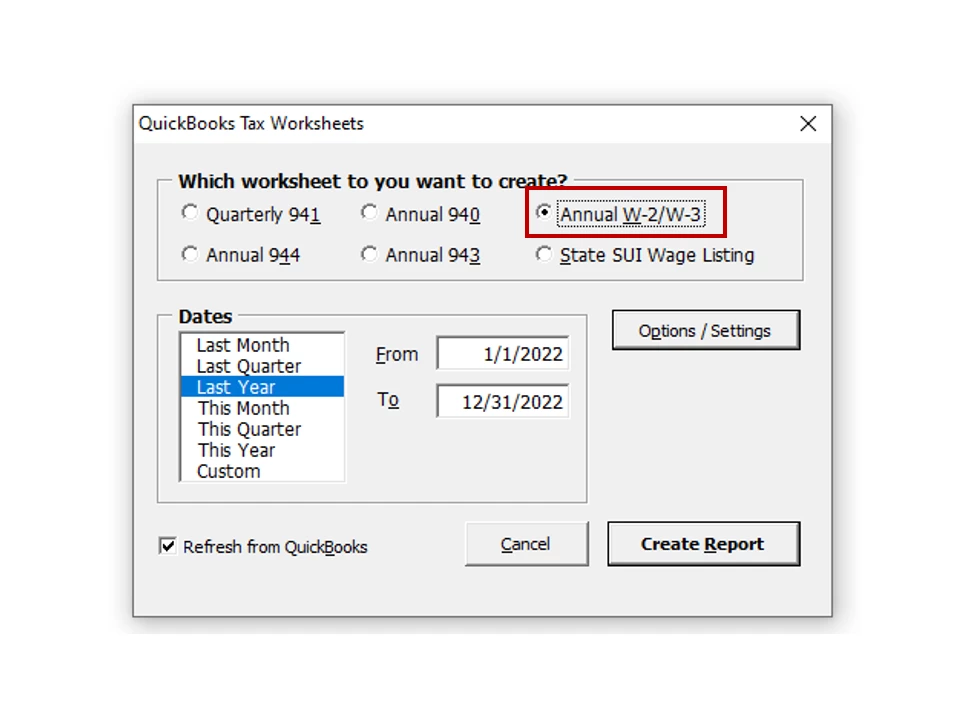
- Click the Create Report button.
- The workbook retrieves payroll tax form data from QuickBooks and displays it in the appropriate places in the worksheet.
- When you move your cursor over various amounts on the worksheet, your cursor changes to a pointer, and the words 'QuickZoom to see details' appear.
- To see the results of an amount in question, click the amount.
- The QuickBooks detailed transactions that were used to calculate the amount appear in an Excel Pivot Table in the workbook.
To view the complete list of Excel-based payroll reports, see this reference: Export reports as Excel workbooks in QuickBooks Desktop. It includes instructions on how to get updated statements as well as create a Summarize Payroll Data.
If you're using the Assisted Payroll version, I recommend contacting our Payroll Support Team for further assistance. One of our specialists will guide you on how to properly handle your payroll taxes and forms.
I've added some links below that tackle how to set up your new payroll service and handle your accounting activities seamlessly:
If you have any other payroll concerns or additional questions about processing tax forms, leave a comment below and tag my name. I'll jump right back in to answer them for you.

