November 1, 2022
Solved

Can I add an expense reimbursement to an employee paycheck to have it included in direct deposit?

  • November 1, 2022
  • 2 replies
  • 0 views
Original commenter did not share additional details

Best answer by JamaicaA

It's my pleasure to help you, @smarberry. I’m here to make sure you can create a direct deposit for employee reimbursements in QuickBooks Online. 


Yes, we can add employee reimbursements to their paychecks. I'd be happy to walk you through the process of setting up another pay type on their profile. Let’s start by creating a reimbursement item.


Here's how:
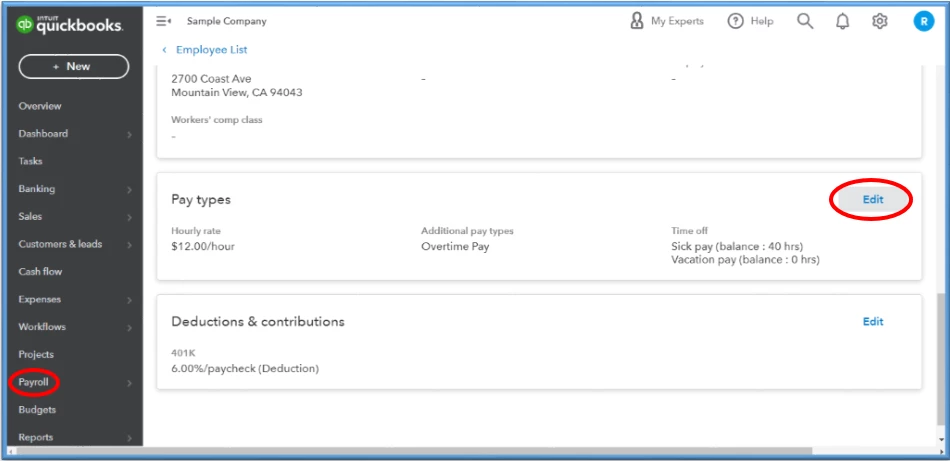
 

  1. On the left pane, go to the Payroll menu, then select Employees.
  2. Locate your employee and go to their profile.
  3. Scroll down to Pay types, then click Edit.
  4. Scroll to the Additional pay types section and choose Reimbursement. You can rename this by selecting Edit ✎. If there's an existing one, let’s select + Another Reimbursement type to add new.
  5. On the Recurring amount, add the default amount or leave it blank, and just enter it as you run payroll.
  6. Hit Save.


Once done, you’ll want to update your payroll accounting preferences for the reimbursement pay type. This way, we can ensure that we’re tracking your expenses using the correct account type. See this article for the detailed steps: Change your accounting preferences in QuickBooks Online Payroll.


If everything is ready, you can proceed to Step 3: Run payroll with a reimbursement amount section from this guide: Reimburse an employee. This will help you create the direct deposit, then send it to us for processing.


Since reimbursement payments aren't taxable, they don't show up on W-2 forms or other tax records. They’re also excluded from the pay basis used to determine deductions like 401(k) amounts. For guidelines on reimbursements, check the Employee business expense reimbursements section of IRS Publication 15, Circular E — Employer's Tax Guide.


Let me know if you have any other questions about direct deposit employee reimbursement. I'll be right here to help you out. Have a great day!

2 replies

JamaicaAAnswer
November 1, 2022

It's my pleasure to help you, @smarberry. I’m here to make sure you can create a direct deposit for employee reimbursements in QuickBooks Online. 


Yes, we can add employee reimbursements to their paychecks. I'd be happy to walk you through the process of setting up another pay type on their profile. Let’s start by creating a reimbursement item.


Here's how:
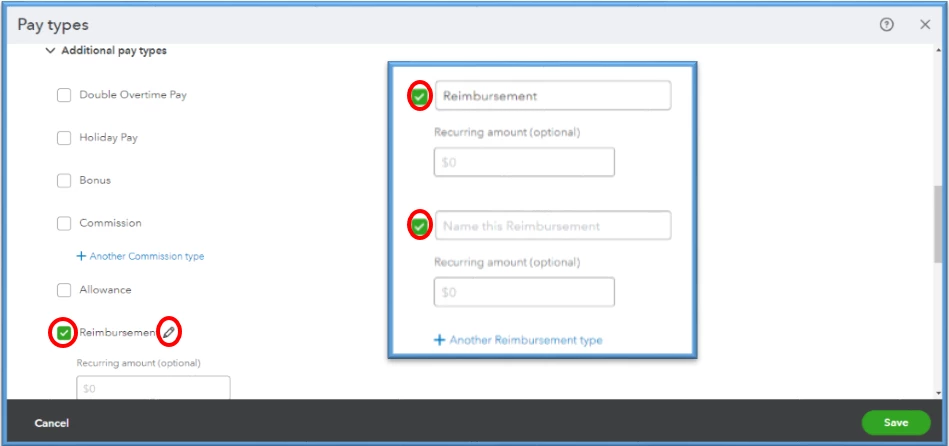
 

  1. On the left pane, go to the Payroll menu, then select Employees.
  2. Locate your employee and go to their profile.
  3. Scroll down to Pay types, then click Edit.
  4. Scroll to the Additional pay types section and choose Reimbursement. You can rename this by selecting Edit ✎. If there's an existing one, let’s select + Another Reimbursement type to add new.
  5. On the Recurring amount, add the default amount or leave it blank, and just enter it as you run payroll.
  6. Hit Save.


Once done, you’ll want to update your payroll accounting preferences for the reimbursement pay type. This way, we can ensure that we’re tracking your expenses using the correct account type. See this article for the detailed steps: Change your accounting preferences in QuickBooks Online Payroll.


If everything is ready, you can proceed to Step 3: Run payroll with a reimbursement amount section from this guide: Reimburse an employee. This will help you create the direct deposit, then send it to us for processing.


Since reimbursement payments aren't taxable, they don't show up on W-2 forms or other tax records. They’re also excluded from the pay basis used to determine deductions like 401(k) amounts. For guidelines on reimbursements, check the Employee business expense reimbursements section of IRS Publication 15, Circular E — Employer's Tax Guide.


Let me know if you have any other questions about direct deposit employee reimbursement. I'll be right here to help you out. Have a great day!

smarberryAuthor
November 2, 2022

Thanks, JamaicaA. Worked perfectly!

November 2, 2022

Hello there, @smarberry


I'm glad to hear that the steps provided by my colleague have helped with your issue. Know that you can always visit our Help Articles page for QuickBooks Online in case you need some references for your future tasks.


The Community is always in your corner if you ever need assistance again. Take care!

February 2, 2023

Can you provide the instructions for Quickbooks - Desktop also.  

February 2, 2023

I've got you covered, @Battalion6


I'd be glad to share the steps to add a reimbursement item in QuickBooks Desktop (QBDT).


To start, let's create a reimbursement item to add to your employees' records. Here's how:


  1. Go to the Employees menu, and select Manage Payroll Items.
  2. Click New Payroll Item. Then, select Custom Setup, and tap Next.
  3. Select Addition, then tap Next. Enter the name of the Reimbursement item and hit Next.
  4. Select an expense account for tracking this item.
  5. Set the Tax Tracking type to None. Then select Next.
  6. Under Taxes, none should be selected. Select Next.
  7. For amounts paid per mile/kilometer, select the Based on Quantity checkbox and tap Next.

  8. Choose to calculate on Net Pay, then select Next.
  9. Enter a Default Rate and click Finish.


Then, follow these steps to add them to your employees' records.


  1. Go to the Employees menu, then select the Employee Center.
  2. Double-click the employee's name.
  3. Go to the Payroll Info tab.
  4. Add the item from the dropdown list under Additions, Deductions, and Company Contributions.


Once you create paychecks, the reimbursement item will appear in the Other Payroll Items area of the Preview Paycheck screen. Enter the amount of the reimbursement on the paycheck. You can also read this article for more information: Reimburse your employee.


Keep in touch if you need further assistance with adding a reimbursement to your employees in QBDT. I'll be here to lend a helping hand. Have a great day ahead.
