April 24, 2019
Solved

Can I pay the same employee at two different hourly rates in one month?

  • April 24, 2019
  • 1 reply
  • 0 views
Original commenter did not share additional details

Best answer by ShiellaGraceA

Yes, you can pay two different hourly rates, MD15.


All you have to do is add an additional pay type. Here's how:

  1. Click Workers.
  2. Click Employees.
  3. In the Employee list, click the employee's name and then click Edit employee.
  4. Under How much do you pay [employee name] section, click Add additional pay types link.
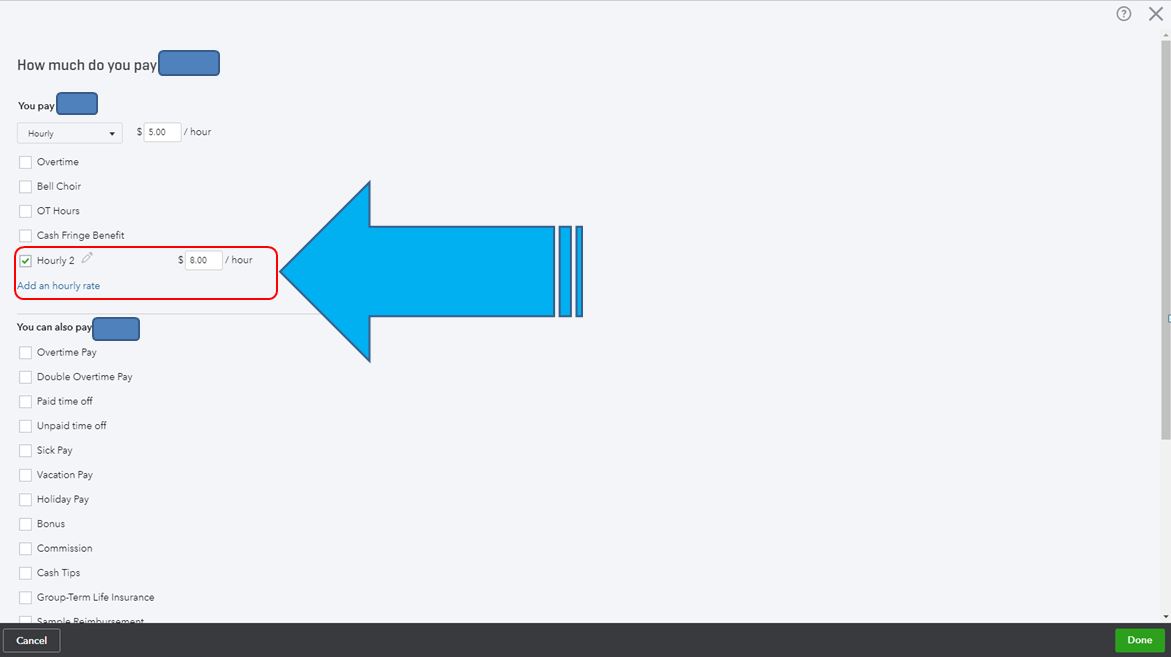
  5. Click the Add an hourly rate link.
  6. Enter the name (E.g. Hourly 2), and the rate per hour.
  7. Click Done.


I'm always here for you if you need anything else. Feel free to reach out anytime.


1 reply

April 24, 2019

Yes, you can pay two different hourly rates, MD15.


All you have to do is add an additional pay type. Here's how:

  1. Click Workers.
  2. Click Employees.
  3. In the Employee list, click the employee's name and then click Edit employee.
  4. Under How much do you pay [employee name] section, click Add additional pay types link.
  5. Click the Add an hourly rate link.
  6. Enter the name (E.g. Hourly 2), and the rate per hour.
  7. Click Done.


I'm always here for you if you need anything else. Feel free to reach out anytime.