
April 25, 2019
Solved

Can someone help me with translating my Quickbooks online back to english?And what happened to Quickbooks helping out online?

  • April 25, 2019
  • 2 replies
  • 0 views
Original commenter did not share additional details

Best answer by BettyJaneB

Thanks for letting me know about this, @kevinsmith2142.


Allow me to provide some more details to get this issue sorted out.


If you are using the US version of QuickBooks, English should be its default language. For now, you can check the language setting of the browser that you're currently using to see if it's English. To do that, please see the sample screenshot that I've provided:
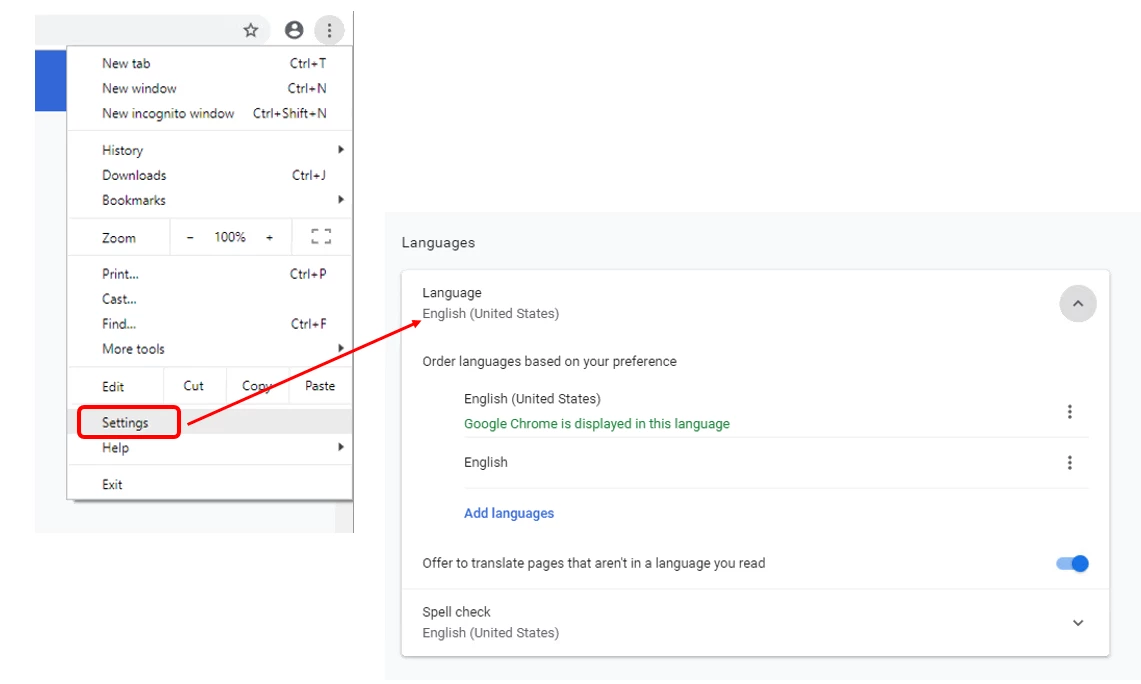
 

Once verified and the issue persists, you can try accessing QuickBooks using a different browser. This is to test if the issue is browser related.  


Here are the different keyboard shortcuts to open a private browser:

  • Google Chrome: press Ctrl + Shift + N
  • Mozilla Firefox: press Ctrl + Shift + P
  • Internet Explorer: press Ctrl + Shift + P
  • Safari: press Command + Shift + N

If it works fine, you can go back to your regular browser and clear its cache. Please follow the outlined steps in this article depending on the browser you're using: Delete or disable cache and temporary internet files in your web browser.


Lastly, if the problem continues after trying all these steps, I'd suggest reaching out to our Customer Care Team. They have advanced tools like the remote-viewing session that can help identify the main cause of this concern.


Please let me know how it goes, or if you have other questions regarding QuickBooks. I'll be around to provide further assistance. Take care.

2 replies

BettyJaneB
April 25, 2019

Hi there, @kevinsmith2142.


Glad to have you here in the Community. I'd be happy to assist you in changing the language of your QuickBooks back to English. 


If you are using the international version of QuickBooks, you have the option to change its language under the Account and Settings section.


Let me guide you how:

  1. Go to the Gear icon at the top.
  2. Select Account and Settings.
  3. Click the Advanced.
  4. Go to Language and click the small Pencil icon.
  5. Click the drop-down and choose the language.
  6. Click Save.

That should change the language of your QuickBooks to English.


Please know that I'm just a post away if you have any other concerns with QuickBooks Online. I want to ensure your taken care of. Thanks for coming and have a great day.

April 25, 2019

Hello Betty JaneB, 

Thank you for responding to my email. 
After I click on advanced, I do not have a language option to click on english. 
I only have Advanced, Acc. company type, chart of acc. categ. autom. project time. and currency
April 25, 2019

Hello Betty JaneB, 

Thank you for responding to my email. 
After I click on advanced, I do not have a language option to click on english. 
I only have Advanced, Acc. company type, chart of acc. categ. autom. project time. and currency
BettyJaneB
April 25, 2019

Thanks for letting me know about this, @kevinsmith2142.


Allow me to provide some more details to get this issue sorted out.


If you are using the US version of QuickBooks, English should be its default language. For now, you can check the language setting of the browser that you're currently using to see if it's English. To do that, please see the sample screenshot that I've provided:


Once verified and the issue persists, you can try accessing QuickBooks using a different browser. This is to test if the issue is browser related.  


Here are the different keyboard shortcuts to open a private browser:

  • Google Chrome: press Ctrl + Shift + N
  • Mozilla Firefox: press Ctrl + Shift + P
  • Internet Explorer: press Ctrl + Shift + P
  • Safari: press Command + Shift + N

If it works fine, you can go back to your regular browser and clear its cache. Please follow the outlined steps in this article depending on the browser you're using: Delete or disable cache and temporary internet files in your web browser.


Lastly, if the problem continues after trying all these steps, I'd suggest reaching out to our Customer Care Team. They have advanced tools like the remote-viewing session that can help identify the main cause of this concern.


Please let me know how it goes, or if you have other questions regarding QuickBooks. I'll be around to provide further assistance. Take care.
