Hi there, @Peti135.
I'll be glad to share details about Workers Comp.
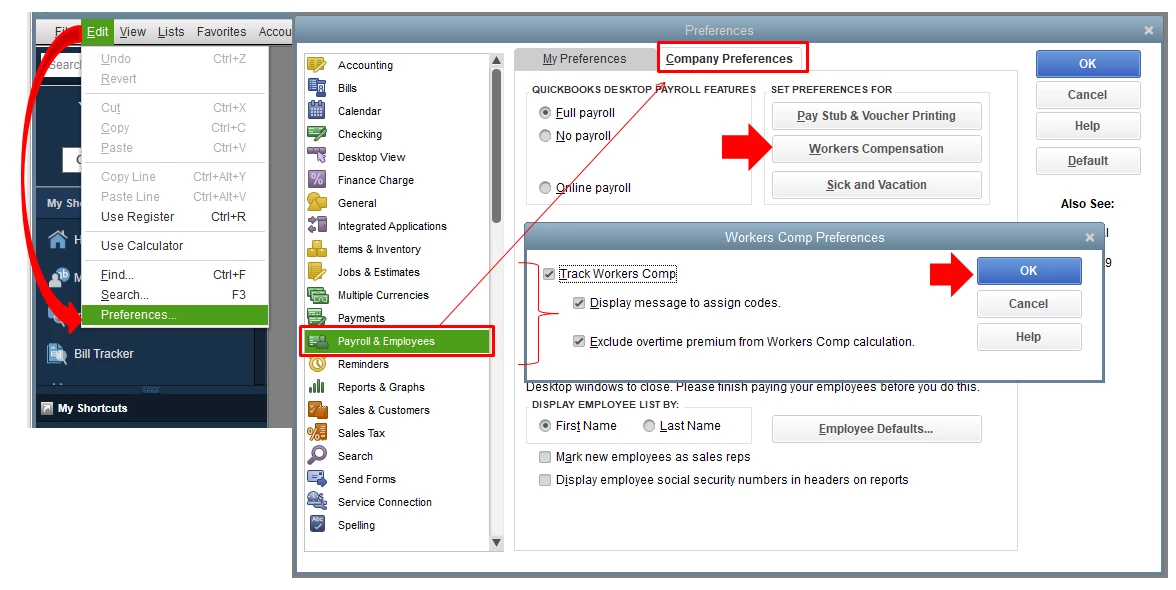
You’ll want to set up worker’s compensation before paying your employees to avoid incomplete and incorrect reporting. You can start by turning on the feature in the program to track them. Let me breakdown the steps for you:
- From the main menu, go to Edit > Preferences.
- Choose Payroll & Employees and then go to Company Preferences.
- Select Workers Compensation and then put a checkmark on the Track Workers Comp checkbox.
- Mark the following checkboxes as well:
- Display message to assign codes to show the Workers Comp messaging in QuickBooks.
- Exclude overtime premium from Workers Comp calculation to display overtime premium as a separate item on your report.
- Click on OK then OK.
Once the feature is activated, you can directly set up Workers Comp for your employees. Additionally, please make sure that we have the latest payroll tax table. You can update it so we can avoid any issues with your payroll.
For more detailed steps, here's a great resource that you can check on: About Workers' Compensation in QuickBooks Desktop.
In addition, here are the available reports for workers’ comp with their description and how you can run them in QBDT.
Should you have other questions about Workers Compensation in QuickBooks, please let me know. I’ll be happy to assist you further.

