

May 19, 2021
Question

Created Employees Instead Of Contractors By Mistake

  • May 19, 2021
  • 1 reply
  • 0 views

In Quickbooks Online, I created my contractors as employees by mistake. They have already been entering their time in the system for several weeks now. I am now trying to convert those employees to contractor status in the system but am not able to.

I tried the steps here: https://quickbooks.intuit.com/learn-support/en-us/set-up-contractors/change-employee-to-contractor-or-contractor-to-employee/00/370705 but that doesn't work because when I try to make an employee inactive I get the following error message:
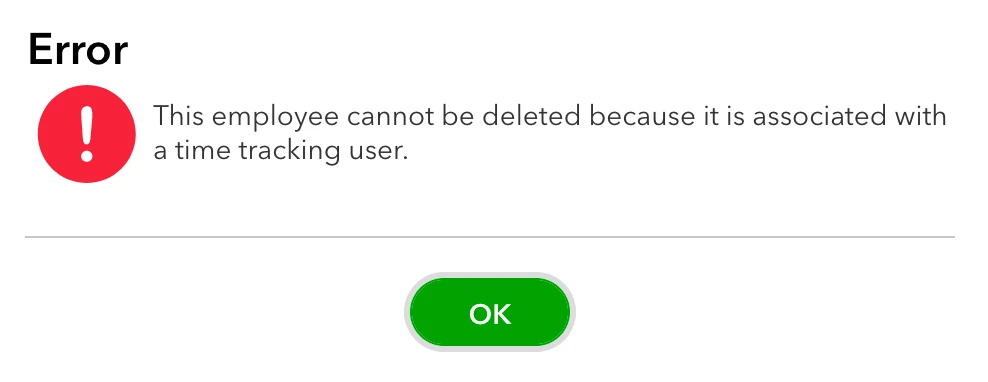


1 reply

SteveChase
May 19, 2021
I recommend that you create a new vendor. Modify the employee name so that you know it's not a vendor. Then open up each transaction for the vendor and switch the payee drop down to the proper vendor. Unfortunately there's no batch option to switch all the names at once. When you are done you could navigate to the Vendors lists and select your vendor contractor. From there you will see a list of all the transaction to ensure you have them all listed properly. This will be important if you are using 1099-NEC filing next January to ensure they all get coded to the correct vendor.
May 19, 2021

Also, how do I now add time for vendors? The system allows me to add time only for employees and not for vendor!


May 19, 2021

Thanks for adding more details about your concern, english_august.


In QBO, you can create a time sheet for the vendors. However, automatic transferring of time sheet data to bills is currently unavailable. You’ll have to manually enter a check or bill to pay the suppliers.


Let me share the following articles for more insights into the Time Tracking feature. From there, you’ll find the complete steps on how to add or edit timesheets, approve time data, etc.


If you have any clarifications or other concerns, click the Reply button and post a comment. I’m more than happy to answer them for you.