January 10, 2020
Solved

Cross Border Employees

  • January 10, 2020
  • 1 reply
  • 0 views

Hello,

We use QB Enterprise 20 and are located in Detroit, MI.  I have been using QB for over 20 years.  I am attempting to use QB payroll for the first time.


We have a bunch of Canadians that reside in Canada, but work in the US and have US (state, local, & federal) taxes withheld from their USD paychecks.  I do not need Canadian tax withholdings calculated and the employees are paid in US dollars to US bank accounts.


I just need to be able to enter their home address with Canadian province and Canadian postal code into their QB payroll record so their paystubs & W-2 are produced correctly at year end.


I had an unfruitful call with a very crowded offshore center where the support person said this is not possible.  I find it hard to believe that there are no other employers near the 5,000 mile Canadian border that have a similar issue.


Anyone out there find a way around this?
Best answer by Mark_R

I appreciate you providing detailed information about your concern, @mbutts4901.


At this time, we won't be able to enter the home addresses of your Canadian employees to show in their paystubs and W-2 form. As a workaround, you can consider pulling up the W-2 form, then manually enter or override the home address of the employees resides in Canada.


Here's how: 


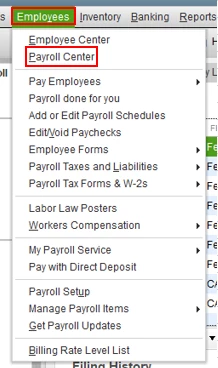
  1. Go to the Employees menu, then select Payroll Center.              
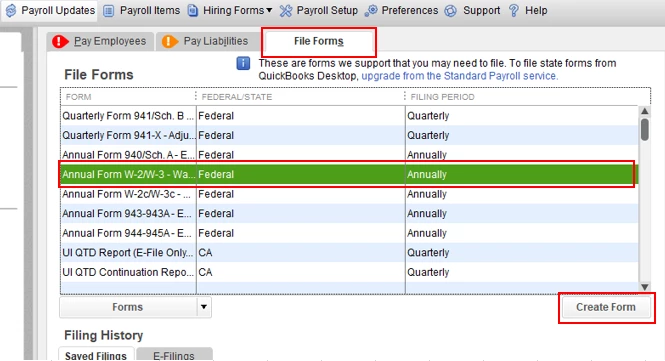
  2. In the File Forms section, select Annual Form W-2/W-3.
  3. Click Create Form.
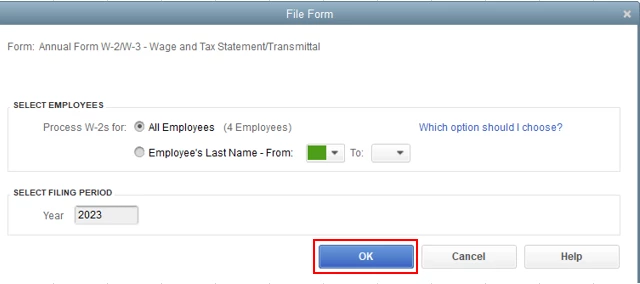
  4. Select the appropriate employees, then choose the filing period and click OK.
  5. In the Payroll Tax Form, click Next until you reach the Form W-2 Worksheet page.
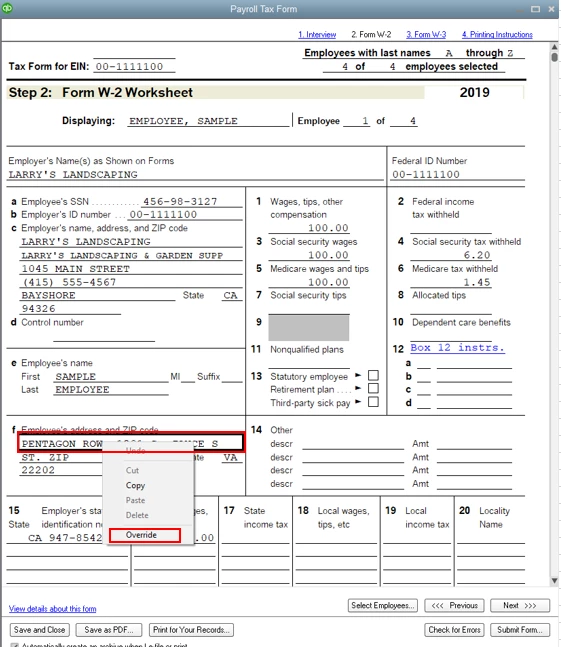
  6. In the Employee's address and Zip code section, right-click the address, then select Override.
  7. Enter the home address of your employee, then select Next once done.

You might also want to check out this IRS article and go to page 15 for the employee's name and address in W-2: https://www.irs.gov/pub/irs-pdf/iw2w3.pdf.


Please touch base with me here for all of your QuickBooks needs, I'm always happy to help. Have a good one.

1 reply

Mark_RAnswer
January 10, 2020

I appreciate you providing detailed information about your concern, @mbutts4901.


At this time, we won't be able to enter the home addresses of your Canadian employees to show in their paystubs and W-2 form. As a workaround, you can consider pulling up the W-2 form, then manually enter or override the home address of the employees resides in Canada.


Here's how: 


  1. Go to the Employees menu, then select Payroll Center.              
  2. In the File Forms section, select Annual Form W-2/W-3.
  3. Click Create Form.
  4. Select the appropriate employees, then choose the filing period and click OK.
  5. In the Payroll Tax Form, click Next until you reach the Form W-2 Worksheet page.
  6. In the Employee's address and Zip code section, right-click the address, then select Override.
  7. Enter the home address of your employee, then select Next once done.

You might also want to check out this IRS article and go to page 15 for the employee's name and address in W-2: https://www.irs.gov/pub/irs-pdf/iw2w3.pdf.


Please touch base with me here for all of your QuickBooks needs, I'm always happy to help. Have a good one.

January 13, 2020

Thanks for the reply.  This would work, but I will be dropping QB as my payroll provider before I run my first payroll.  This is too much of a "band-aid" approach on official payroll records.  If an employee needs a paystub for proof of employment for a mortgage application, for example, how do they explain that their home address does not appear on it?


BTW, if you could let Intuit management know, I appreciate their quest for efficiency in moving the support for payroll to an offshore call center.  However, the support was terrible (he was clearly just reading from the Help in QB and had no idea how employees get paid, the background noise was deafening, and it took me two days to get an appointment to speak with someone).  This is the main reason I'm not going forward with QB payroll.

January 13, 2020

Hello again, mbutts4901.


I appreciate you reaching out to our phone support and I'm taking note of the feedback regarding your experience. We’re receiving high call volume, so hold times may be increased. Now that you’re in the Community, I’ll do everything in my power to help fix or resolve the issue you have.


If you have Canadian employees, for you to enter their address, you may want to use QuickBooks Online Payroll or QuickBooks Desktop specific for Canada region. 


You can test out our product for 30 days to help you decide which product suits your needs. Here are some useful links:

If you need anything else, you can leave a comment below. I'm here for you. Take care.